Trimble Business Center

 View Only
Expand all | Collapse all

No Computed Grid Coordinates Error

  • 1.  No Computed Grid Coordinates Error

    Posted 07-01-2020 04:31

    When I import data into TBC.  I am receiving the following error on the import summary.  What do I need to do to correct this? 


  • 2.  Re: No Computed Grid Coordinates Error

    Posted 07-01-2020 09:22

    Hi David, do you have the G12AUS file in the folder below?


  • 3.  Re: No Computed Grid Coordinates Error

    Posted 07-01-2020 10:15
      |   view attached

    Thanks for responding.  Yes, the file in the folder.


  • 4.  Re: No Computed Grid Coordinates Error

    Posted 07-01-2020 11:57

    Hi David, would you attach your field job file so we can take a closer look? 


    And is the G12AUS.ggf copied to your TA System Files folder when you collected the data?


  • 5.  Re: No Computed Grid Coordinates Error

    Posted 07-02-2020 14:33
      |   view attached

    Attached is the job file.

    Attachment(s)

    zip
    20299.job.zip   49 KB 1 version


  • 6.  Re: No Computed Grid Coordinates Error

    Posted 07-03-2020 04:59

    Yes, it was in the TA systems folders when the data was collected.


  • 7.  Re: No Computed Grid Coordinates Error

    Posted 07-06-2020 13:23

    Hi David, 

    When I open the job file in Trimble Access, I see these three points were deleted from the job.

    Therefore, when they are imported to TBC, their (global) coordinates are disabled.

    You can enable them following the screenshot below. Then the grid coordinates will be computed.
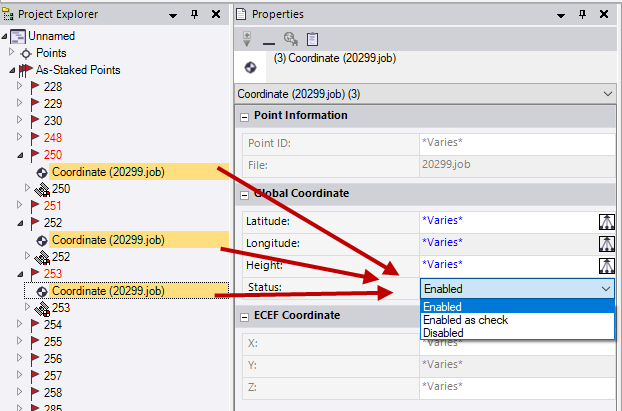
     

    Let me know if it works. Thank you.


  • 8.  Re: No Computed Grid Coordinates Error

    Posted 07-06-2020 15:20

    Thank you!  Trimble Geomatics Office would give you a message saying which points had been deleted when the file was imported.  With TBC giving the error message saying “No Computed Grid Coordinates.  This may be caused by the geoid sub-grid Model…”  it gives me the impression that something is wrong with the file.  Is there a way to change this behavior of TBC to make it more similar to the way Trimble Geomatics Office reported deleted points on import instead of giving the message “.. no computed grid coordinates..” ?


  • 9.  Re: No Computed Grid Coordinates Error

    Posted 07-07-2020 05:11

    Yes, I agree that TBC sometimes gives you warnings or errors that aren't intuitive such as an FXL file wasn't found in the same folder when importing a JOB file. But if that file was already imported previously into the same TBC project, it gets used just fine even though the warning/error.