Trimble Business Center

 View Only
Expand all | Collapse all

Alignment Report Using PI Stations

  • 1.  Alignment Report Using PI Stations

    Posted 04-05-2020 17:53

    We use a online plan app that we upload our alignments.  The alignments are in CSV format and the PI N/E with radius is used.  For tangent lines only need the N/E.  The Geometry Report comes close, I would want the PI instead of the PC and PT.  Is there setting to change or a report I could use to that report in excel?


  • 2.  Re: Alignment Report Using PI Stations

    Posted 04-05-2020 19:06

    If your alignment was keyed in using PI method you would get the PIs on the report. If you keyed in or imported based on Geometric elements then the report reports those as far as I know. We dont typically convert from one form to the other in TBC - you can create a PI based alignment from a geometric alignment but it is some work to do that of course


    Not sure that this helps - maybe?


    Alan


  • 3.  Re: Alignment Report Using PI Stations

    Posted 04-05-2020 19:26

    I can run a Alignment report and import that into Excel and do a lot of clean up, rather not.  i just checked  using the Geometry Report( not the alignment report)  on a alignment base off PI segment input.  The Geometry Report spits out the PC and PT.   Our office is using HCSS which more and more companies are using.  If only then in the Geometry Report, the PI data ( station, N,E) be added aside from the PC and PT of the ARC.


  • 4.  Re: Alignment Report Using PI Stations

    Posted 04-06-2020 06:04

    Frank

    You are right that the Geometry Report, even for a PI Based alignment doesn't report the PI Locations - I will put that in as a request today to see if Trimble can address that.


    If you run the Alignment Geometry Report you get an HTML Report in your Browser.
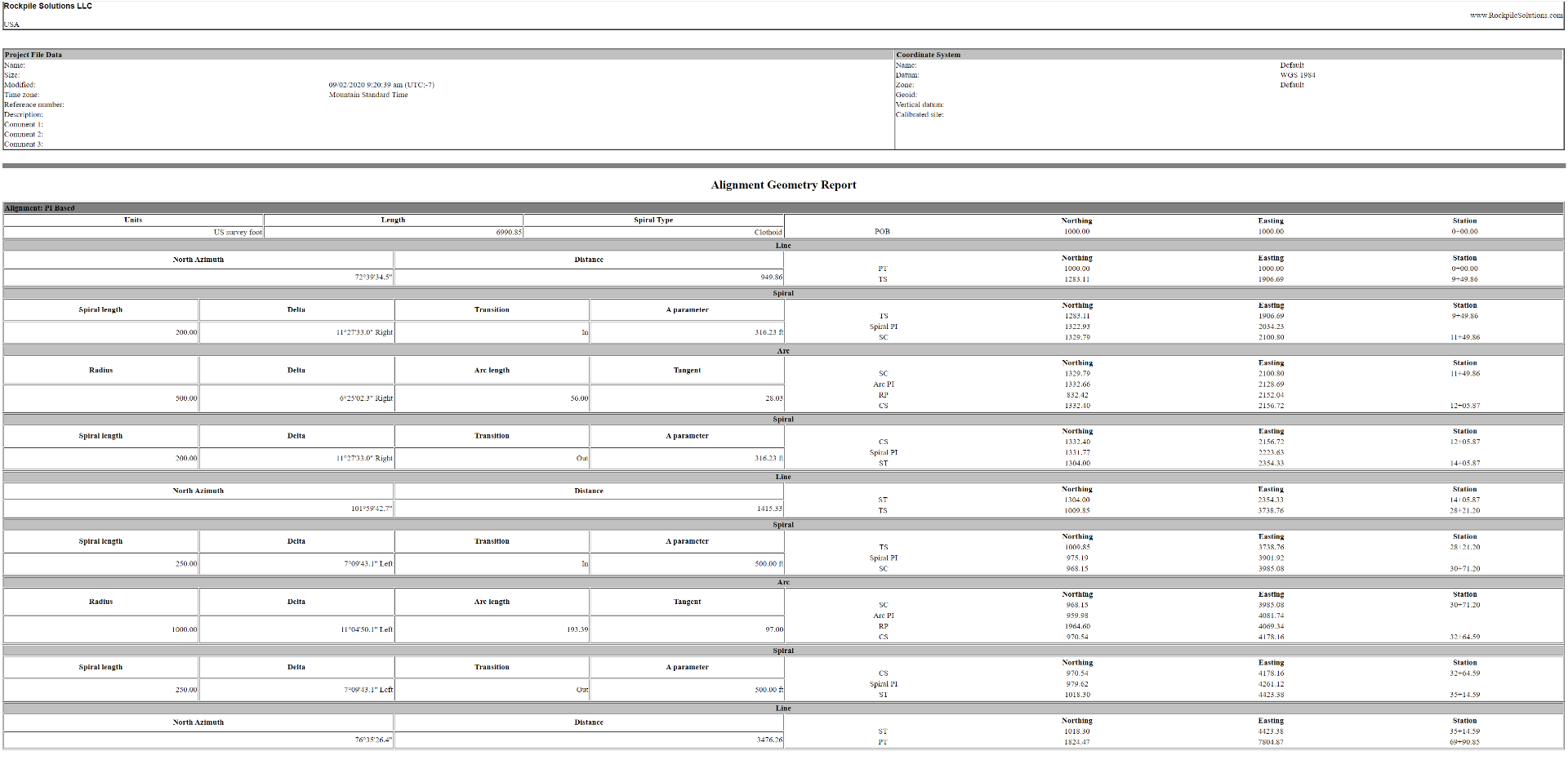
     

    You can copy all the Text and paste it into Excel (as Text) and you get all of the PI information. (Red Text is what you need I think right)?
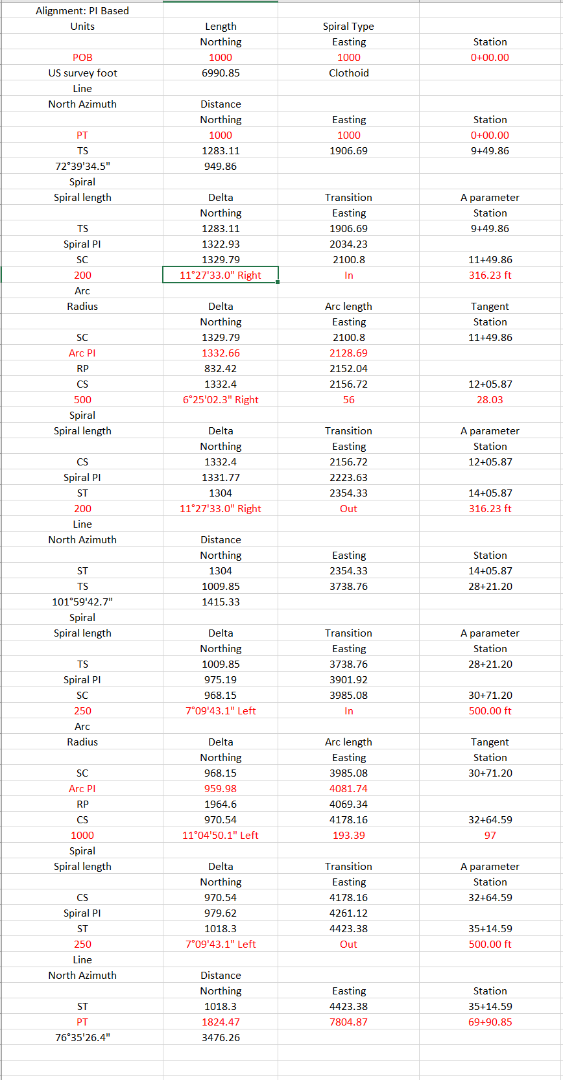


    When you mention HCSS - what do they use the Alignment Data for and do they have a specific format that they require for the alignment as Trimble has a partnership with HCSS to sell HCSS outside N America and so creating better links between TBC and HCSS is in the interests of Trimble to further the integration capabilities. 


    If you can tell me why HCSS needs an alignment, and if you can give me the format they need - we can likely get a dedicated routine written or adjust an existing one to get what they need. If you have a CSV file that you have given them in the past that works, please send me the VCL file of the alignment and the CSV output you need to create and I will have Trimble take a look at it.


    Thanks


    Alan


  • 5.  Re: Alignment Report Using PI Stations

    Posted 04-06-2020 06:22

    Thank you very much,


    The alignments are used for field crew in any departments giving locations.  We import the HAL's by csv using tangent N/E and the arc PI N/E. This is what i am doing in the mean time. I use the Geometry Report and only keep the Tangent and PC data > then open the Alignment Report > copied the PI arc N/E > replacing the PC N/E while keeping the radius.   I am attaching an image of the alignment and annotation using the alignment.  

    Here is an image of the csv with arc 


  • 6.  Re: Alignment Report Using PI Stations

    Posted 04-06-2020 11:29

    What happens with Spirals in and out of the ARC - do you need Spiral PIs as

    well? or dont you use Spirals in Texas


    Alan


    On Mon, Apr 6, 2020 at 7:23 AM frank.guerrero@ebcc.com <trimble@jiveon.com>


  • 7.  Re: Alignment Report Using PI Stations

    Posted 04-06-2020 12:38

    I can say we have not had one Spiral Alignment since I have been at this company.  There could be some in the future or possibly other companies that have Spirals. 


  • 8.  Re: Alignment Report Using PI Stations

    Posted 04-06-2020 16:54

    Sure - we have that covered


    Alan


    On Mon, Apr 6, 2020 at 1:37 PM frank.guerrero@ebcc.com <trimble@jiveon.com>


  • 9.  Re: Alignment Report Using PI Stations

    Posted 04-06-2020 16:52

    One more thing that you can do that gives you 100% of what you need today is to use the Edit Alignment as Spreadsheet TML Macro Command - that gives to the PIs etc in the format that you need


    Start Station

    Start Coordinate PI

    Spiral Arc Spiral PI coordinate and Radius (1000) and Spiral Length in (200) and out (200)

    Arc PI coordinate and Radius (1500)

    Spiral Arc Spiral PI and Radius (1000) and Spiral In (200) and Out (200)

    No End Coordinate so Alignment is incomplete


    Now it is correct

    So you have what you need I think now.


    Here is a Geometry Based Alignment in the same spreadsheet - currently we cannot enter as a Geometry Alignment and Report it as a PI Based Alignment, so if possible enter as PI Based or convert the Geometry Alignment to a PI Based Alignment by drawing over the top to create the PI Points and Inscribe the curves (appreciate that is some work)


    Alan


  • 10.  Re: Alignment Report Using PI Stations

    Posted 04-07-2020 11:25

    just ran a quick check with another project and his worx.  It did swap the first coords and did a brief overview.  

    thanks again


  • 11.  RE: Re: Alignment Report Using PI Stations

    Posted 02-10-2021 07:43
    Just to bring this up especially those that use HCSS.  In HCSS you can upload alignments as a CSV file which  need to have the PI of the arc's.  Using the "Edit as Spreadsheet"  works great for grabbing all the coordinates instead of typing all that data out again.  You will have to do a copy and past of the data in "Edit as Spreadsheet".  Now if we only add a option to do as "Save As"!!!!!!

    ------------------------------
    Francisco Guerrero
    ------------------------------