Do you mean Point data with Features and Attributes that you collected in the field? This is not an easy one to answer - however I will give it a shot - I guess the answer also depends on whether you have Microstation only or InRoads or one of the myriad other products of Bentley in Microstation, and similarly for AutoCAD or Civil 3D in Autocad etc.
I just exported Point Data with Features and Attributres in SHP file format - I opened the SHP Files in Microstation V8i and it has the points and the attributes from BC-HCE are on the Points. How usable those attributes are in Microstation I am not sure, but at least we can pass them using this method.
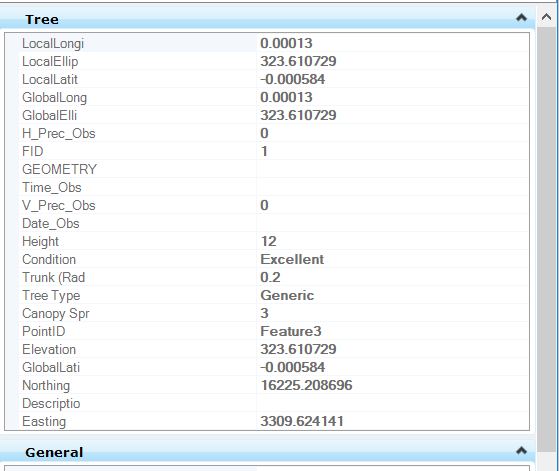
When you output SHP file format you will get many SHP files (one for each feature type and you will need to import all of those to create a project. This will give you Points and Lines with Attributes on the Objects as per the image below from Microstation
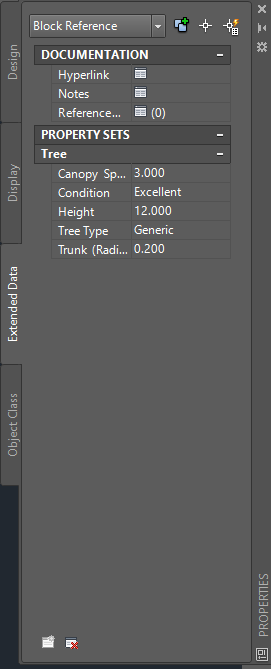
When you export a DWG file you have the option to Export the Attribute data to the DWG. When opened in Autocad if you look at the object Properties under the Extended Data Tab you will have all of the BC-HCE attribute information for the object as shown below here. I am not sure if Microstation reads that Extended Data and if it does where it places it in the Microstation Object properties etc. The benefit of the DWG over SHP is that all of the Block and other drawing elements all get passed as well as the attributes giving a more faithful representation of the model from BC-HCE.
If there are any Bentley Power Users out there that can advise on this I will upload a small DWG Test file for you to look at and advise where these Extended Data items end up in Bentley using the DWG transfer.
I hope that this is at least partially helpful.
We may need to crowd source answers on this to get to the bottom of this one.
Here is a quick link to a simple Test File - if a Bentley User out there could try this for me and post a response as to what happens to the Extended Data shown in the Autocad image above I would appreciate it.
Click Here
Thanks
Alan