Hi Saif,
To select points by part of a feature code in TBC, go to the Data ribbon, and select Advanced Select.
Use the options as shown below:
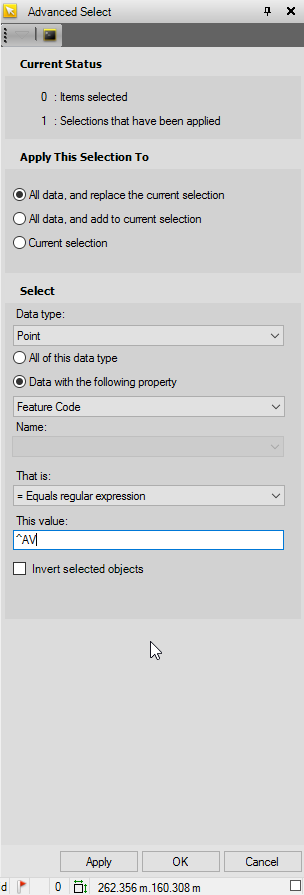
That is:
= Equals regular expression
This value:
^AV
The ^ before AV selects all feature codes starting with AV, such as AV1, AV2, AV3, AV end, AV start etc.
Entering "AV" into the This value: box will select all points whose feature code contains "AV", equivalent to *AV*.
There is more information about other regular expressions you can use in TBC help under the section "Select Using Advanced Criteria", this can be accessed by pressing the "F1" key while in the Advanced Select command pane.
I hope this helps!
Matt