Trimble Business Center

 View Only
Expand all | Collapse all

Issues with Corridor Surface

  • 1.  Issues with Corridor Surface

    Posted 01-22-2020 00:36
      |   view attached

    I have generated a corridor surface in the attached file. It is giving some issues at some locations. I tried to decipher the problem and rebuit the Surface several times. Could not get an answer for myself. Could some one help me out.


    Thanks.

    Attachment(s)

    zip
    AlQua-Umalzamool.vce.zip   4.48 MB 1 version


  • 2.  Re: Issues with Corridor Surface

    Posted 01-22-2020 08:15

    Change your Maximum left and right Offset to a lower distance in both templates you have


  • 3.  Re: Issues with Corridor Surface

    Posted 01-28-2020 03:44
      |   view attached
    Thank you very much.
    Here are some unresolved issues:
    image.png
    At Station 39+625, 43+000,47+625 The RHS instruction is not followed.
    At Station 39+700,43+050, 47+650  The LHS instruction is not followed.
    There are similar issues at a few more Stations.
    I attach the updated file with OGL covering more width as suggested by you.
    Thanking you again.
    Attachments area

    Attachment(s)

    zip
    AlQua-Umalzamool(SBD).vce.zip   6.12 MB 1 version


  • 4.  Re: Issues with Corridor Surface

    Posted 01-28-2020 09:18

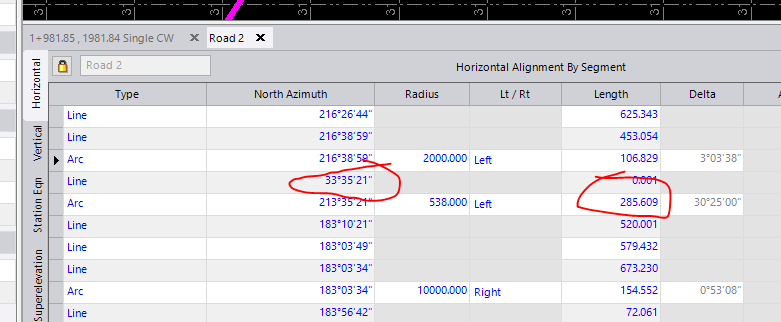
    You have a 0.001 length segment at station  39+652 in your HAL that goes in the opposite direction.  This was most likely caused by some small inaccuracy of the imported data.  Shorten the adjacent curve and delete the segment or otherwise revise the alignment.


  • 5.  Re: Issues with Corridor Surface

    Posted 01-28-2020 22:28

    Perfect.


    That resolved my issue. It was of immense help.


    Thanks.


    On Tue, Jan 28, 2020 at 8:18 PM tim_mcclannahan@trimble.com <