Trimble Business Center

 View Only
Expand all | Collapse all

Can you lengthen a Line to given Elevation?

  • 1.  Can you lengthen a Line to given Elevation?

    Posted 05-23-2019 00:00

    Is there good way in TBC to Lengthen/shorten (Extend/Trim) Line to given Elevation?

    What I mean, I've got ex Line Start (E=100, N=100, Elev=10), End (E=300, N=300, Elev=20), I'd like to extend this line till end(or start) of it reach new elevation lets say Elev=30, horizontal extend distance is unknown.


  • 2.  Re: Can you lengthen a Line to given Elevation?

    Posted 05-23-2019 08:27

    You have a couple of options here


    1) Create a rectangle larger than the area that you are working on at elevation 30. Make it into a surface called Datum 30. Now run the command Create Surface Intersection - Name the point you will create, place it on the layer that you want, select the Datum 30 Surface, Select the coordinate (in your case the 300,300), select the start elevation (the elev 20 point), select your bearing - extract it from your line using SHIFT and Click the end that you want the bearing from (you may have to select the wrong end and +180 to get the right bearing because the end is also the reference point and this will not work because the bearing From / To is to the same exact location unless you pick somewhere back down the line but beyond the half way point), for the Vertical Angle do the same SHIFT Click trick to select the Vertical Angle of your source line and hit apply - this creates you the spot that you need - you can now connect to it with an extension to your linestring.


    2) You can extend the line in the direction of the last segment by adding a horizontal node to the linestring with no elevation that is far enough away to give you the VPI location you need. Use Bearing / Distance snap on Right Click Snaps to create the node and extract the bearing from the line that has the line direction you need. You can also use Deflection Method in Linestring and select Straight ahead to set the direction ad then enter a distance and leave the elevation blank. Make sure that the line has properties "Extend Vertical" set to Yes - his will continue the slope from the first segment where you know the height values. Now use the TML VPI at Elevation and select the line and set your Elevation value e.g. 30 in your case. (TML can be downloaded from the Macros forum if you don't have it). This creates the point elevation on the line. You can then trim the line back to that VPI location.


    These are the methods that I will use to create this type of point / line location


    I agree that a Slope / Elevation control in Linestring Editor would be handy


    Alan


  • 3.  Re: Can you lengthen a Line to given Elevation?

    Posted 05-29-2019 10:38

    If you remember a little basic math you can use TBC’s math capabilities to directly compute the required length.

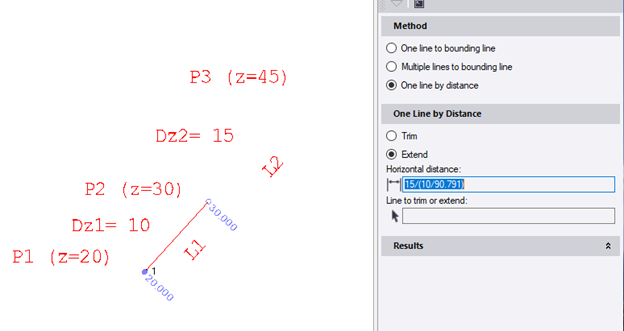
    The distance required (L2) will be =Dz2/(Dz1/L1) where Dz1 is the difference in elevation of the known segment and Dz2 is the desired change in elevation to the new point. This is just the ratio of the change in elevation to length of previous segment to the new segment, holding the same slope.

    Turn on line marking so you see the elevations of the segments

    Run the Trim and Extend command

    Click in the Horizontal distance control

    Hold the shift key and click on the previous segment to recall its length (90.791)

    Edit the length to be 15/(10/90.791)

    When you tab off, TBC will compute the distance to be  138.187

    Pick the line to extend

    The line holds the slope of the previous segment, so an elevation is not shown on the last node.

    This trick is worth remembering as math can be used in most controls


  • 4.  Re: Can you lengthen a Line to given Elevation?

    Posted 05-30-2019 01:28

    Thank you Tim, in fact math inputs in TBC are very helpful but if you have many lines to amend then it can be problematic. I'm not sure if your calcs are correct. Your formula isn't clear to me. I've done schematic sketch using your naming convention, please see attached.


  • 5.  Re: Can you lengthen a Line to given Elevation?

    Posted 05-30-2019 08:45

    Your equation is one step more simplified, so both give the same results.  I will add your request to extend to an elevation to our list for consideration .  (Too much math gives me a headache!) Good idea!