Trimble Business Center

 View Only
Expand all | Collapse all

Join Alignments - Possible

  • 1.  Join Alignments - Possible

    Posted 02-02-2021 11:39
    I have 3 alignments that end/begin together, but they are separate alignments in the design files.

    They all have their own vertical alignments added to each, but I would like to make one alignment with all of them for the 3D drive view and keep the vertical profile info.

    ------------------------------
    Tylor Foster
    ------------------------------


  • 2.  RE: Join Alignments - Possible

    Posted 02-02-2021 15:54
    Easiest way to do this off the top of my head would be 
    1. Use the convert to linestring on all three alignments
      1. there is an option to convert alignments
    2. Join all three newly created linestrings
    3. create a new alignment using this new line. You are able to append both the horizontal and the vertical


    ------------------------------
    Patrick L'heureux
    ------------------------------


  • 3.  RE: Join Alignments - Possible

    Posted 02-03-2021 09:41
    I thought when you convert to linestring you lose VC information. Grade Breaks stay, but the curve information is lost. I'm not sure if appending will work because they have station equations at each new alignment so appending will jack it all up?

    ------------------------------
    Tylor Foster
    ------------------------------


  • 4.  RE: Join Alignments - Possible

    Posted 02-03-2021 14:18
    Edit or copy/edit (retain original) the first alignment and append the subsequent alignments. Select the Vertical tab and repeat for the vertical alignment.

    Note: If your alignments don't end/start coincidentally (including vertically), it can have mixed results for the vertical alignment. This can be compensated by manually adding a Grade Break, to the new alignment, at the start of the subsequent alignment before appending its vertical alignment.
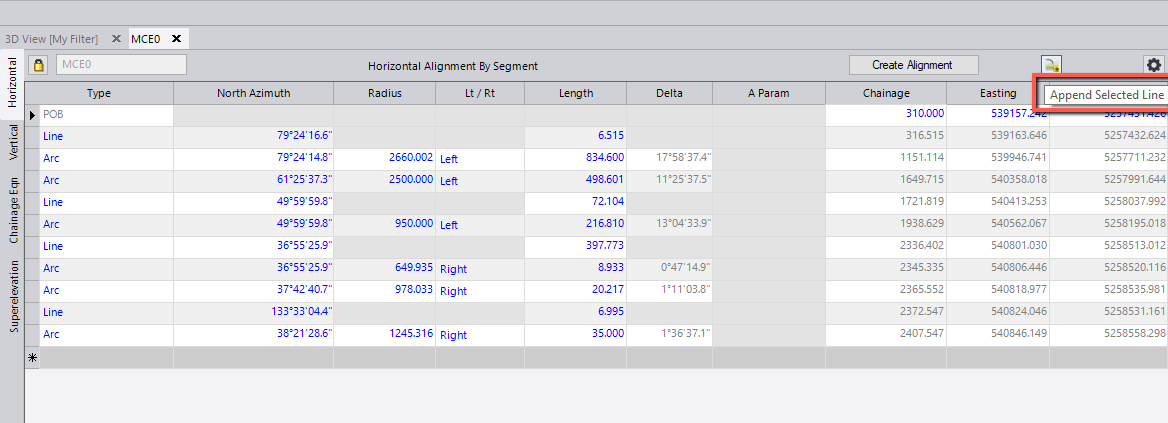


    - Rob

    ------------------------------
    Rob Davidson
    ------------------------------


  • 5.  RE: Join Alignments - Possible
    Best Answer

    Posted 02-04-2021 13:58
    Edited by Tylor Foster 02-08-2021 09:13
    Hello Tylor,

    I would suggest using the edit alignment as spreadsheet command, it should be located on your macro tab of your ribbon. Alternatively you can hit your "F12" key to access the command pane and enter the following in the command field


    This will allow you to copy alignment data from one alignment's spreadsheet and paste it into another. You can use this process to merge multiple horizontal and vertical alignments.

    If you have trouble let me know.

    ------------------------------
    Shane Odenbach
    ------------------------------