Trimble Business Center

 View Only
Expand all | Collapse all

How do i extend my corridor surface to cover L Shaped Bend on a bridge?
  • 1.  How do i extend my corridor surface to cover L Shaped Bend on a bridge?

    Posted 09-18-2021 03:18
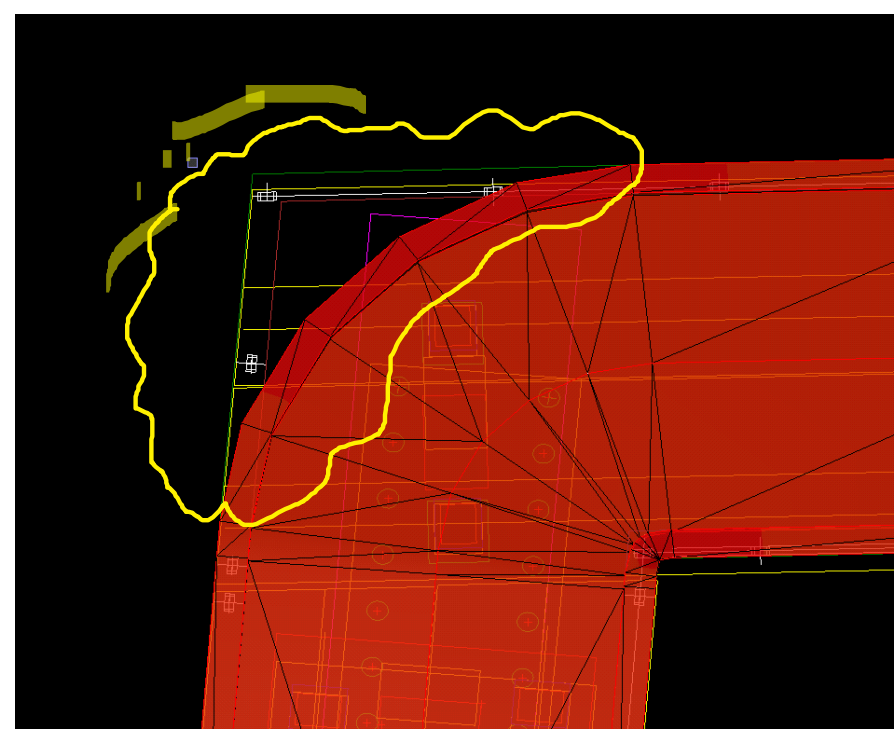
    I'm trying to model a pedestrian bridge above using the alignment @1% slope on either side of the  alignment.So far so good until it reaches the highlighted  L shaped bend.I tried 2D line command to extend the back of kerb string line but still face issues.Is there an option to extend all my kerb lines/surface to the L shaped bend?
    Thanks ​

    ------------------------------
    Julius Joseph
    ------------------------------


  • 2.  RE: How do i extend my corridor surface to cover L Shaped Bend on a bridge?

    Posted 09-19-2021 23:58
    Can you please highlight the lines your are actually using in your template and also upload a screenshot of the template editor.
    From just this one screenshot I have no idea what you've done so far and what string lines are available.

    Or, better, upload the project.

    The sideslope with a line string as limit should look like this in TBC. The only thing I ran into during this quick test with a corner string line is that the triangulation is wrong. No matter what values I set for the maximum edge length, maximum edge angle,  sampling distance, breakline approximation values, densification etc.. Not sure if this is some kind of bug or just an overall limitation. @Alan Sharp would probably know.

    If I use a fixed value for the offset the triangulation is ok, but it's past the limit of course.


    ------------------------------
    Ronny Schneider
    ------------------------------


  • 3.  RE: How do i extend my corridor surface to cover L Shaped Bend on a bridge?

    Posted 09-20-2021 00:09
    It's still not 100% correct, but "adjust flat triangle" did mend it a little bit.


    ------------------------------
    Ronny Schneider
    ------------------------------


  • 4.  RE: How do i extend my corridor surface to cover L Shaped Bend on a bridge?

    Posted 09-20-2021 14:55

    The white line is the Back of Kerb and the model is supposed to follow the L shape,but at the moment its a curve following the alignment.

    ------------------------------
    Julius Joseph
    ------------------------------


  • 5.  RE: How do i extend my corridor surface to cover L Shaped Bend on a bridge?

    Posted 09-20-2021 15:34
    Piece of cake. Make your Offset a table instead of a fixed distance. Looks like th offset is consistent from the BOP to the start of the curve, so input those to Sta/Off values. Then select the station and offset both by clicking at the outside corner of the path, the back to the fixed offset distance at the PT.

    The slope will remain 1% all the way through.

    ------------------------------
    Nelson Hays
    ------------------------------


  • 6.  RE: How do i extend my corridor surface to cover L Shaped Bend on a bridge?

    Posted 09-20-2021 20:20
    Thanks ,will try that option

    ------------------------------
    Julius Joseph
    ------------------------------


  • 7.  RE: How do i extend my corridor surface to cover L Shaped Bend on a bridge?

    Posted 09-20-2021 22:25
    Hi Nelson,
    Can you please provide me with more information of how to use the Sta/Off method?there is slope table on corridor and it gives station,slope and vc length. 

    Cheers

    ------------------------------
    Julius Joseph
    ------------------------------