Hi Richard,
Looks like the website section has been updated to clarify, "SITECH
CS".
Commands (+ importer/exporter) for the ANZ market have been around for a long time - originally installed separately, later included in the TBC install options, and now part of the TBC licensing system.
I hadn't kept up with it, but noticed last year that they had some general market commands - and appear to be creating more, which is great for the community.
------------------------------
Quan Mueller
Revenant Solutions - TML Development
------------------------------
Original Message:
Sent: 08-02-2021 05:22
From: Richard Tyndall
Subject: Excel Tables in TBC Drafting
Hey Ronny,
Website doesn't say anything about only purchases from SITECH Australia qualify. It clearly indicates purchase from SITECH, which we did, qualifies for the free tool pack, plan and simple. If the offer is specific to SITECH Australia, then their website should say that, which it doesn't. I believe that we, and anyone else who has purchased from SITECH, is owed a tool pack.
------------------------------
Richard Tyndall
Original Message:
Sent: 08-01-2021 19:57
From: Ronny Schneider
Subject: Excel Tables in TBC Drafting
Hi Richard,
they should have made it more clear. Only SITECH Australia counts here.
Every SITECH is its own company and needs to see where it gets the profit from. SITECH Australia employs Dylan and pays his salary, and needs to refinance his efforts, Trimble doesn't care. Maybe they cover a little bit for all the 12d import/export/compatibility in TBC that is also programmed by SITECH Australia instead by Trimble.
So, only if you buy TBC through SITECH Australia they get their cut and are willing to give you the Toolbox for free. Every other SITECH customer needs pay extra, like buying from any other third party.
------------------------------
Ronny Schneider
Original Message:
Sent: 08-01-2021 12:50
From: Richard Tyndall
Subject: Excel Tables in TBC Drafting
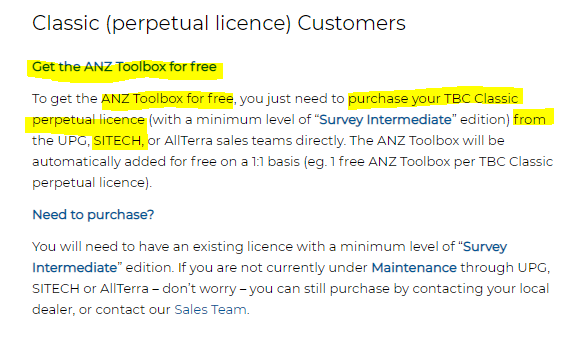
Dylan - since we purchased our Infrastructure level perpetual license through SITECH, we should already have access to the commands correct. Currently I'm showing the AZN Toolbox as unlicensed and your website clearly states the "TBC Classic perpetual license purchased ...... from ...... SITECH." qualifies for the free toolbox. I guess I need to handle through my SITECH dealer? thanks
------------------------------
Richard Tyndall
Original Message:
Sent: 07-31-2021 16:35
From: Dylan Towler
Subject: Excel Tables in TBC Drafting
Hi Wayne, the module is not restricted to a particular region and is available worldwide. You can see a list of all the commands (they all support imperial units btw) and functionality included here: https://tbcanz.com/anz-toolbox/
------------------------------
Dylan Towler
www.tbcanz.com/anz-toolbox/
Original Message:
Sent: 07-31-2021 09:33
From: Wayne Welshans
Subject: Excel Tables in TBC Drafting
Dylan, where has this command been hiding! I'm very excited to see this in the software, I was unaware of it. I have it available in my command pane but it says my license does not include it. I can't imagine what license it must be under?! I have survey advanced and drafting (among others) but I would think it is in one of them. Unless its in the pesky ANZ toolbox that has all these nice commands that I can't get.
------------------------------
Wayne Welshans
Original Message:
Sent: 07-30-2021 14:05
From: Dylan Towler
Subject: Excel Tables in TBC Drafting
The InsertExcelTable command will allow you to insert a table from an excel file and control text style/colour etc... It doesn't use copy and paste currently. See example screenshot below.

------------------------------
Dylan Towler
www.tbcanz.com/anz-toolbox/
Original Message:
Sent: 07-30-2021 07:48
From: Richard Tyndall
Subject: Excel Tables in TBC Drafting
Aside from creating a .pdf / georeferencing the .pdf / dynaview the .pdf to the sheet view, is there an easy way to insert excel tables, ultimately to the sheet view for plotting/drafting of a "field to finish" deliverable, in TBC?
Use of the clipboard, another words widely used current technology, would certainly be helpful.
------------------------------
Richard Tyndall
------------------------------