As a user, I have done a lot of TBC installation testing/experimentation this week (launch week) and wanted to post a simple summary of my conclusions.
If you have v5.40.1 and have NOT installed TMLs from Rockpile Solutions:1. Install TBC v5.50
With a clean v5.40.1 installation, I installed v5.50 with no issues - the new TMLs from Trimble appeared just fine in the Surfaces ribbon. (Note: This is probably the pathway tested the most by the TBC dev team and Beta testers.)
If you have v5.40.1 or earlier, and have installed the Rockpile TMLs (specifically Combine Surfaces or Explode Surface)1. Run the Rockpile Solutions 4.1 command installer (
download here)
BEFORE you upgrade to v5.50.
2. Install TBC v5.50
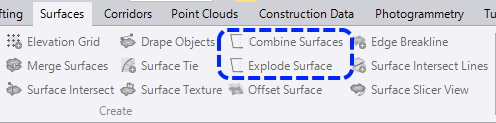
This will properly remove the old Combine Surfaces and Explode Surface TMLs (.pydll files) from the Trimble macros folder, and allow the new Trimble sample versions of these TMLs to be installed.
If you upgraded to v5.50, and Combine Surfaces and Explode Surface do not appear in the Surfaces ribbon tab1. Run the Rockpile Solutions 4.1 command installer (
download here)
2. Uninstall TBC v5.50 (you can run the setup.exe again, and choose the Remove option)
3. Re-install TBC v5.50
This should now properly install the new Trimble sample TMLs for Combine Surfaces and Explode Surface, and they should appear in the Surfaces ribbon tab:
 Curious why?
From my testing, it appears that the TBC v5.50 installer will not install the new Trimble sample TML files if the old Rockpile versions (CombineSurfaces.pydll, ExplodeSurface.pydll) are present in the Trimble macros folder. Running the Repair function of the installer will not install the new files, because they were not installed during the original installation. The two .pydll files must be removed before running the TBC install.
Hope this helps.
------------------------------
Quan Mueller
Revenant Solutions - TML Development
------------------------------
(edit: formatting)
(edit: added section for upgrade w/ no RPS TMLs installed)