Here are a few relevant facts about this situation:
- Civil 3D units and AutoCAD units are not the same, can be set differently, and do not work the same way.
- Civil 3D units are only honored by Civil 3D commands. Everything else is handled by AutoCAD using its unit settings.
AutoCAD 2016 and prior had one imperial units option: "Feet". In 2017, they introduced a new unit: "US Survey Feet". The way they went about implementing this new unit was, in my opinion, absolutely unforgiveable. Starting in 2017 the
default handling of "Feet" units was set to International Feet,
even when upgrading an older drawing that had no distinction between international and US Survey Feet. The "conversion" was applied
transparently and without warning to the end user. It's reasonable to assume that many people who used 2016 would've set their default units to "Feet" in their primary template drawings, and those settings would've been inherited during future upgrades. However, when you set your C3D settings in 2017+ with the "Set AutoCAD variable to match" box checked, you're now telling AutoCAD to use US Survey Feet instead of "Feet" (assuming you're in the US and use US Survey Feet). Older drawings that lacked the distinction between these two units would now be assumed to represent international feet and there was no option to circumvent this. Essentially, AutoCAD decided starting in 2017 that every drawing you ever created with "Feet" units
must have been International Feet only.
Here's an example of how to recreate this issue:
Create a drawing in Civil 3D 2016 and set the C3D Drawing Settings to US Survey Feet, with the "Set AutoCAD variables to match" box checked (like below):
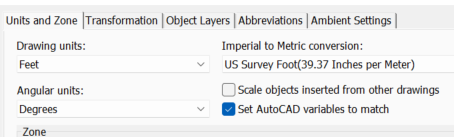
(Check your UNITS afterwards, you'll see "Insertion scale" units = "Feet")
Now, do the
exact same thing in Civil 3D 2017+ and check your UNITS, now "Insertion scale" units = US Survey Feet. You can see where this is about to go wrong!
Next, XREF your 2016 drawing into the 2017+ drawing. Job done! You've now got messed up XREFs, and AutoCAD didn't warn you or make any fuss about the fact that it's doing something so clearly severe despite there being no unambiguous call for it to happen.
This probably didn't get picked up by those who use local / assumed coordinates, but for those of us operating in State Plane Coordinates this amounts to shifts of 10 feet or more. Enough to destroy your hard work, but not enough to immediately go undetected.
Because of the fact that AutoCAD is programmed to handle unit conversions automatically and silently, we (as a firm) have opted to abandon the use of defined units in all of our drawings moving forward. Every new drawing is set to "Unitless" and we handle the scaling ourselves in the extremely rare case when it is necessary. This makes it possible to XREF older content into our current drawings without having to remember to go back and fix it later.
To "detect" and reverse this issue in progress, here's what you do:
- Run UNITS and set the Length type to Decimal and Precision as high as it will go.
- Open the properties for your reference.
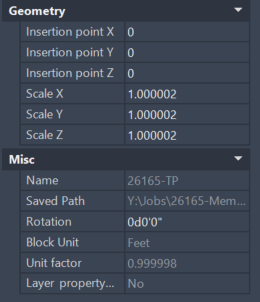
- For XREFs, look under "Misc" (might be elsewhere for different types of references". You're looking for "Unit factor".
- If it isn't 1.000000000000000 you're being scaled. Likely it'll either say 0.999998 or 1.000002. That's the scale factor for international/US survey feet.

- Select your XREF and run the SCALE command. Base point should be whatever your reference's base point is.
- Type in the inverse of the "Unit factor" for the scale factor
- Unit factor will remain the same but you're countering that with a X/Y scale factor.
Alternatively, if you're married to the use of the defined units in AutoCAD, you can temporarily change your Insertion scale units to Unitless immediately prior to running the XREF or import function, and then revert it back afterwards. The process is
not retroactive or real time - it only happens during the actual XREF/import process based on the unit settings in effect at that moment.
I don't know what solution is appropriate for your client, but that's the nature of the problem and it's what you have to be aware of when the decision is made to use defined units in AutoCAD.
------------------------------
Scott Roberts
------------------------------