Lol are you accepting donations?
Huge help! For this I'm going to have the perpendicular lines already drawn, I'll be copying the group around and dropping it on the right spots, then all I have to do is rotate one of them, tangent or perpendicular, to the correct spot to have the tangential line. So simple, angle to the center is the circle then just add 90 degrees to get the right angle. I'll just be rotating towards the radius and it'll automatically line up the other guide lines.
Thanks again!
------------------------------
Adam Bower
------------------------------
Original Message:
Sent: 07-20-2021 20:00
From: Richard Tyndall
Subject: Rotate Tangent to Arc
On straight line segments, you don't need to rotate anything to quickly create perpendicular or parallel lines to the curb line.
- perpendicular running snap is on
- start your favorite line command.
- select your first coordinate on the curb line.
- right click select <bearing distance>
- with focus in the bearing field, right click again select <point to point>
- with the focus in the first point field, pick anywhere on the opposite side of the line that you ultimately want your perpendicular layout tic and overwrite the default coordinate (in this case).
- with the focus in the second point field, hover over the curb line at the highlighted perpendicular running snap icon and click that location.
- the displayed bearing is perpendicular to the curb line and the line will draw from your first selected coordinate, perpendicular to that line.
Hope that helps, that will be $89.95 + tax. See the cashier on your way out. 😉
------------------------------
Richard Tyndall
Original Message:
Sent: 07-20-2021 19:40
From: Richard Tyndall
Subject: Rotate Tangent to Arc
from memory so hopefully I don't miss a step
- start your favorite line command
- select the position on the arc as the first coordinate.
- right click - select <bearing distance>
- with focus in the bearing field right click again and select <point to point>
- accept the first coordinate as that is the original point on the arc
- with the focus in the second point field right click and select the <center of arc> snap, select the arc
- accept both points
- the displayed bearing is radial towards the center of the arc to the original coordinate that you selected on the arc
- add or subtract 90 degrees (do that directly in the bearing field) for a right or left tangent bearing from the original point or add or subtract 180 for a radial bearing away from the arc center.
- enter the distance - bang you're done.
Hope that helps, sorry if I missed a step but I'm sure you get the idea, let us know how you make out.
------------------------------
Richard Tyndall
Original Message:
Sent: 07-20-2021 14:56
From: Adam Bower
Subject: Rotate Tangent to Arc
Yes exactly!
------------------------------
Adam Bower
Original Message:
Sent: 07-20-2021 14:24
From: Richard Tyndall
Subject: Rotate Tangent to Arc
Are you referring to something similar to how I setup layout tic's for structures on arcs as shown below? The tic (blue line) is tangent to the curb arc (green line) and the end is at the center of grate x face of curb.
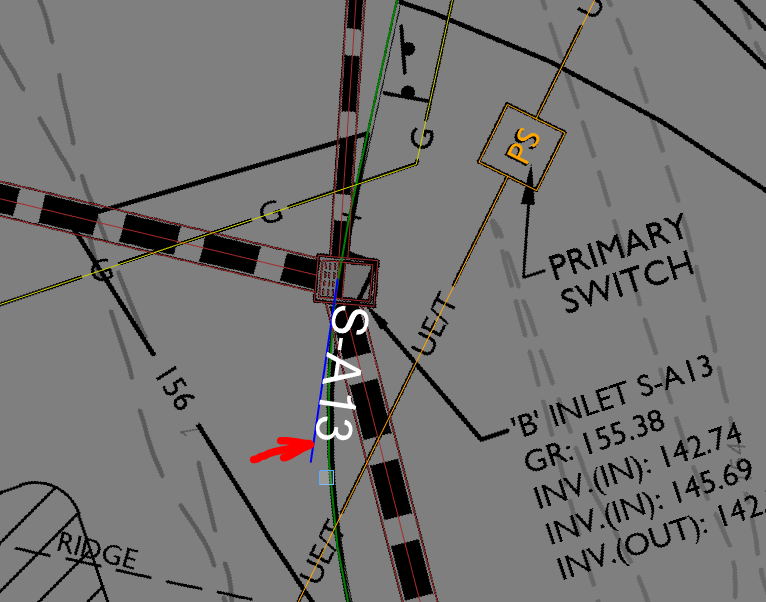
------------------------------
Richard Tyndall
Original Message:
Sent: 07-20-2021 12:22
From: Adam Bower
Subject: Rotate Tangent to Arc
I'm trying to create guide lines for laying out drainage. I'm wondering if I copy all of these lines to each box, how can I rotate the lines so that the one is tangent to an arc? It's easy in a straight line segment. I can just do deflection angle and rotate parallel to the segment, but I can't figure out the easiest way to stay tangent to an arc.
------------------------------
Adam Bower
------------------------------