Trimble Business Center

 View Only
Expand all | Collapse all

Photogrammetry - Required amount of GCPs

  • 1.  Photogrammetry - Required amount of GCPs

    Posted 02-07-2021 16:27
    Hello all, 

    I am very happy to be using the Photogrammetry module. It has been quick and efficient thus far. 

    However, I have noticed that on my first project I utilized six (6) GCPs and that project processed perfectly. 
    On my second project I had four (4) GCPs and the software allowed me to process utilizing these four (4) GCPs.

    But last week, on another project utilizing four (4) GCPs, I was prompted with an error "A minimum of 6 ground control points with observations are required."

    This prevented me from being able to move forward with my Absolute Adjustments to the next stage. 

    Drone : DJI phantom 4 RTK

    All photos were RTK on all projects. 

    Has anyone had similar experiences or can explain why this might be happening? 
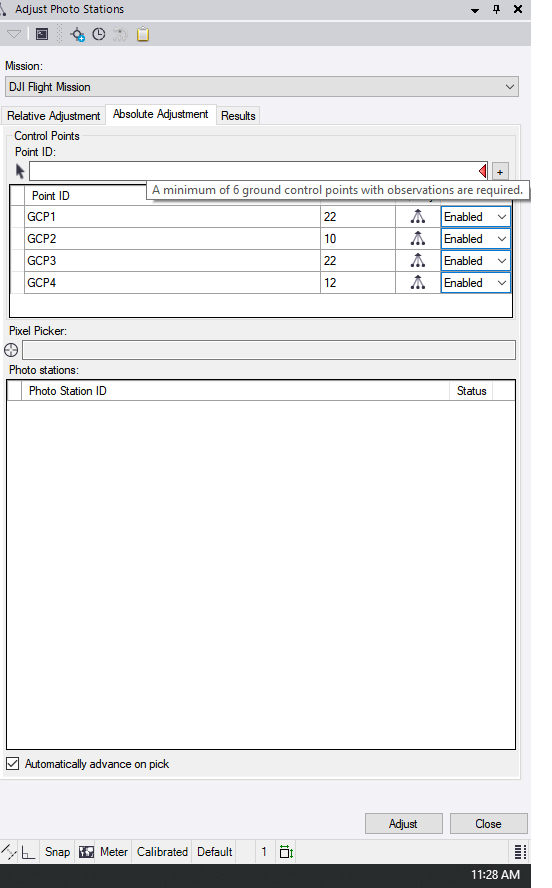


    ------------------------------
    Sabrina Mohammed
    ------------------------------


  • 2.  RE: Photogrammetry - Required amount of GCPs

    Posted 02-09-2021 19:55
    Hi Sabrina
    I can see the issue too.

    If you import 1 flight and use GCPs it only requires 3.
    If you import 2 flights and use Merge Flight Missions TBC is now requesting 6 GCPs. 
    That doesn't seem correct.

    My data was actually one flight I split into 2 folders and I can see the issue once I merge the same photos that worked with 3 GCPs in another project.
    Maybe you can confirm you have merged 2 flights and I'll check with the TBC team if this is meant to be happening as designed.


  • 3.  RE: Photogrammetry - Required amount of GCPs

    Posted 04-21-2021 18:37
    Neil, I did infact merge 2 flights and that's when I get that error.

    ------------------------------
    Sabrina Mohammed
    ------------------------------


  • 4.  RE: Photogrammetry - Required amount of GCPs

    Posted 01-11-2023 15:32
    Hello,

    I too have seen this happen to me. Every time the drone lands for a battery change is creates a new folder. I Imported both files and merged the missions. Also flying a Phantom 4 RTK.
    It then shows the same error as above. Is there a work around for this or an explanation ?

    I want to stay in TBC and do not want to revert to UAS Master.

    ------------------------------
    [Jennifer] [Christy]
    [DCP]
    [SITECH Southeast Texas]
    [Houston] [Texas]
    [713-452-7539]
    ------------------------------


  • 5.  RE: Photogrammetry - Required amount of GCPs

    Posted 01-12-2023 08:12
    Jennifer,

    I have not seen this error. Are you willing to share the data set with me?

    Thanks
    Mike

    ------------------------------
    Mike Tartaglia
    ------------------------------


  • 6.  RE: Photogrammetry - Required amount of GCPs

    Posted 01-12-2023 08:45
    Hi Jennifer,
    TBC considers each folder as an individual flight and will assign its own camera to it, even if the camera has the same model name, focal length, and pixel size, as we do not know if this was flown with two separate e.g. Phantom 4 RTK drones. To calibrate the camera only the images related to the camera can be used and if the images are not GNSS high-precision images, you need at least 3 ground control points within these images to run the calibration.
    If you want to use for all images one single camera, you should copy all your images into one folder, before importing it into TBC. Then all images will have the same camera and you can run the project with 3 ground control points.
    I hope this makes sense.

    Best regards,
    Thomas

    ------------------------------
    Thomas Widmer
    ------------------------------


  • 7.  RE: Photogrammetry - Required amount of GCPs

    Posted 03-05-2021 14:43
    Sabrina,

    If you continue to have issues like this in TBC you could try processing your aerial imagery using UASMaster.  TBC has an export to UASMaster function that will get everything into UASMaster where you may have some more success.   UASMaster is able to process imagery with or without GCPs.  Once you are successful at processing it in UASMaster the final products can then be exported back into TBC.

    Good luck!

    ------------------------------
    Kevin Lesika
    ------------------------------