Original Message:
Sent: 3/1/2023 10:33:00 AM
From: Martin Kalafut
Subject: RE: A problem with Feature Code Processing in TBC v5.81
Ian,
thanks for your valuable comments! I will take them into account next time, when I will use an FXL for my data.
I do not know, why the area features (shapes) in TA 2022.11 are not filled, since I use exactly the same FXL file for both TA and TBC.
I thought, when I define an area feature in the FXL file and start to measure it in the field, the ending point of the line string will automatically close
to the first point of the area feature.
I am aware of the control code CLOSE TO FIRST, however I never used it, since - like in this case, I always used ST and END control codes and in case of area
features, FCP always closed the area from last measured points to the first.
This was my first problem with FCP processing of an area feature.
Nevertheless - again, many thanks for your valuable comments, especially with your hint to use OP1 and OP2 codes
to avoid such problems like this.
Martin
------------------------------
Martin Kalafut
------------------------------
Original Message:
Sent: 02-28-2023 18:28
From: ian bissonnette
Subject: A problem with Feature Code Processing in TBC v5.81
martin. sorry i am away from my computer for the week so i can t load your file. but from some of your comments i think i can add to your understanding a bit.
end code is not usually needed. you can simply start a new string with your start code. it will automatically end the previous line and the point before the new start.
if you do end a string it will not close the polyline. you need to use the close line control code to close the shape. i don t usually have a colour filled shape, so i am curious if because your shape is not actually closed maybe this is why it is drawing funny in tbc. in access the shapes are not filled in. it is a bit hard to see in your first pictures if it is closed in the access image.
as a side note, i was always reluctant to use numbered codes, OP1, and then OP2. as an example, but i now always do. it means i can run two strings of the same code at the same time and do not need to ever start a line.
hope this might help. best of luck
------------------------------
ian bissonnette
------------------------------
Original Message:
Sent: 02-28-2023 15:09
From: Martin Kalafut
Subject: A problem with Feature Code Processing in TBC v5.81
Evelina,
Now, I did exactly step by step the procedure like you in your video (previously I removed my old FCP processing NOT in the moment when
I deleted the codes and the field for the codes was blank, but first, I filled in the blank field for the feature code with new ones and only then I removed my old FCP processing)
and getting the following:
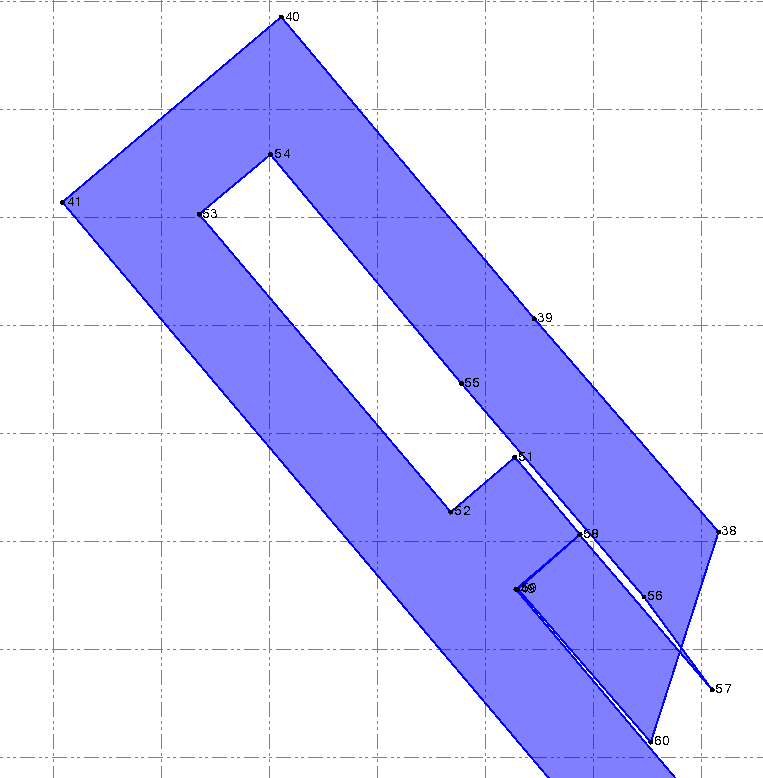
As you see, this outcome supports my understanding that after removing the OP END code on the point 56 to OP code only and removing
the OP ST code on point 57 to OP code only, the FCP continuously joins points in turn with the same code, it means it draws the line from
point 56 (with OP code now) to point 57 (also with OP code now) and NOT to point 38, where it should close the area feature.
------------------------------
Martin Kalafut
Original Message:
Sent: 02-28-2023 14:14
From: Martin Kalafut
Subject: A problem with Feature Code Processing in TBC v5.81
Hi Evelina,
I saw your video - thanks! This is very strange. Now, I do NOT understand quite good the logic of Feature Code Processing (FCP).
When I remove the code OP ST for starting point 38 (start a new area feature with line control code ST, start a new joining sequence)
and replace it just be the code OP, I can still understand it,
since previous area feature ended on the point 33 with feature code OP END (ending of an area feature) and the new area feature can start
only with feature code OP (without line control code ST, start new joining sequence).
But what I do NOT understand - how could you achieve your result, when you changed the last point code in the area feature (point 56, code OP END)
just to code OP (without END line control code - ending current joining sequence) and also the next point in turn, point 57 has also changed code
from OP ST (starts a new joining sequence) to OP only. For me it means that joining sequence will continue from point 56 to point 57, since both points have the same OP code
and NOT from point 56 to point 38 (point 38 is not the next point in the joining sequence), exactly as I achieved in my previous result.
Or, what is wrong in my interpretation?
Martin
------------------------------
Martin Kalafut
Original Message:
Sent: 02-28-2023 01:49
From: Evelina Indilaite-Gale
Subject: A problem with Feature Code Processing in TBC v5.81
Hi Martin,
I am not sure what is the glitch but removing code, removing feature processing and reprocessing again solves the issue on my end. Please take a look the recording https://drive.google.com/file/d/1u17Gl9V41M_cSYsyht5WhKy8IDGhgZX5/view?usp=share_link
Regards,
Evelina
------------------------------
Evelina Indilaite-Gale
Original Message:
Sent: 02-27-2023 15:27
From: Martin Kalafut
Subject: A problem with Feature Code Processing in TBC v5.81
Hi Evelina,
Just a remark: I created the FXL file in Feature Definition Manager installed along with TBC v5.81 and the FXL file
was used both with TA 2022.11 and TBC v5.81 (absolutely NO difference in the FXL file used with both programs).
Thanks for your tip! I did it as you suggested - but it does NOT work with me, the result is even worse.
Here is how it looks:
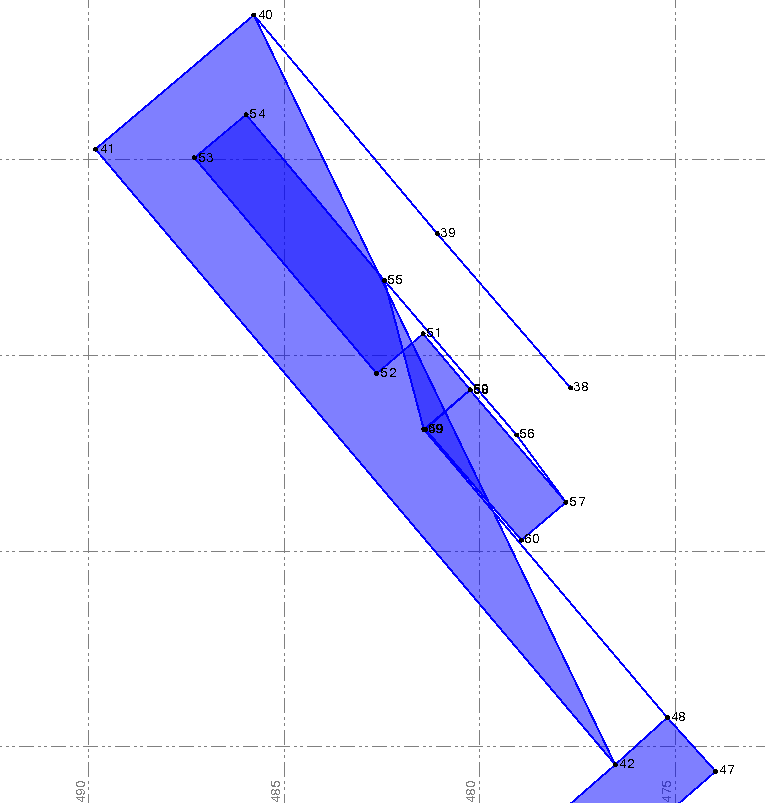
As you can see - after changing the code from OP ST on the starting point 38 to OP only and after changing the code from OP END on point 56
(where the particular area should end and the point 56 should be joined by line with point 38 to close the area) to OP only, the drawing of lines (logically) continues
from point 56 to point 57 which also has the code OP.
So - this is for me unresolved and at the moment it is unexplainable for me, why everything works fine in TA 2022.11, while in TBC v5.81 not.
Martin
------------------------------
Martin Kalafut
Original Message:
Sent: 02-27-2023 08:54
From: Evelina Indilaite-Gale
Subject: A problem with Feature Code Processing in TBC v5.81
Hi Martin,
I was not able to import jxl file to TBC because that I do not have the correct Geoid model but anyways, I opened your provided TBC project.
Not sure how the feature codes were created but they were not working correct. I found a way how to fix it: select all points from no. 38 to 60 and change feature code to OP, remove processing and reprocess features again. After this, the result will look as you saw in TA.
------------------------------
Evelina Indilaite-Gale
Original Message:
Sent: 02-23-2023 14:51
From: Martin Kalafut
Subject: A problem with Feature Code Processing in TBC v5.81
Ian,
You can try it yourself.
Attached are JXL file (export from TA 2022.11 to JobXML format creating the JXL file, ver. 6.26), the project file (.VCE) and the FXL file.
The FXL file is EXACTLY the same in TBC v5.81 like in TA v2022.11.
Martin
------------------------------
Martin Kalafut