Depending on the type of point/observation, it can be as easy as a "recompute". This often happens automatically, but sometimes you must also manually do it. There will be a red disk (or ball) in the lower right-hand corner if a recompute is needed. You can click on that disk or hit F10 to recompute.
If it is an as-staked point, you might have to explode it. I have been out of the field for 7 years so that one is a bit rusty.
------------------------------
Dave Olander
------------------------------
Original Message:
Sent: 10-15-2025 09:40
From: Lou Morris
Subject: Adjusting horizontal prism offsets
Thanks for the reply. I have changed the offsets in point properties but how do you get the coordinates to update after changes the offset?
------------------------------
Lou Morris
------------------------------
Original Message:
Sent: 10-28-2021 18:21
From: James McWha
Subject: Adjusting horizontal prism offsets
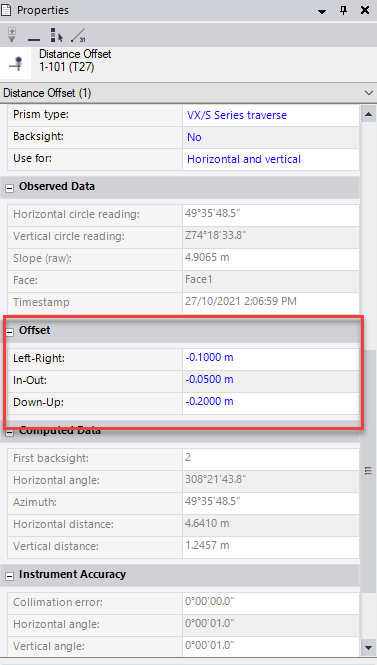
I assume your field crew were using the Distance offset measurement method in Trimble Access? If this is the case then yes you can change it in TBC. If you select the observation you can view and edit the offsets in Properties:
------------------------------
James McWha