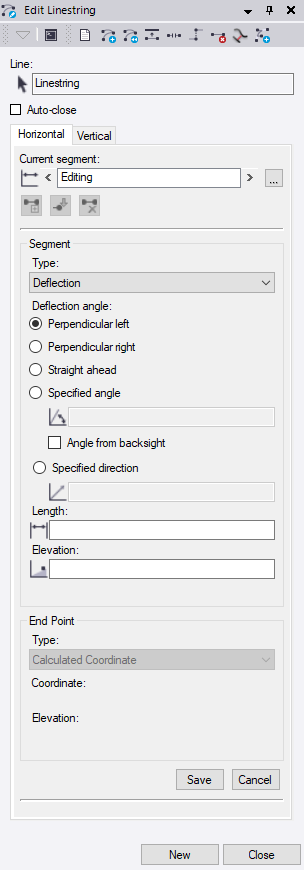
I usually use deflections instead of delta x/y, but I'm not sure what your workflows might entail. I also reverse linestring direction a lot to add to the other end, and obviously break and join to get what I need.
------------------------------
Nelson Hays
------------------------------
Original Message:
Sent: 11-08-2023 11:22
From: Alex Lambert
Subject: Basic CAD functionality Help
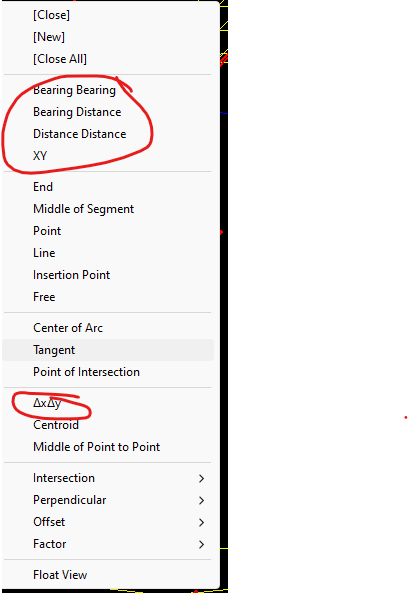
Thank you Erik! The Delta X and Y helps a whole bunch, I had no idea that existed
------------------------------
Alex Lambert
------------------------------
Original Message:
Sent: 11-08-2023 06:53
From: Erik Petersen
Subject: Basic CAD functionality Help
Alex, you should be able to right click while creating the linestring for the next point on the line
------------------------------
Erik Petersen
Original Message:
Sent: 11-08-2023 05:47
From: Alex Lambert
Subject: Basic CAD functionality Help
Thanks for the help guys, I should have been more clear with my question. Its not really drafting dimensions I'm looking for, TBC does a great job of this. its giving things physical dimensions. in Autodesk products I have the ability to create a rectangle or square with X and Y dimensions very quickly, or a line that is a specific length, or maybe a line a given angle off another. so far I cannot figure out how to do this quickly. You can struggle through some of in with line-string commands but nothing is very easy. hope that makes sense.
Thanks again!
------------------------------
Alex Lambert
Original Message:
Sent: 11-07-2023 14:01
From: Edward George
Subject: Basic CAD functionality Help
Hi Alex,
Best way is as Michael has mentioned however, you can also save measurements. This is a "quick and dirty" method of creating measurements without having to set up text and dimension styles however not as customizable.

------------------------------
Edward George