The circle fitting is included in macro SCR_3PtsToCircle and in the public repo since at least 2 month. Works with V2025.21.
Compatibility with V2026 will probably be another 2 weeks, until my boss is back from vacation.
Trimble refused me a trial license, or the automatic system is broken.
Trimbles bullshit move to subscriptions only requires us to change the whole system.
The order with Sitech went out early July but the codes only came through last week after I enquired.
I don't know the password for the subscription account they send through. I have the bad feeling I'll have to muck around with 3 different Trimble ID's from now on, private, current company account and TBC license.
We're waiting since last week for an explanation from Sitech what our IT needs to do with the code they send through for changing our on-premises server license, probably from USB dongle to code only.
It looks like a full month of paid licenses down the drain.
------------------------------
Ronny Schneider
------------------------------
Original Message:
Sent: 08-04-2026 08:25
From: Attila Tóth
Subject: Best fit plane
I'm curious like a virgin before a wedding: How long should I expect?
------------------------------
Attila Tóth
------------------------------
Original Message:
Sent: 06-09-2026 14:07
From: Ronny Schneider
Subject: Best fit plane
There is a macro for this in my public repo. https://github.com/RonnySchneider/SCR_Macros_Public
!!! that macro needs V2024 or newer, it uses some built-in methods which are not available in older versions !!!
It's not the latest version but works, I believe the surface boundary my look a bit weird on near vertical surfaces. I'm currently reworking quite a few of them, so check for repo updates in the next weeks.
I'm using a TBC built-in SVD algorithm to compute the plane. That one takes ages or fails if it's fed more than 15000 points. But the macros samples them down accordingly, also with built-in methods.
Give it a try and suggest improvements.
That version might be missing the help button:
- works with TBC2024 only, uses some new release built-in computation methods
- works with standard and cloud points
- I wouldn't advise selecting more than 15000 normal points, the fitting algorithm might take ages or fail
- in terms of cloud points, you can select as many as you want, it will automatically sample them down to around 15000, it will show a statistic at the end
- the macro does compute a temporary/intermediate surface from the selected/sampled points
- it's mainly used to compute the outer boundary edge breakline, which can be used to limit the planar surface
- this surface is not kept and deleted immediately, but if you Undo just once it will be there again
- if you have a surface created and limit it by the outline of the selected points you must undo twice in order to get to the state before executing the macro

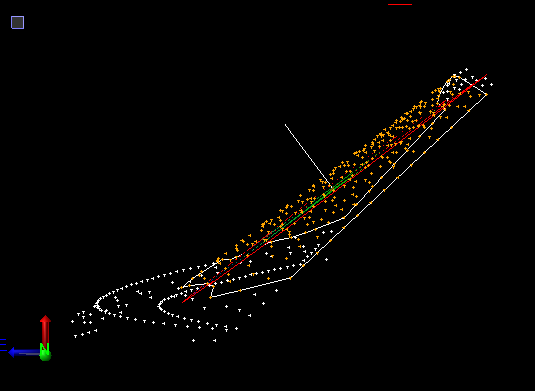
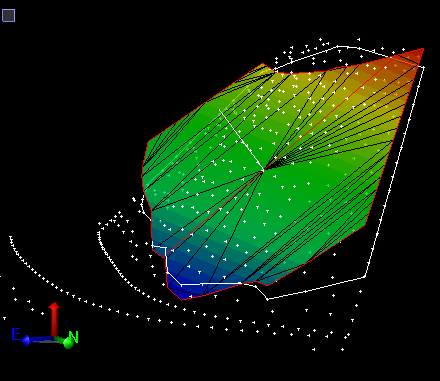
Best fit circles, in 2D and 3D are currently in the works, including fitting with fixed/given radius. Haven't had time to test that properly yet.
------------------------------
Ronny Schneider
------------------------------