Hi Zach,
thanks a lot for your answer and offer ! Really appreciate it.
Please find attached a vce and fxl for what I´m trying to do. Basically I would like to export to DWG the Room Stamp as a block with attributes, as the most of my customers need that instead of a simple MTEXT.
I´ve tried to assign a block definition to a point, also trying to assign an object to a block and also to the block itself that was previously imported from DWG.
1- If I assing a code to the point and process the codes, I see the attributes in TBC but not in AutoCAD after exporting to DWG
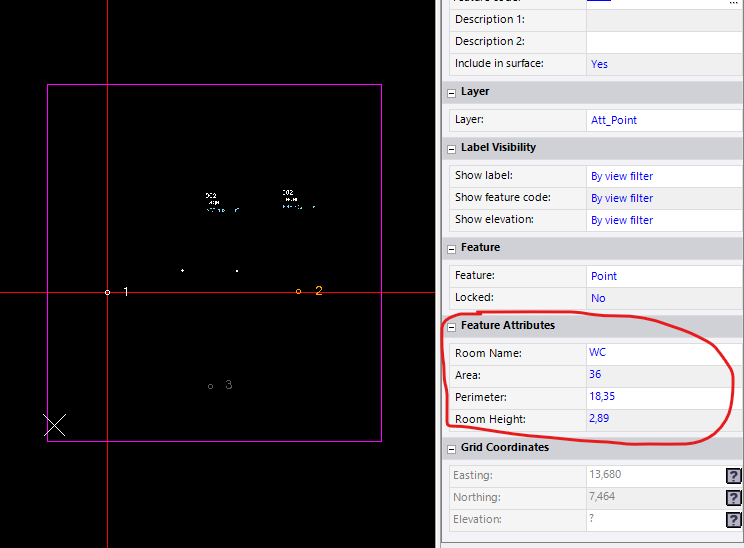
2- I don´t see any attributes in TBC on the original imported block with attributes itself, however, if I export to DWG, the attributes are there

3 - If I assign a Feature from the Properties pane (without processing codes), then I can type in the attributes values, however when exported to DWG, they are not exported while the original ones (002, Lager, etc) are exported.
Not sure whether I´m doing something wrong, but I basically need to export blocks with attributes to DWG being able to edit those values inside TBC.
Thanks for your support.
Regards,
Fernando
------------------------------
Fernando Calvo
calvo@calvo-geospatial.com------------------------------
Original Message:
Sent: 03-20-2024 14:33
From: Zach Edwards
Subject: Block with Attributes supported or possible via Feature code with attributes when exporting to DWG?
Fernando,
You should be getting attributes when exporting from TBC to DWG or DXF so long as you processed feature codes first. Then when you export to DWG, you want to include attributes and change it to Yes for Export Blocks. If that isn't getting it done, feel free to shoot me over the .JOB or archived TBC project to review.
------------------------------
Zach Edwards
------------------------------