Trimble Business Center

 View Only
Expand all | Collapse all

Creating Points on Edited Linestrings

  • 1.  Creating Points on Edited Linestrings

    Posted 07-08-2020 12:27

    Hello,


    First time poster here...


    Our TBC / C3D workflow is such that we edit surveyed linestrings in TBC. The editing could involve any of the following:


    1. Moving / deleting points
    2. Trimming, extending, breaking linestrings


    My question is this...


    Can I re-establish points in TBC such that they are numbered consecutively along the resulting edited linestrings?  To explain the need ideally we should be able to i) create new points ii) export those points to a text file and iii) import them back to TBC and the resultant is perfectly formed linestrings that reflect the edits that were made initially.


    At this point I'm not looking for an alternative method or procedure, I'm just curious to know if there is a way to automate the creation of consecutively numbered points on the linestrings such that the descriptions match those of the linestring.  Probably a reach but just wanted to see if anybody had any ideas.


    Thanks!


    Andrew


  • 2.  Re: Creating Points on Edited Linestrings

    Posted 07-08-2020 14:26

    Hi Andrew, 

    Correct me if I'm wrong, you want to see incremental point ID along the linestring, do you?


  • 3.  RE: Re: Creating Points on Edited Linestrings

    Posted 01-11-2023 08:22
    I'm going to join in on this, since you've drawn such a nice diagram. We have the same workflow as the original poster, but the problem we're having is the linestring is following the original sequential order of the points and the linestring is crossing itself. Do you know if there's anything we can do to re-arrange the linestring? 

    Thanks!

    ------------------------------
    Alex Coleman
    ------------------------------


  • 4.  Re: Creating Points on Edited Linestrings

    Posted 07-08-2020 14:30

    Hi there - yes this is exactly what we are looking for - thanks.  Imagine having several linestrings in a drawing - we don't want to have to place points individually but somehow automate the creation of points.


    Andrew


  • 5.  Re: Creating Points on Edited Linestrings

    Posted 07-08-2020 23:14

    Hi Andrew, 

    This is how I do it, but there may be better ways. 

    Select everything on that linestring, then use Ctrl+click to unselect the line itself. Now you should have just the points highlighted. Delete those points.


    Then go to CAD tab -> Create from CAD. 

    Select the linestring. Choose "Segment end points". As for "create grid-only points", I would recommend untick that option, so you would get regular points with grid, local, and global coordinates. But it's your decision.


  • 6.  Re: Creating Points on Edited Linestrings

    Posted 07-11-2020 17:25

    Hi Rui,

    Is there a way of selecting points along the line like the old Terramodel commands - both "OF" line or "NEAR" line with a user defined tolerance?


  • 7.  Re: Creating Points on Edited Linestrings

    Posted 07-14-2020 09:13

    Hi John, 

    TBC doesn't have that command. I have talked to our engineers so we may be able to add it for the future. \

    Thank you!


  • 8.  Re: Creating Points on Edited Linestrings

    Posted 07-14-2020 10:46

    Hi John,


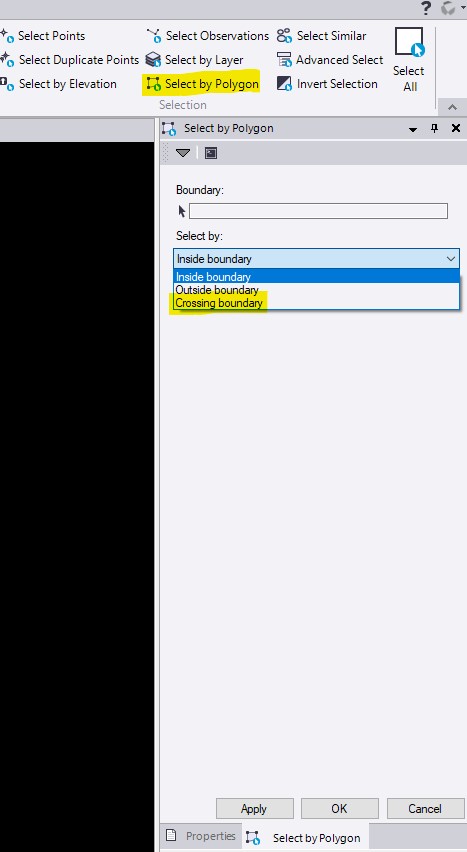
    There is a way to select points along a line but it may require a sequence of operations. The "Select by Polygon" tool that usually lives on the "Home" tab has a mode called "Crossing Boundary", and it will work to select anything touching a line, and the "Boundary" object doesn't have to be a closed line. The behavior is that it will select all objects touching the line. You can then filter those objects down to only the points, e.g. using the Selection Explorer or the Advanced Select tool. There is no tolerance option, so it will only select those object directly touching.


    If you need to select within a tolerance on either side of a line, I would suggest taking the approach of offsetting the source line left/right by the tolerance amount, using the "Join" command to create a closed boundary from those offsets, and then using "Select by Polygon" with "Inside boundary" selected.


    It isn't automatic but it's possible.


  • 9.  Re: Creating Points on Edited Linestrings

    Posted 07-14-2020 20:57

    Hi Rui and Stephen,

    I think the way to do it would be a macro - almost exactly as Stephen has described above


    Select line,

    Create temp offset lines and hinge points either side by the tolerance specified (min 1mm say)

    Closed Polygon from the offset lines 

    create a DTM using these three lines - with the boundary being the polygon

    Select points within that polygon and

    then within the vertical tolerance of the DTM - as specified


    I'm not a macro person yet but obviously I'll have to learn.


  • 10.  Re: Creating Points on Edited Linestrings

    Posted 07-21-2020 13:26

    John, I was just looking for the Points Near Line the other day and thought it was from Terramodel. That would be a great selection command addition.