Trimble Business Center

 View Only
Expand all | Collapse all

Creating surface for a 3D model

  • 1.  Creating surface for a 3D model

    Posted 02-08-2023 06:47
    Hi

    I was wondering if it is possible in TBC to create a surface on a 3D model?

    I have a culvert & headwall model that I need to create a surface for, however the linework has linework above, below etc.

    Creating individual surfaces and merging isn't properly working where you have both a top and bottom of a shape for example. Also the triangulation joins to the wrong linework etc.

    I'm aware of using break lines etc but with such a complex 3D design, it's proving to be very difficult. 

    Any pointers would be much appreciated.

    Thanks

    Richard

    ------------------------------
    Richard Childs
    ------------------------------


  • 2.  RE: Creating surface for a 3D model

    Posted 02-08-2023 16:51
    What would you want to use that surface for?

    In TBC unfortunately you still can't create complicate solid IFC type objects. (ANZ-Toolbox soon will have some basic extruding functionality, we saw a demo).
    But even then forget about creating models like that

    TBC can import them, but is probably a long time away from actually being able to create them. Which is surprising since Trimble owns Sketchup. And with that you have amazing snap, extrude and body intersect/combine functionality.

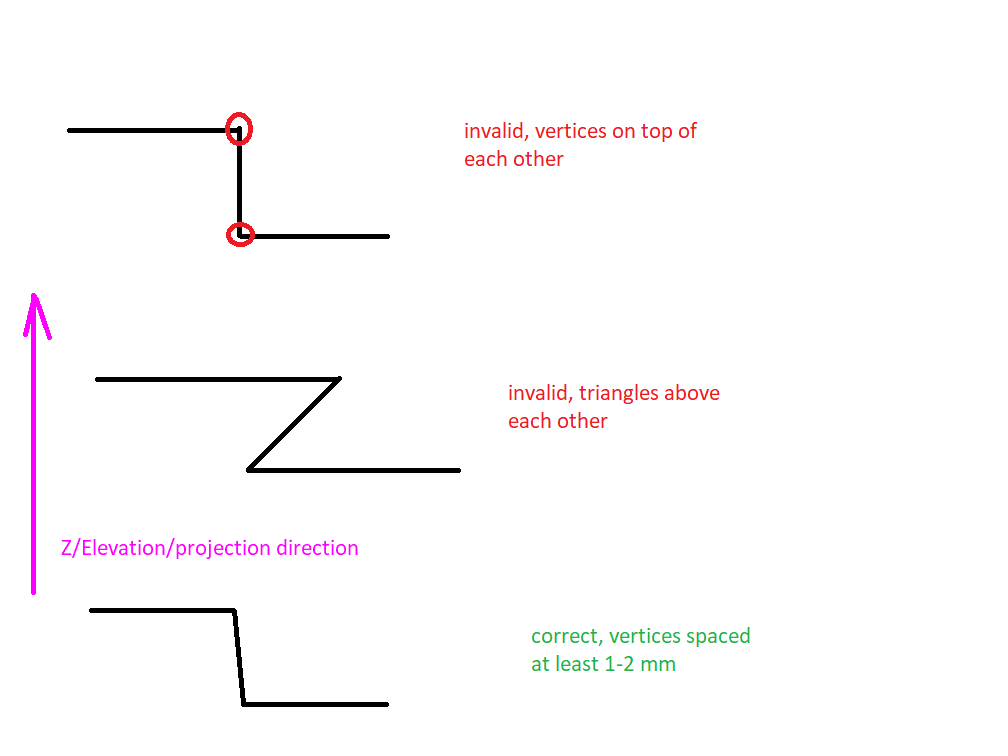
    A TBC, Trimble Access, Siteworks (and I believe also any third party) earthworks surface can't have exact vertical faces, vertices exact vertically above each other or triangles vertically above each other.


    Or put differently, in Z-direction (or projection direction for projected surfaces) a ray, parallel to that direction, must not hit more than 1 entity (vertex/triangle).


    ------------------------------
    Ronny Schneider
    ------------------------------


  • 3.  RE: Creating surface for a 3D model

    Posted 02-09-2023 01:21

    Hi Ronny

    Thanks for your reply.

    I created projected surfaces , however they don't seem compatible with the surface slicer or able to export as XML.

    Thanks for your help

    Richard


    ------------------------------
    Richard Childs
    ------------------------------


  • 4.  RE: Creating surface for a 3D model

    Posted 02-09-2023 01:58

    Thanks for the confirmation, the culvert tunnel I did initially offset the bottom lines out by 1mm and that seemed to worked fine, top and both sides.

    Was hoping the projected surfaces using the vertical option would work but oh well. Thanks for the confirmation anyway, much appreciated.


    ------------------------------
    Richard Childs
    ------------------------------


  • 5.  RE: Creating surface for a 3D model

    Posted 02-09-2023 08:37

    I to have asked for this capability in TBC.  Every now and then you run into these weird shapes that you need to track or create a volume for so you can get paid.  Right now have a Z shape similar to the one shown and the lengths I am having to go to calculate that volume is ridicules!  If I understand the utility module correctly you can create sold shapes in there.  So I would beg that they give us this in the modeling side as well.  It is funny how I can import a IFC model into TBC but I can't use it for a whole lot.


    ------------------------------
    Ben Ryschon
    ------------------------------


  • 6.  RE: Creating surface for a 3D model

    Posted 02-13-2023 09:32

    I always create dams and berms with different zones in corridors.


    ------------------------------
    Erik Petersen
    ------------------------------