Custom reporting has always had errors and can't be trusted. Yes it's concerning, renders it useless and no they won't fix it. Maybe someday we'll have the pleasure of paying yet another third party subscription fee to have reliable and customizable reporting...
Original Message:
Sent: 05-05-2026 21:55
From: Tylor Foster
Subject: Custom Takeoff Report - Quantity Errors
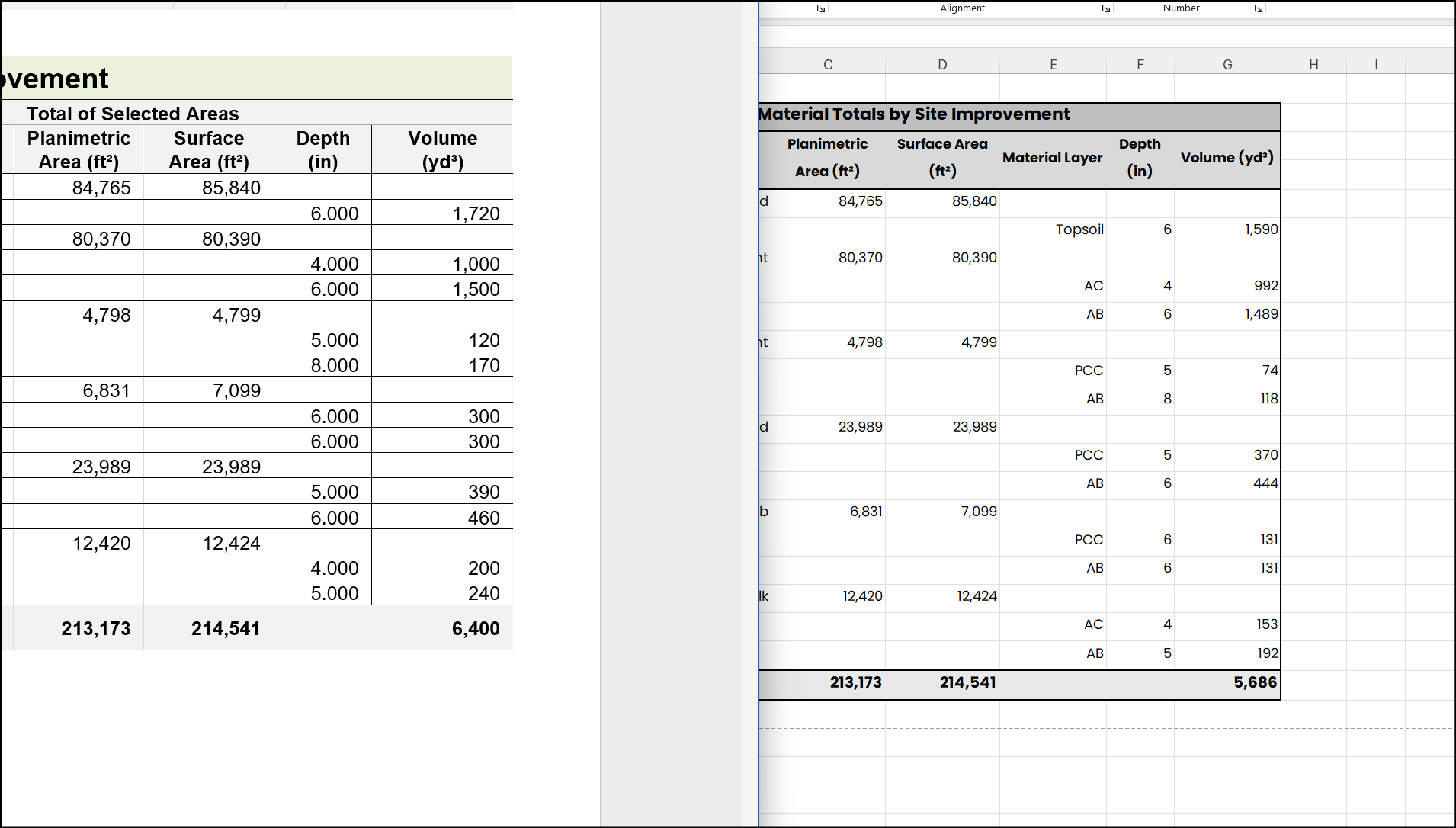
Hey TBC product managers: the material quantities on the custom takeoff report are reporting false quantities. Here's a great example of the same values calculated out in excel against what the custom takeoff report is showing. Alarming to say the least...
------------------------------
Tylor Foster
------------------------------
Original Message:
Sent: 03-04-2026 14:26
From: Tylor Foster
Subject: Custom Takeoff Report - Quantity Errors
The Custom Takeoff Report is not calculating volumes accurately. This is EXTREMELY concerning. Take a look at the screenshot below where two separate Site Improvements (AC material, same depth, but half the area) have the same volume reported. This isn't the first time we've seen something like this, but this is unacceptable and erodes trust of the software.
------------------------------
Tylor Foster
------------------------------
Original Message:
Sent: 01-24-2026 13:00
From: Zach Edwards
Subject: Custom Takeoff Report - Quantity Errors
Morgan,
These aren't necessarily incorrect numbers. It may be the edge of your surface. I would recommend creating a surface boundary if you haven't already. See here for more: https://share.google/UqMkOqDkjl2dSToE8. I would also review here: https://help.fieldsystems.trimble.com/tbc/1534.htm. Lastly, see below for a workaround/solution per a similar issue that someone else had:
"The Takeoff Report Engine calculates volumes within each requested boundary (either the 'entire site' or selected AOIs) and then reports the volumes for each Site Improvement (SI) in each Boundary.
Those SI are only reported if they are enclosed by a boundary. If the user selects 'Entire Site' then all SI are enclosed by the outer boundary and are therefore reported.
If the report is selected 'by AOI', we calculate all of the volumes between the surfaces and report on each AOI boundary with its corresponding enclosed SI. Then whatever volumes that were not reported within the AOIs are clumped together and reported as the remaining area ('remainder' is just leftover areas and volumes which were not already reported). Note that the 'remaining area' isn't really a boundary, it is just the volumes which were not reported within an AOI. This means the remainder does not report on SI and material layers outside of the selected AOI.
In the simplest form, when reporting by AOI you are asking that we do a takeoff on 'Entire Site' first (saving the information) and then run the current report 'by AOI'. Then the report could subtract the total of all material volume (in the 'Entire Site') from all of the individual AOI material volumes- this difference is the 'remainder' you want.
I hope that gives some clarity on how to use the functions. Ultimately, if you make sure to use AOIs for the whole site, you should see the results you're after with the exception of AOIs within AOIs, which I have added to the list for future development."
Hopefully, this helps.
------------------------------
Zach Edwards
Original Message:
Sent: 01-23-2026 09:32
From: Morgan Gilliam
Subject: Custom Takeoff Report - Quantity Errors
I am running version 2024.12. The report where i found errors on the 'Site Improvement Details' section of the takeoff report. Attached are two screen shots of the sidewalk subtotals per phase.
------------------------------
Morgan Gilliam
Original Message:
Sent: 01-22-2026 19:07
From: M_ Hufford
Subject: Custom Takeoff Report - Quantity Errors
Can you specify which report you are running (screen clip)? Does it report correctly if you run the report for each AOI separately? One of the earthwork reports from the previous version of TBC was reporting incorrectly when reporting topsoil quantities with multiple areas of interest. I haven't checked to see if the last TBC update fixed that one or not, but it sounds suspicious...
------------------------------
M Hufford