If you click on a scan or scan station in the project explorer what does the properties pane (F11) say about the "Number of points" in that scan or region?
If it still shows more than 0 you may be lucky to get it working again. You can try
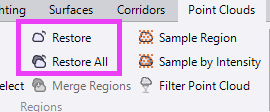
And it may just be a wrong rendering setting as Alan pointed out.
If it shows 0 points in the scan or region it's unlikely you get it working again. The connection to the point cloud data base got broken. I never managed to fix it when it happened.
I had a look with the macro debugger in those cases and the folders and variables did look ok, but for some reason TBC was unable to load the points. Since we don't have any documentation on how TBC works behind the curtain it's unclear what happens in those cases.
With point clouds try to avoid mapped drives, even if it's not a real network drive and just pointing to a subfolder on your main C drive. (I occasional do this as some kind of quick access, if the data is multiple levels down from C root level.)
And don't store the data multiple levels down from C root level. TBC doesn't properly support long paths. Which is a pain since companies move to cloud storage like OneDrive and that folder itself may already waste 100 characters out of 256.
Try moving the TBC project and subfolder to i.e. C:\tmp and load it from there. If you're really lucky the database access starts working again.
------------------------------
Ronny Schneider
------------------------------
Original Message:
Sent: 01-29-2026 07:07
From: Justyna Cała
Subject: Re: Dont see scan points, but they are there?
Hello,
Is there any way to fix this? I have the same problem – after colorizing the point cloud, I tried to open the plane manager, but TBC stopped working. I had to close it from the task manager, and after restarting, the point clouds are not visible, but their names are visible in the project explorer. Does anyone know where I can find them?
------------------------------
Justyna Cała
------------------------------
Original Message:
Sent: 11-12-2020 10:48
From: Fredrik Bergstrom
Subject: Re: Dont see scan points, but they are there?
I have sent you a link on the mail with the project.
I cant figure this out. Noting of the steps you asked above works and i have also tried to downgrade to 5.3 again but that did not work either. Very strange.