Once a surface is created, any and all arcs used to reference the surface are turned to tangent breaklines. Once the surface is exploded, all breaklines are tangent lines. There is no way to turn those breaklines to arc. What is best to do before exploding. You can either densify the surface at those curves ( of course if it follows the alignment) if say the arc used was for a turn lane then it will not be densify.
You will have to go into the corridor surface and view its properties to add the densify, then explode. If you want to you can undesnsify back after you explode.
One other form to getting segments tighter is to change the SAMPLE DISTANCE. This can make the segments as close as 0.7'. Which it turns the whole surface breaklines to 0.7' segments. Doing it this way can turn into a two part process so you can just get those arc sections needed. For this to happen, you need to go to the corridor and view the properties of the corridor template ( if you have multiple templates it will only change the stations along that template) towards the bottom of the properties window you will see SAMPLING DISTANCE. There is a default distance already and you will just click in that box. Change to this template and then you can change the distance to your liking. After doing this, you can explode.
There is also a setting to change that helps out the densify which I don't have my laptop to check where that setting is.
------------------------------
Francisco Guerrero
------------------------------
Original Message:
Sent: 12-22-2022 11:24
From: Clint Stewart
Subject: Re: extract feature line from Corridor surface
I am on here trying to figure out the exact same thing. Did you ever figure this out? Thanks!
------------------------------
Clint Stewart
------------------------------
Original Message:
Sent: 01-07-2022 09:51
From: kyle Boracchia
Subject: Re: extract feature line from Corridor surface
Alan,
When I Explode the Corridor it creates it in cords is there a way to convert the line into an arc? 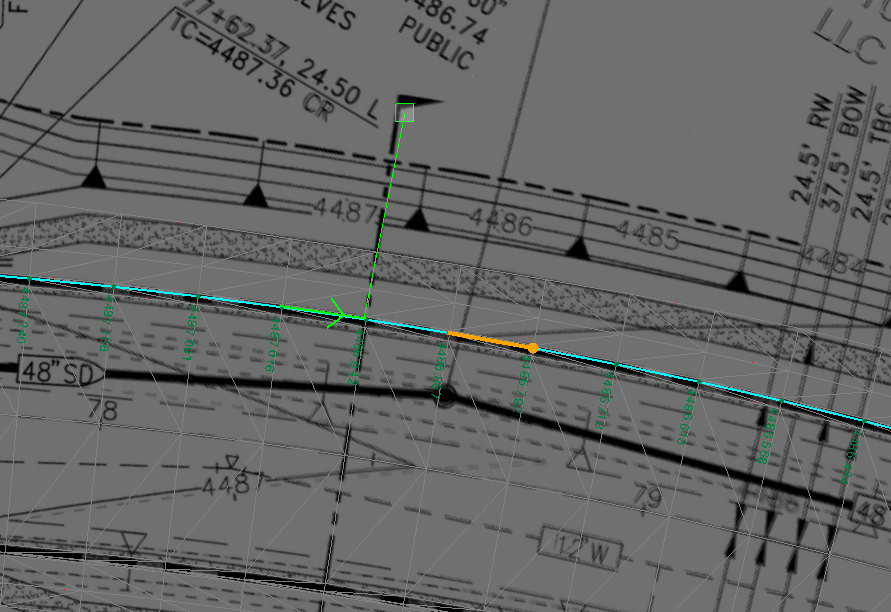
thanks,
------------------------------
kyle Boracchia
Original Message:
Sent: 06-28-2018 20:05
From: Alan Sharp
Subject: Re: extract feature line from Corridor surface
When you Explode a Corridor Surface Model, it will create all of the Feature Nodes as Named Feature Lines on a layer the same name as the Corridor Surface. The Explode command is typically used to explode CAD Blocks into their component parts, but we also use it to explode Corridor Surfaces, Elevation Grids and other similar objects in BC-HCE.
Another Tip if you are running Machine Control or Site Positioning Systems, when you run the Field Data commands to send out ALignments, Surfaces and Linework is that if you select a Corridor Surface Model as the Linework, it will explode the corridor in background to generate the linework that then gets sent to the DXF file used by SCS900 / Sitework or the SVD/SVL files and DSZ files used by the Earthworks system.