I will try to tackle these in sequence
1) 2 Point Blocks are scaled by the distance between 2 measured points. You should ensure that your block is defined as a unit Length (X Axis) and whatever ratio you want the Y axis to be. So for example if I have a gate that will be drawn between two points coded GP (Gate Post) then I want my block to be 1 unit wide and maybe 0.2 units high. The below symbol is an example of a Gate Block.
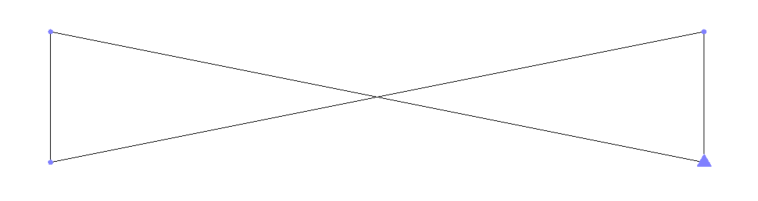
If the two Gate Posts are 2.56m apart then the Block will be scaled by 2.61 - the Unit length X side will now be 2.61m long and the Y length will be 2.61 x 0.2m.
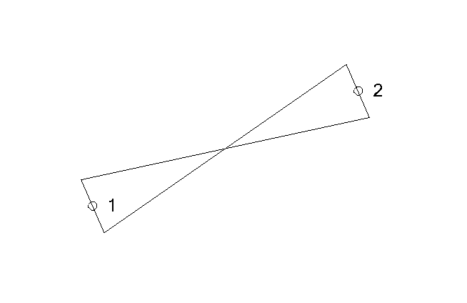
2) 3 Point Blocks are scaled in X by the distance between points 1 and 2 of the measurements and the Y axis is scaled by the Perpendicular distance of point 3 from the line between points 1 and 2. The 3rd point can be e.g. measured anywhere on the side opposite the baseline (if e.g. a Rectangle like a Manhole) but also anywhere on the extended line of the opposite side if for any reason you cannot get to the opposite side (e.g. a car is parked over it etc.). Again the Block definition should be defined with Unit Length in both X and Y axes so that it can be scaled by the measurements made in the field. So if you have Manholes that are 0.6m x 0.4m your block should be a Square of 1m x 1m when you want to place it between 3 points. The video shows how.
Note: when you use 2 Point and 3 Point Blocks from measured data, it will find all the e.g. MH points in the file in sequence and group them into sets of three for this purpose. So if for some reason you measured an extra point somewhere in the survey with code MH, this will throw off all of your sets of three points - in Siteworks this doesn't happen as when you pick the code for a 3 point block, it automatically asks you to measure groups of three points, whereas in Access I don't believe it does that - I think you have to know to measure three point groupings and not make a mistake.
3) Curve Fitting - the request that the customer made was to measure a series of points that fall on an Arc, however they also wanted to have a Gap in the Arc. I looked at the Line Control Codes and there is no "Gap" Line Control Code. There is a code that allows a point to be ignored in the processing of linework, however the linework will just join between the point prior and post the Ignored Point so this is not a Gap function. To add a Gap you need to End one line and start another based on what I could see in the Line Control Codes. So I create an END control code
(used like KB END)
and that will stop a Line and allow it to be restarted using a code like KB. If the Gap between KB END and KB is on a curve, then you would need a Curve in the approach to the END point and a Curve starting from the KB point - however it will not use the Points KB END and KB over the Gap in the curve computation.
The video shows how this works.
4) Ignore Surface Flag - this puts a Flag on the measured Points of this type and sets the property of those objects during Feature Code Processing so that if at any point afterwards you add those points to a Surface Model they will be ignored in the model (The triangles will not connect to them). In TBC each point can be individually Added or Ignored in Surface Models through its Properties Pane. The Feature Coding in the Field is really targeting all points of this code to have the same property. So you could e.g. set all trees with code TR to be don't include in surface. If you only want to ignore some trees then you would need two codes for Trees e.g. TR3D and TR2D where TR2D has the Ignore setting on the codes. For Line Features, since the Main Code can only be one value, I am not sure how you would exclude the Z value for a single point of many on a line through Field Coding - you would likely have to edit those in TBC after import and processing of feature codes

Hope this is helpful
Alan