Trimble Business Center

 View Only
Expand all | Collapse all

How to split a surface into multiple surfaces

  • 1.  How to split a surface into multiple surfaces

    Posted 11-21-2024 08:58
      |   view attached

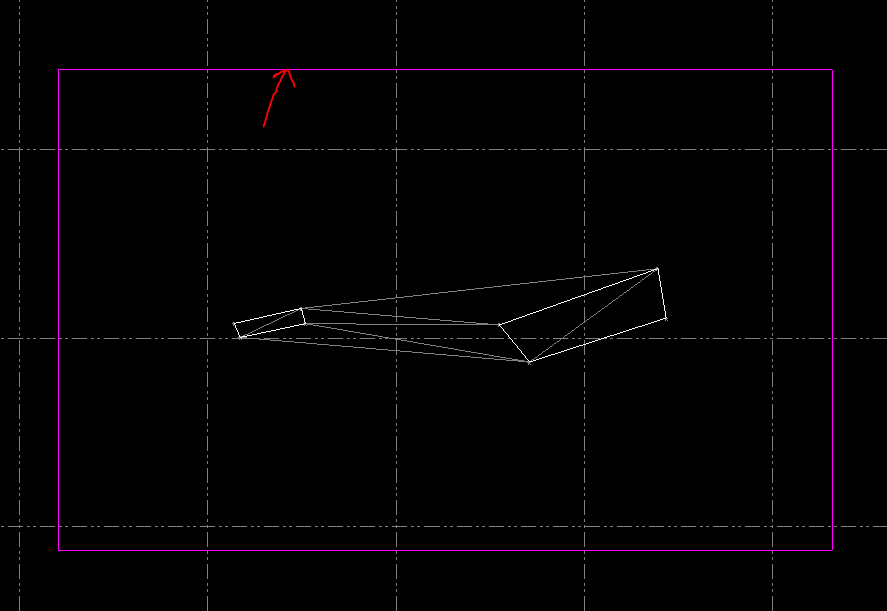
    Our designer provided a LandXML surface file for subsoil excavation with all areas in one file. I'm able to import it into TBC, and use the triangle option as per FDOT procedures, but TBC connects all of the areas with triangles to make one giant surface. The trim surface edges tool doesn't work. Explode surface doesn't seem to do anything. I am able to create a boundry around one of the areas, but then the rest of the surface disappears. I've searched all over and can't find a solution on how to break this surface up into multiple surfaces. Any help would be appreciated. The xml is attached if that helps.


    ------------------------------
    Scott Cavendish
    ------------------------------

    Attachment(s)

    xml
    AMG-3SURFACESE01.xml   6.29 MB 1 version


  • 2.  RE: How to split a surface into multiple surfaces

    Posted 11-21-2024 09:55
    One work-around could be:

    Since you've already imported it once, and created a boundary for one area...

    Import it again for the next area, and use a different boundary.

    Repeat for each area.

    You might have to change the file name for each import if TBC takes issue with using the same filename.

    This is less than ideal, but might help you in the short term.

    ~BC


  • 3.  RE: How to split a surface into multiple surfaces

    Posted 11-21-2024 09:58

    Import>delete surfaces>make new surfaces out of each area with the points>combine surfaces command


    ------------------------------
    Erik Petersen
    ------------------------------


  • 4.  RE: How to split a surface into multiple surfaces

    Posted 11-21-2024 10:25

    I'm not following your steps. I did get your email and it solved the issue, but I'd like to be able to do this myself. I don't see Import>Delete Surfaces option, and then I think you mean to select the points left over and create surfaces from that? So you imported as breaklines and points rather than triangles?


    ------------------------------
    Scott Cavendish
    ------------------------------


  • 5.  RE: How to split a surface into multiple surfaces

    Posted 11-21-2024 11:24
    1. Import the XML surfaces
    2. Delete the surface/s it generated after importing
    3. Make a new surface out of each region where the points are be selecting them, there's twelve regions, so that would be twelve different surfaces.
    4. Run the combine surfaces command, Name the surface and select all twelve surfaces that you generated in the previous step.

    So you imported as breaklines and points rather than triangles? Correct


    ------------------------------
    Erik Petersen
    ------------------------------


  • 6.  RE: How to split a surface into multiple surfaces

    Posted 11-21-2024 11:41

    Thanks for clarifying, I was able to reproduce. 


    ------------------------------
    Scott Cavendish
    ------------------------------


  • 7.  RE: How to split a surface into multiple surfaces

    Posted 11-21-2024 14:20

    You could also apply 12 area boundaries to one surface. If you do it one by one, most of the surface will disappear first, but should reappear if you add the next one. Adding a boundary doesn't remove the triangle data.

    Create inner border and cut off inner area | Trimble Business Center


    ------------------------------
    Ronny Schneider
    ------------------------------


  • 8.  RE: How to split a surface into multiple surfaces

    Posted 11-24-2024 13:51

    Scott, you can add an outer boundary to your surface, this can be a polygon that encompasses the surface. 

    Then add individual boundaries to each of the surfaces in the model.

    This will still be one single surface but the triangles will be limited to the internal boundaries that you have created.

    **Note that I have found instances on imported surfaces where the triangles will still spill out of the boundaries, the fix for this is to retriangulate in TBC.

    If you want individual surface for each then I would use command Offset Surface and offset by zero height using a clipping boundary.


    ------------------------------
    Clem Slatter
    ------------------------------


  • 9.  RE: How to split a surface into multiple surfaces

    Posted 11-24-2024 14:55

    The outer boundary is not necessary in this case. That's why I proposed to just add the 12 outlines of the single areas.


    ------------------------------
    Ronny Schneider
    ------------------------------


  • 10.  RE: How to split a surface into multiple surfaces

    Posted 11-24-2024 15:11

    Apologies Ronny, I must have missed your reply.

    There must have been a change along the way somewhere that I missed as I wasn't aware you could do this now without the outer boundary.


    ------------------------------
    Clem Slatter
    ------------------------------


  • 11.  RE: How to split a surface into multiple surfaces

    Posted 11-25-2024 02:02

    Not a problem. It's like this since quite a while. Just checked the old V4.12, I still have on my test machine, and it's the same there.

    You do need an outer boundary if you want to create a hole in a surface.

    Green lines are part of the surface (not added as boundary), blue lines are added as boundaries only.


    ------------------------------
    Ronny Schneider
    ------------------------------


  • 12.  RE: How to split a surface into multiple surfaces

    Posted 11-25-2024 08:07

    If you set all of the Linework sharpness to "Sharp and Texture Boundary" you can set a texture of "None" on the outside of the required area and all of the triangles not in the boundaries would disappear.


    ------------------------------
    Matthew Pitt
    ------------------------------


  • 13.  RE: How to split a surface into multiple surfaces

    Posted 11-26-2024 04:53

    Ronny and Matt are right.  the XML using the import function works well to bring in linework to reuse as surface lines.  The other option would be as Mat mentioned, in properties all of the linework, turn SURFACE SHARPNESS to sharp and texture boundary.  Then you can use a SITE IMPROVEMENT (which you dont need to build any improvement for this).  On this option you would have to make sure all lines are touching and no gaps.  you will get this affect *see below.

    option 3 would be to re-export as a DXF and re-import.  you will have all 3d lines from the surface just like a XML.  then recreate your surface


    ------------------------------
    Francisco Guerrero
    ------------------------------