Trimble Business Center

 View Only
Expand all | Collapse all

Most efficient way to create multiple points with station/offset

  • 1.  Most efficient way to create multiple points with station/offset

    Posted 01-22-2025 14:21

    Very often I have to create points that are listed in the plans as a station/offset table. Currently the only method I know how to create them is individually with the "create point from offset" command in the CAD tab. 

    This is a multi-step process for each point so it can get pretty tedious when I have hundreds of points to process. Is there a way to create multiple points simultaneously using a table?

    Thanks

    Chris


    ------------------------------
    Christopher Partridge
    ------------------------------


  • 2.  RE: Most efficient way to create multiple points with station/offset

    Posted 01-22-2025 15:42
    Edited by Ronny Schneider 01-23-2025 14:24

    There are at least two ways.

    One is built in, open the TBC help with F1 and search for "TBC Excel" (example here IMPORTING POINTS FORM EXCEL | Trimble Business Center)

    The problem with that one is that the elevation must be absolute, it can't be relative to a linestring, and it only works with Alignments and not with normal Linestrings. Afterwards you may have to elevate the points i.e. with a DTM.

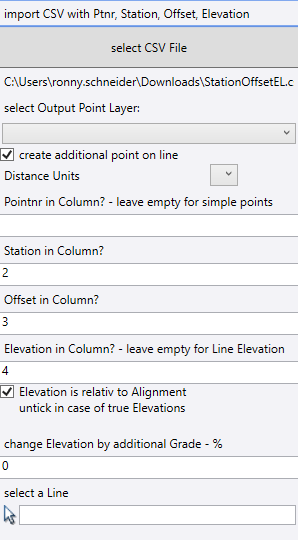
    My public macro collection (https://github.com/RonnySchneider/SCR_Macros_Public) does include a macro called "SCR_ImportStaOffEl" that allows the elevation to be absolute or relative to a line and doesn't necessarily need a point number column.

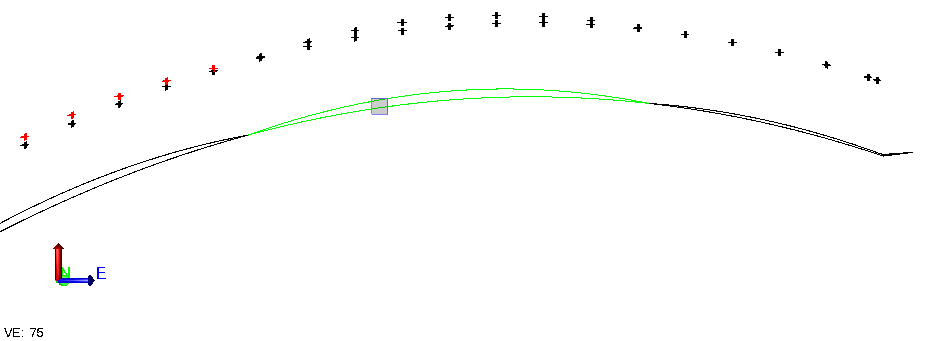
    If you tick the "relative" box but still enter a column for elevations than those values act as vertical offset from the reference line, i.e. different bolt projections. Had handrails/screens with different types of bolts/projections along the same reference line. In combination with my "SCR_AddHogToLine" macro you can quickly create bolt patterns with correct elevations for different construction stages, deck sag values.

    AnzToolbox has a similar macro to mine "Points from Chainage Offset", but at least the old version that I have only supports absolute elevations when using a CSV file, so not much better than the TBC Excel approach. At least you can define the order of the columns, like in my macro.

    RPS might have something similar as well.


    ------------------------------
    Ronny Schneider
    ------------------------------


  • 3.  RE: Most efficient way to create multiple points with station/offset

    Posted 01-23-2025 08:34

    Thank you Ronny.


    ------------------------------
    Christopher Partridge
    ------------------------------


  • 4.  RE: Most efficient way to create multiple points with station/offset

    Posted 01-23-2025 13:18

    Ronny, is your tool dependent on the source line?

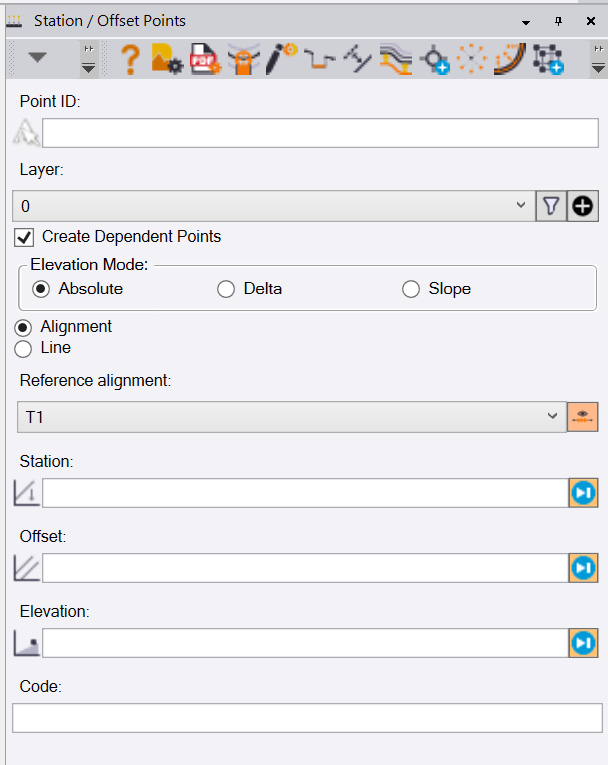
    RPS took over the Trimble Station / Offset Points sample macro command, and it does allow for delta elevations as well as dependency to the source object - however only in the horizontal. I want vertical dependence...


    ------------------------------
    Nelson Hays
    ------------------------------


  • 5.  RE: Most efficient way to create multiple points with station/offset

    Posted 01-23-2025 14:23
    Edited by Ronny Schneider 01-23-2025 15:07

    My tool doesn't create dependent points, the points won't move if you move the line. I never needed that myself, and I always prefer simple CAD points that don't have a name/number and won't show in the project explorer. I always leave the number-column-field empty when I run my macro.

    But they'll receive the line's position and elevation, or with an added horizontal/vertical offset.

    The big advantage over the "TBC Excel" approach is that you don't need an Alignment, it works with any Line.

    I had a brief look in the SDK and it seems fairly simple to implement the creation of dependent points with Station/Offset and deltaElevation in the near future.

    The Trimble.Vce.Alignment.LocationComputer.DependentPoint is what the TBC-"Create Dependent Point" creates and that one is a simple CAD point as well. And specifically has the option for deltaElevation from the source line.

    Are you positive that the RPS macro doesn't create vertical dependent points if you set "elevation mode" to "delta"?

    Haven't updated RPS in ages, and their webpage recently always wants your contact details when you just want to see the tools list. The tools list and what is free and what is to pay for isn't as clear as it used to be on older versions of their webpage. Is that one for free or is it one of the paid ones? 


    ------------------------------
    Ronny Schneider
    ------------------------------


  • 6.  RE: Most efficient way to create multiple points with station/offset

    Posted 01-30-2025 11:45

    Hey Ronny, I just tested the RPS Station / Offset Points command again to confirm nothing has been updated. The Horizontal component is dependent on the source line/alignment, but the vertical delta is not.


    ------------------------------
    Nelson Hays
    ------------------------------


  • 7.  RE: Most efficient way to create multiple points with station/offset

    Posted 01-30-2025 14:07

    That's surprising.

    I've updated my public GitHub repo the other night (https://github.com/RonnySchneider/SCR_Macros_Public). It includes the latest version of my "SCR_ImportStaOffEl". It now has an option to create dependent points, and in this case they're always dependent in station/offset/delta elevation. Potentially I could add another tickbox to make the "RPS mode" available as well, don't really see the point though.


    ------------------------------
    Ronny Schneider
    ------------------------------


  • 8.  RE: Most efficient way to create multiple points with station/offset

    Posted 01-24-2025 11:25
    Edited by Ed Levandoski 01-24-2025 11:27

    Here's a video I made using the excel spreadsheet method

    https://youtu.be/acPnEjJrULU?si=6eSROFhqPX1uwEVh


    ------------------------------
    Ed Levandoski
    ------------------------------


  • 9.  RE: Most efficient way to create multiple points with station/offset

    Posted 01-28-2025 12:22

    TBC has another tool called "create dependent point".  The only bad thing about this is that you have to name each point manually.


    ------------------------------
    Francisco Guerrero
    ------------------------------


  • 10.  RE: Most efficient way to create multiple points with station/offset

    Posted 01-28-2025 14:32

    You're correct, the "create dependent point" tool does exactly what he asks for, but he asked for an "efficient way".

    And since this tool is unfortunately incrementing the first number in a point name it's rather cumbersome to use. It's the same crap as with "create point" and at least one more command, and I have complained to our dealer several times about it, but Trimble doesn't care.

    Plus, you'll have to enter every station/offset/dh by hand. Totally inadequate if you need to enter hundreds of bolts. You do this kind of thing in Excel where you setup the assembly spacing, offset, dh and first interval along the line with some formulas and then it's just a matter of dragging/copying the cells, and you're done.

    "TBC Excel" is inconvenient, since it needs alignments, it doesn't work with normal lines and only supports absolute elevations.

    "Create dependent points" by hand is totally out of the question since it involves way too much manual entering.

    I've updated my Import macro with an option to create dependent points (horizontal and vertical) as well. I'll do some final testing today and probably release a new GitHub repo tonight.


    ------------------------------
    Ronny Schneider
    ------------------------------


  • 11.  RE: Most efficient way to create multiple points with station/offset

    Posted 01-30-2025 14:13

    i have missed on how to install these macros from Ronny.  Where can I find instructions to install the macro?


    ------------------------------
    Francisco Guerrero
    ------------------------------


  • 12.  RE: Most efficient way to create multiple points with station/offset

    Posted 01-30-2025 16:12

    If you scroll a bit down on that Github page you'll find a section "Installation", with screenshots on how the folder structure needs to look like.

    You basically only have to unzip the archive into the correct folder on your machine.

    And make sure that the whole folder with subfolders has write rights. This is an issue since V5.90, Trimble does write protect that folder each time you install a new TBC version, total nonsense.


    ------------------------------
    Ronny Schneider
    ------------------------------