I totally agree. My solution is definitely not suitable for you.
It re-enables the scanning workflows but all scanning needs to be re-imported and processed.
In my case that was OK since I only had one single PTS file in it.
For me the alternative would have been to export all the drawing entities as VCL and re-import into an empty project.
And that's something I don't like at all. You lose your import history that way. You can't just easily see what's been imported or right-click and "select members" on a file anymore. I'd have to create lots of selection sets to achieve the same.
A while ago I've been poking around in those database files with DBeaver and HeidiSQL but so far I haven't really found a match. Some showed that they're SQLite but not much in them. And once you get to the rwcx files nothing really fits, must be some proprietary Trimble database.
The big mystery is how everything is intertwined and how the containers in TBC are connected to the database files and where the corruption happens. That's exactly what I meant when we just recently had the discussion in the Macro forum with Bryce about retrieving point data from the database. It's all undocumented, non-human readable, proprietary ......
Original Message:
Sent: 04-23-2026 00:36
From: Fernando Calvo
Subject: Point cloud no longer visible after black screen due to NVIDIA issue - After restarting TBC getting "Scanning workflows are unavailable"
Hi Ronny,
thanks for your message.
I already tried this as you proposed last week but in my case it didn´t work for some reason, but anyway my issue is that I have hundreds of .tzf´s and not generic point clouds, which is easier to import as a "whole" instead of individual scans that TBC interpretes as Trimble scan stations and changes whatever, moves and rotates them, and in many cases i.e. if you try to simply move and rotate your whole scans to the project placement and orientation, each individual scan station is differently rotated and even tilted (I never understood why and how and nobody at Trimble was able to give me a solution).
So at least I find the workaround as mentioned above via SdeDatabase.sdb --> TDX --> TRW
Thanks.
Regards,
Fernando
------------------------------
Fernando Calvo
calvo@calvo-geospatial.com
------------------------------
Original Message:
Sent: 04-20-2026 17:57
From: Ronny Schneider
Subject: Point cloud no longer visible after black screen due to NVIDIA issue - After restarting TBC getting "Scanning workflows are unavailable"
By chance I hit the same error with 2025.10 yesterday. Don't know how it happened, don't recall a crash and no major data involved as in your case.
At some point I had a small cloud portion imported as PTS file, just a few trees for visualisation. That was the only cloud region in this project.
Didn't have the cloud enabled in a while but tried the other day. Wouldn't show, but the region said it's 2 million points. Since it was the only cloud I just deleted the import file and tried reimporting it.
Only at the end of the import it showed me the Scanning Workflows not available error, the project was broken for use with point cloud data.
I managed to repair it the following way.
# must use the Disable; manually deleting the PointCloudDatabase from its conatiner with remove is not enough# only Disable removes everything that would prevent to re-enable the Workflows tt = ScanningWorkflows.Disable(self.currentProject) if not ScanningWorkflows.Enabled(self.currentProject): tt = ScanningWorkflows.Enable(self.currentProject) tt.Connect()
Afterwards I was able to reimport the PTS file.
------------------------------
Ronny Schneider
Original Message:
Sent: 04-19-2026 09:01
From: Fernando Calvo
Subject: Point cloud no longer visible after black screen due to NVIDIA issue - After restarting TBC getting "Scanning workflows are unavailable"
Hi Paul,
unfortunately, I got the answer from a TBC developer, that my proposed solution via programming and accessing each scan station and re-assign the correct position and orientation would not be possible.
It´s a petty, as I can indeed access to the scan stations programmatically as they are still there but the "scanning workflows" and the "database integration" is lost.
I tried over a couple of days many different ways even something that I didn´t know so far: If you zip a VCE file and you open the zip, you access several files inside it and one of them is the ObjectData file containing all database connections, GUID´s, etc, but I tried many different options without success.
The good news is that I was finally able (after several days trying everything but anyway quicker than if I had to re-register the whole project with 1000 scans from many days and many manual registering needed) to recover my project doing Trick number 99999... :-)
I picked the SdeDatabase.sdb contained on the subfolder with the same name as your VCE from an older security copy of the whole project and replaced it onto the corrupted project.
After that, if you open the VCE (the theoretically corrupted one), you can pick the scan stations and no longer get the error message "scanning workflows not available" and you can even see under properties that the scan station has X million points.
You don´t see the point clouds though, but I tried to export then the whole project (as it contains all scans positions and orientations, although many of them were not added to the project yet when the SdeDatabase.sdb was created) to TDX, so it worked as the Scanning Workflows were then available again.
Then, I imported the TDX into Realworks, which apparently re-creates a proper database again and keeps the scan stations positions and orientations, so it looked pretty good there and I needed to create the sampled point clouds again but it was fine and just took a few minutes.
So I finally have my whole project back in Realworks and if needed, I can export again to TDX and import it onto TBC again, however I`m doing a few things directly in Realworks as creating orthophotos from the point cloud for the whole facades so I can draw them in CAD.
I hope this also helps some of you who experienced similar issues.
Regards,
Fernando
------------------------------
Fernando Calvo
calvo@calvo-geospatial.com
Original Message:
Sent: 04-18-2026 23:29
From: Paul Miller
Subject: Point cloud no longer visible after black screen due to NVIDIA issue - After restarting TBC getting "Scanning workflows are unavailable"
I've had the same issue after a few crashes resulting from insufficient storage. I've resolved the storage issue but am getting the same error message and I can see that the .tzf and .rcwx files are still there in the project folder.
Hopefully Trimble come back with a solution. It seems like there is a broken link somewhere.
------------------------------
Paul Miller
Original Message:
Sent: 04-14-2026 22:49
From: Fernando Calvo
Subject: Point cloud no longer visible after black screen due to NVIDIA issue - After restarting TBC getting "Scanning workflows are unavailable"
Hi Ronny,
thanks again for your proposals and ideas !
I try many of these things without success, unfortunately, so before trying more and more hours it would be highly appreciated if anyone at Trimble could confirm if it is basically possible or not to recover this, before spending days while Trimble knows that it is not possible to recover.
It´s really difficult to believe that it cannot be recovered, at least programmatically, as all the objects are still in the project, but the links to the .tzf´s and/or .rwcx and/or .sdb etc seem to be lost. However it should be possible to re-establish it somehow.
@Bryce Haire : Could you please advise if it could be possible or not?
Thanks a lot.
Regards,
Fernando
------------------------------
Fernando Calvo
calvo@calvo-geospatial.com
Original Message:
Sent: 04-13-2026 15:19
From: Ronny Schneider
Subject: Point cloud no longer visible after black screen due to NVIDIA issue - After restarting TBC getting "Scanning workflows are unavailable"
Hi Fernando,
I asked the chatbot to go through Trimble.Vce.Data.Scanning and propose fixes.
See attached. If this will help is of course unclear but worth a shot. Try on a full copy.
I did run a test with ScanningWorkflows.Disable(self.currentProject); that removes all regions and stations from the project containers, which seems to make it impossible to retrieve anything.
Are you still seeing regions and stations in the project explorer or with the "View Project Data" macro?
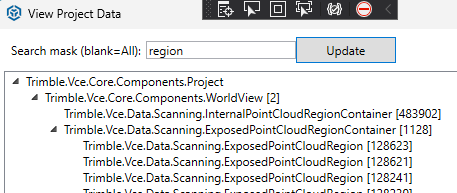
A ScanningWorkflows.Enabled(self.currentProject) does always create a new database, there is no way to point it to an existing one. In case you still see regions and stations in your project, I wonder what happens if you run a ScanningWorkflows.Enable(self.currentProject), save and close the project and then overwrite the new database with the old one, including some file renaming.
------------------------------
Ronny Schneider
Original Message:
Sent: 04-13-2026 07:27
From: Fernando Calvo
Subject: Point cloud no longer visible after black screen due to NVIDIA issue - After restarting TBC getting "Scanning workflows are unavailable"
BTW we also use Realworks and there is an option there to re-define the paths to the TZF files, however we cannot export the current status of this TBC project to TDX to later on import it onto Realworks, because the scans are not recognized and if we import just the TZF´s into Realworks, their current position and orientation in the TBC project is not kept, so they are placed to the original position and orientation as they came from Perspective
However if anyone knows a way to bring the TBC project to Realworks and there use any function to relink the point clouds or scans, it would be also highly appreciated
Thanks a lot !
------------------------------
Fernando Calvo
calvo@calvo-geospatial.com
Original Message:
Sent: 04-13-2026 02:33
From: Fernando Calvo
Subject: Point cloud no longer visible after black screen due to NVIDIA issue - After restarting TBC getting "Scanning workflows are unavailable"
Hi Ian,
thanks for your new suggestions ;-)
Yes, I already tried the lock and ~ files, changing the path, trying from other laptops with other graphic cards etc without success.
As I´m a TBC 3rd party developer, I tried even to access to the point cloud database but I get an error:
Additionally, trying to access to the point cloud via macro programming, I get the error message "The integration is not connected":
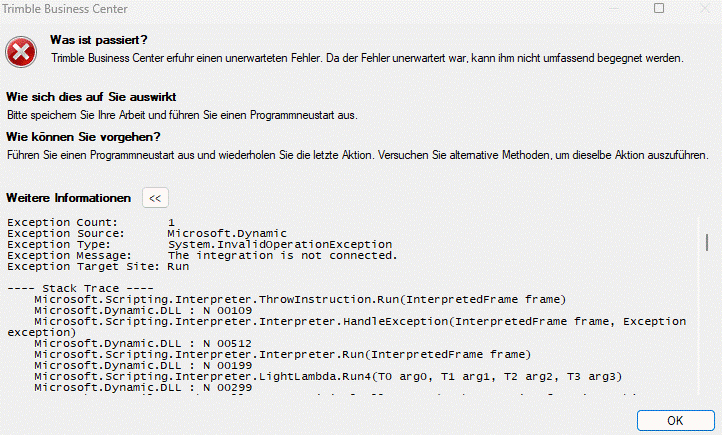
So Trimble could check if there is a way to try to recover the Integration, which is a part of the point cloud data base:
public Trimble.Vce.Interfaces.PointCloudIntegration.IPointCloudDatabaseIntegration Integration { get; }
Member von Trimble.Vce.Data.Scanning.PointCloudDatabase
@Bryce Haire: Do you have any guess why it could happen or if Trimble or even myself via TML could relink the apparently lost path connections?
Thanks a lot
------------------------------
Fernando Calvo
calvo@calvo-geospatial.com
Original Message:
Sent: 04-11-2026 13:26
From: ian bissonnette
Subject: Point cloud no longer visible after black screen due to NVIDIA issue - After restarting TBC getting "Scanning workflows are unavailable"
hummm. big bummer. you seem to have way more experience than me, so hopefully others will try to help too.
no backups on your system?? we were just dealing with our cloud provider and we subscribe to a service with 3 times daily backups and options for rollbacks, but likely not the case if you are on your local drives.
do you have the backup lock file with '~' extension and what size is that. typically it seems to be a copy of the main project, but sometimes i see the size is different. did you try copying it and remove the lock symbol and open that file? maybe others can also chime in here about this file and any risks playing around with it. but making a copy of it first might give you something.
other post in the past have questioned tbc auto save and backup systems. i would like to say again that this is critical for any project and the norm for most autocad programs. tbc neeeeeeeeds to have these options. no excuses.
------------------------------
ian bissonnette
Original Message:
Sent: 04-11-2026 11:46
From: Fernando Calvo
Subject: Point cloud no longer visible after black screen due to NVIDIA issue - After restarting TBC getting "Scanning workflows are unavailable"
Hi Ian,
thanks for your reply and recommendations.
We work exclusively on local SSD hard drives. In my case I have 2x 2 TB SSD hard drives.
I have also experienced many issues with visualization of point clouds inside TBC and i.e. pretty often, the point cloud is suddenly poorly shown and you need to select the point cloud regionfrom the project explorer and right mouse key --> Show all points, and then you see the point cloud fine again.
Also sometimes as you describe, the point cloud is not visible on one plan view for example, but visible in other views with the same view filter, which is really strange, and in some cases the only way to solve this is to open a new plan view, choose the same view filter, and then close the original one.
Anyway nothing to do with this new big issue for us, as the project has around 750 scan stations and over 20 different selection groups over 4 different buildings of the same complex, so it would be extremely tedious to import all scans again and start grouping each station to each selection set, etc.
Furthermore, I´ve never been able to properly re-import into a new project the scans (.tzf) or processed scans (.rwcx) keeping the same position and orientation as the ones exisiting in the original project. It always take the original position and orientation as they come from the field via the .tdx + .tzf´s, while many of them are later better registered, adjusted and refined, so their positions and orientations change but no way to get this onto a new project.
In this case, I cannot even export the whole project as .tdx and re-import, as no scans are exported as the apparently corrupted project does not recognize the scan stations although they are there and linked to their respective .tzf´s or .rwcx or whatever.
So unfortunately a serious issue for us now and waiting for the feedback from our local Trimble reseller, which forwared our case including .vce etc to Trimble.
Regards,
Fernando
------------------------------
Fernando Calvo
calvo@calvo-geospatial.com
Original Message:
Sent: 04-11-2026 09:52
From: ian bissonnette
Subject: Point cloud no longer visible after black screen due to NVIDIA issue - After restarting TBC getting "Scanning workflows are unavailable"
curious where the project is saved. is it on your c? could the directories have gotten changed on a cloud drive?
i have not seen this exact error. but we have several projects that sometimes glitch out where they have large uav point clouds. yesterday i could see the cloud then zoom in and it would disappear. we are on one drive and i suspect that might be some of the problem, but not certain, and even if it is then trimble needs to get it under control. and have options to relink the path if needed.
i m leaning towards having the option to save clouds to the project setting turned on, but hesitate because i don t want to waste the time (if it takes time to save them) and double the large storage files. i have a feeling this would help. any chance those raw file directories got moved around?
do you have any archives.
------------------------------
ian bissonnette