Trimble Business Center

 View Only
Expand all | Collapse all

Printing settings

  • 1.  Printing settings

    Posted 06-20-2022 04:24
    where can I change the plot settings for printing

    If I want to plot in black and white can I change it?
    mvh Linus

    ------------------------------
    Linus Nilsson
    ------------------------------


  • 2.  RE: Printing settings

    Posted 06-20-2022 06:25
    Unless they has been a recent change.  You can not print in black and white.  I heard there was suppose to a option for this and hav3 yet to see it.  Best bet is to save and the change your draft work to white or black.  You could also after printing the plot,  open in Adobe and do a save as I think and you have an option for save in black and white.

    ------------------------------
    Francisco Guerrero
    ------------------------------


  • 3.  RE: Printing settings

    Posted 06-21-2022 22:38
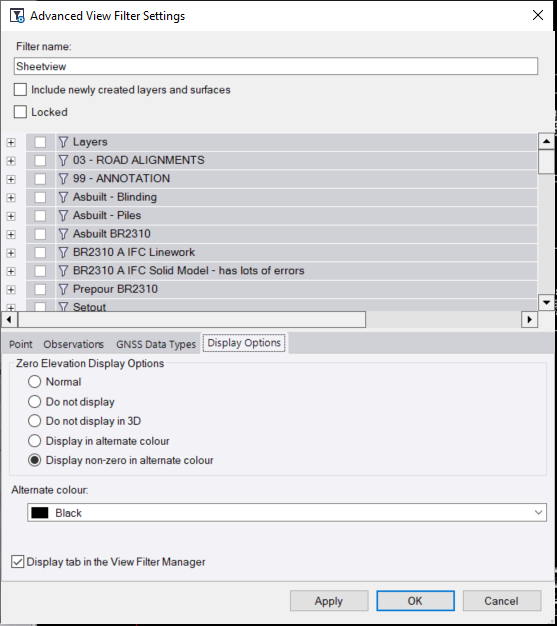
    Not sure how you've setup your Viewfilters. I've got one that is specifically for the Sheetview, that includes a layer where I put all my Dynaviews and it is usually locked.
    The Dynaviews then have their own Viewfilter.
    If you've got a similar setup you can try to go to the Advanced View Filter Settings for the Sheetview. Under Display Options set the following. It depends on your data having an elevation.

    ------------------------------
    Ronny Schneider
    ------------------------------


  • 4.  RE: Printing settings

    Posted 06-22-2022 05:10
    I had forgotten that you can go make a copy of your VIEW FILTER and within that view filter go to ADVANCE FILTER SETTING (see above) you can change your layer color by opening the group where the layer is(from wathcing one of RPS classes and Alan recent post on this topic in their forum).  from there just change the color to white.  IT would be so simple if there was a black/white print option.  here is my screen shot test. 


    ------------------------------
    Francisco Guerrero
    ------------------------------