Trimble Business Center

 View Only
Expand all | Collapse all

Remaining scan data missing after Random subsampling

  • 1.  Remaining scan data missing after Random subsampling

    Posted 12-20-2020 16:05
      |   view attached

    This is a project that I finished about a month ago, I had been messing around trying different subsampling for surface generation.

    I just opened the project in TBC 5.4 to export some Structured Scan Data when I realized my ground data is very sparse, I have one region with 0.30 subsampling and I have another with just under 1% of ground points (Random Sample).

    All regions and scans are loaded and I have used restore Restore All command. 

    The Ground region should contain the remaining points, in the areas I used the Random Sampling there are no additional points.

    Any suggestion as to how I recover / restore the missing cloud data?

    Can scan data be deleted? I thought it could only be reorganized. 


    ------------------------------
    John Whidden
    ------------------------------


  • 2.  RE: Remaining scan data missing after Random subsampling

    Posted 01-25-2022 13:47
    I think I have had similar issues with scan data disappearing. If you select the region and look at the properties does it say points zero? See the pic below. I have created surfaces from scan data and the surfaces are still there but the scan data is gone that created it. 
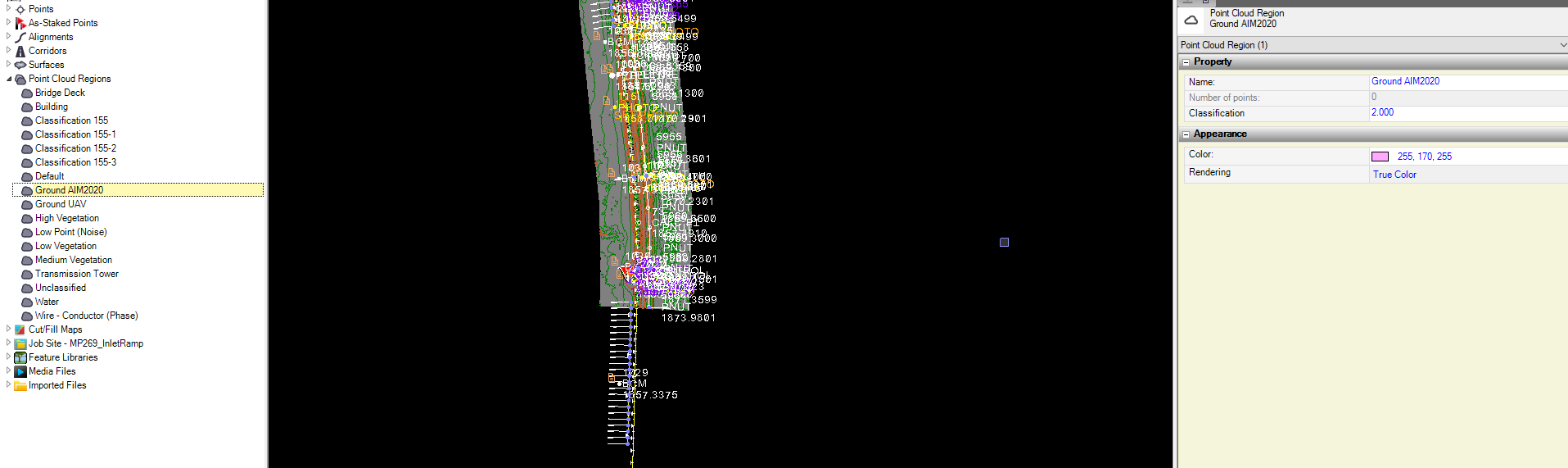


    ------------------------------
    Sean Lahann, PLS
    Phoenix, Arizona
    ------------------------------


  • 3.  RE: Remaining scan data missing after Random subsampling

    Posted 01-26-2022 11:19
    Sean

    I have encountered 2 different sets of conditions that have caused point cloud points to be missing:

    1. In the project folder there is a "SdeDatabase.rwi file that contains a .rwcx file for each scan, I have had these go missing a few times, not sure why.
        The solution I used is to reprocess the scan files in a fresh project and copy the files from the new "SdeDatabase.rwi file to replace the missing files.
         As a preventive measure you can keep an extra copy of this file in your job.

    2. The other time I have had points missing is when a point cloud region was accidentally deleted along with other features.
        The solution is to select the point cloud on the default region, right click and select "Get All Points or Get Unused Points", this will restore the missing points to the default layer.

    Hope this helps

    ------------------------------
    John Whidden
    ------------------------------


  • 4.  RE: Remaining scan data missing after Random subsampling

    Posted 02-11-2022 21:43
    Thank you John, you just have saved me 5 days of hard work! The second option  worked perfect to recover a  vanished region (my main one!)

    ------------------------------
    Jaime Ayala_Torres
    ------------------------------


  • 5.  RE: Remaining scan data missing after Random subsampling

    Posted 02-12-2022 05:22
    Thank you for letting me know.
    Cheers 


  • 6.  RE: Remaining scan data missing after Random subsampling

    Posted 02-14-2022 13:26
    John, 

    Thanks for the information, sorry for the delayed response. I'll have to see if I can get #1 work on my project. I do not think #2 applies in my situation.

    Sean
    ​​

    ------------------------------
    Sean Lahann, PLS
    Phoenix, Arizona
    ------------------------------


  • 7.  RE: Remaining scan data missing after Random subsampling

    Posted 08-05-2024 06:33

    I've had a bug where my "Default" region has deleted/disappeared, does anyone know if there's a way of using the "Get all Points" command without the default region?


    ------------------------------
    Lachlan Pagan
    ------------------------------


  • 8.  RE: Remaining scan data missing after Random subsampling

    Posted 08-05-2024 07:35
      |   view attached
    Lochlan

    Go to the "Project Explorer" tab (see screen shot), look in the "Point Cloud Regions", if the "Default Region" is there, right click and select "Get All Unused Points" or "Get All Points".

    If the Default region is not listed, try importing another scan. That should restore the "Default Region". 

    JOHN WHIDDEN


    The information in this e-mail and attachments are privileged and confidential. It is intended only for the use of the individual(s) to whom it is addressed and any other distribution, copying, or disclosure is strictly prohibited. If you have received this communication in error please notify us immediately by telephone or reply by e-mail to the sender. Thank you for your cooperation.