Trimble Business Center

 View Only
Expand all | Collapse all

Renaming a surface in import

  • 1.  Renaming a surface in import

    Posted 07-11-2022 04:13

    Hi!

    I would like to know that is there a way to import same surface (LandXML) more than two times 

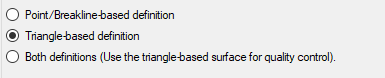
    in TBC? I can import it first with "Triangle-based definition" and second time with

    "Bot definitions (Use...)". If I try to import same surface again it won't import (because there are 

    already surface with a same name). I and our customers have to modify .LandXML file in notepad to change the surface name.  
    It would be handy if there was some kind of notification 

    "Surface with a same name already exist. Do you want to rename

    imported surface?" 

    Or is there that kind of import-option for LandXML already?

    Thank you!


    ------------------------------
    Antti Niittyoja
    ------------------------------


  • 2.  RE: Renaming a surface in import

    Posted 07-11-2022 08:20
    Why are you trying to bring in the data twice? If you can share what you're trying to accomplish, I can share the correct workflow for that. Likely, all you will need is to use the "Both" option first rather than the "Triangle-based" option.

    Charlie Sorg | He/Him
    Product Owner, Trimble Business Center
    Civil Construction Software


    Remote, GA
    United States
    +1 (303) 635-8230 Direct
    +1 (720) 737-6437 Mobile

     NASDAQ


  • 3.  RE: Renaming a surface in import

    Posted 07-11-2022 22:14

    Hi Charlie!

    Thank you for your reply. 

    Our customer said that they would like to create different versions of the same surface. 

    They work with one surface and modify it. After some time they want to "reset" and start 

    over with the original surface. 

    Another reason is LandXML files with wrong naming (same name for two different LandXML-surfaces.

    I can send you those two LandXML surfaces as an example. 

    Cheers!


    ------------------------------
    Antti Niittyoja
    ------------------------------


  • 4.  RE: Renaming a surface in import

    Posted 07-14-2022 13:33
    Antti,

    All of this is easily solved. My suggestion is to import the file, rename the surface to something like K1 - Original. Then reimport the file and rename it something like K1 - Edit.

    Hope this helps!

    ------------------------------
    Charlie Sorg
    TBC Product Owner, CIS
    ------------------------------