You've set every single segment to smooth curve. Then the first image is the expected outcome, always.
I use smoothed curves a lot for access ramp modelling. The shape of a curved segment is determined by the incoming angle of the previous segment and outgoing/next segment. Moving a vertex around will change the shape of 4 adjacent segments, as shown below.
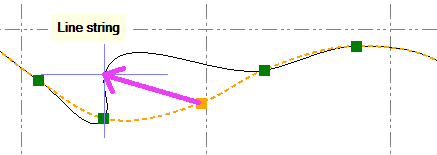
From my understanding it must do an iterative adjustment over all segments to compute a near zero change of direction at each vertex. Changing all segments of a line with hundredth of nodes to smooth (I've got a macro for this) takes quite some time to re-compute.
In your case you'll have to break the line at that sharp corner or set one of those segments to straight (which you probably don't want).
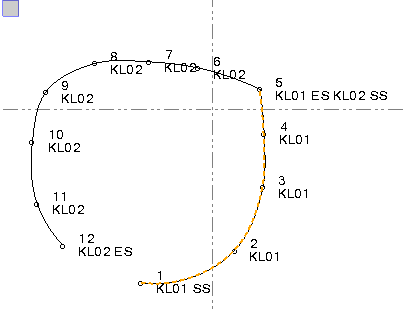
You'll probably have to add an end line, start new line code. The line must not be continuous.
If you double code the point at the tip it will start a new line but will also use it for the previous one.
SS - start smooth
ES - end smooth
KL - a line code
------------------------------
Ronny Schneider
------------------------------