I did not understand correctly the idea of your statement that my lines contains two components: Now I know that you meant horizontal coordinates in a local datum as ONE component and the other one is GLOBAL ellipsoid height.
Original Message:
Sent: 04-22-2026 15:23
From: Ronny Schneider
Subject: TBC v2025.21 import problem
The on/off toggle only needs to happen one single time, then save the template. Afterwards it will always work.
A feature code will be associated to the point itself, not the single coordinates.
I don't know how I can make it any clearer than in my screen shots.
Grid and Global are two different things and need to be kept separated. Due to the coordinate systems projection and associated datum definition it's then possible to convert between the two.
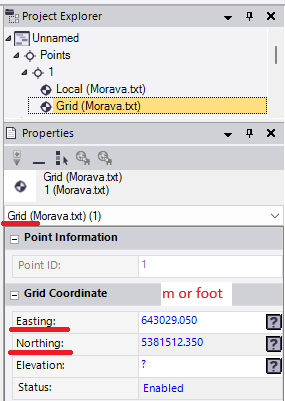
Grid uses a square pattern based on a point where the grid plane touches the ellipsoid, using linear dimensions, m / foot. Elevation square to this plane.
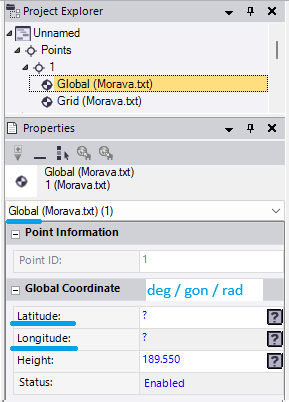
Local and Global use angular dimensions based on the ellipsoid center, degrees / gon / radians. Elevation square to the ellipsoid.
In your case, using UTM, Global and Local are identical, same ellipsoid without any datum difference. You could also define the last column as "Local - Ellipsoid Heights"
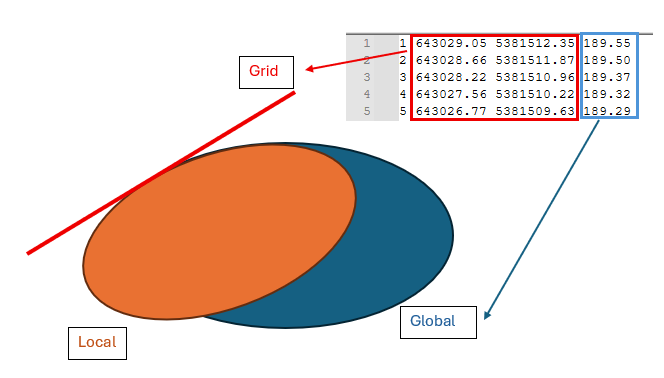
A Grid (plan / plane / flat) X/Y location
and a Global ellipsoid height
------------------------------
Ronny Schneider
------------------------------
Original Message:
Sent: 04-22-2026 06:59
From: Martin Kalafut
Subject: TBC v2025.21 import problem
Ronny,
huge thanks for your help!
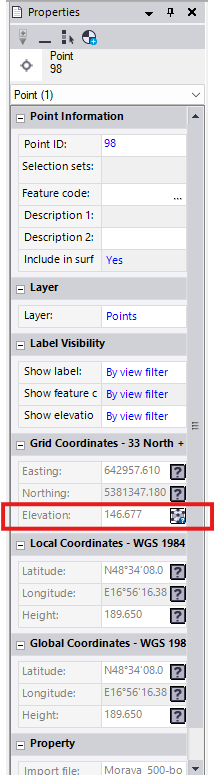
Now it seems - it works when I once toggle ON/OFF BEFORE import starts

Then, even when I have a question mark for the option Start undefined ID numbering
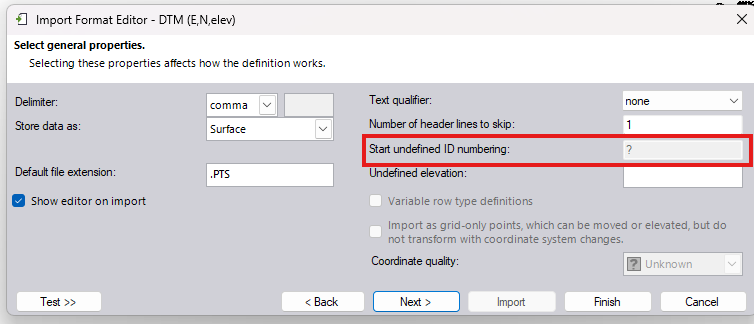
the import works:
So, to summarize it - in the importer are two problems for the moment (TBC v2025.21 - latest version):
- the limit of the imported points MUST NOT exceed 500 points per file
- it is necessary BEFORE import to toggle ON/OFF once for the option Import as grid-only .... points
Of coarse, fur such "Field to Finish" software package, it is a basic unresolved problem what is (when I use very mild/diplomatic words) fathomless. Both limitations must be removed NOW (as a patch), not in an open-ended and undefined future release.
Still, I need one clarification, so if would you be so kind and answered me:
You wrote: "That "merging" is necessary since each line in your file contains two components."
I do NOT understand it! Up to now, I thought that when I have a line containing PointID, EASTING, NORTHING, Elevation/Height then the point is strictly defined as a whole and as such it is ONE component.
Where in the line containing PointID, EASTING, NORTHING, Elevation/Height are TWO components?
What is ONE component (horizontal coordinates EASTING/NORTHING) and the second component is ELEVATION/HEIGHT?
And what then, when I add to the line Feature Code, Attributes? Then, how many components has such line?
Thanks in advance for your clarification!
Best wishes!
------------------------------
Martin Kalafut
Original Message:
Sent: 04-21-2026 20:42
From: Ronny Schneider
Subject: TBC v2025.21 import problem
This is buggy as hell. Kept playing around with it during my lunch break. Currently I'm at a point again where it won't work.
I found it. See my above comments.

------------------------------
Ronny Schneider
Original Message:
Sent: 04-21-2026 15:43
From: Ronny Schneider
Subject: TBC v2025.21 import problem
Coming back to work trying it on my machine with the old version I ran into the same issue.
There is another bug. Even though you have point numbers in your import file you MUST set a start for undefined ID in the import format editor, any number will do, just don't leave a question mark.
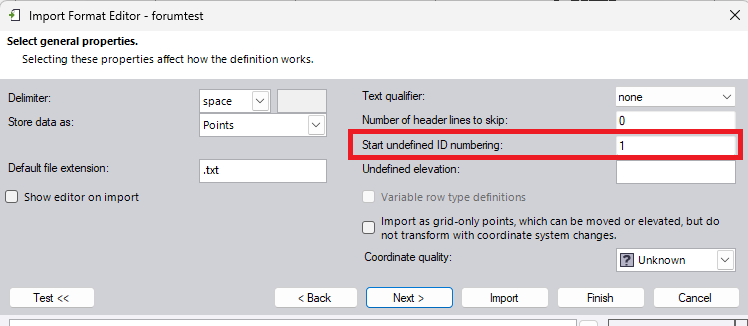
To get the import working:
- no more than 500 lines at once
- must have point ID's in the import file
- must set any number to handle undefined ones; even though there aren't any
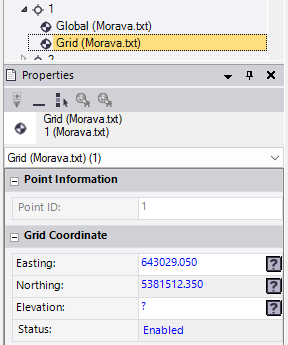
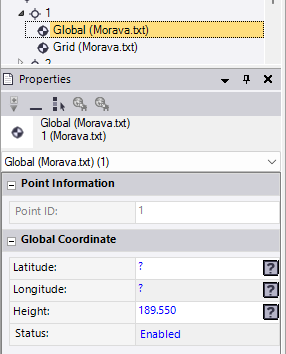
That "merging" is necessary since each line in your file contains two components. In my opinion the merging dialog is superfluous in this case and shouldn't be triggered if the data is coming from the same line in the import file, just merge.
If the data would come from different lines in the file, I can understand the need for a merge dialog. You could have two lines with the same point number in your file, potentially hundreds of meters apart. In that case you want to see a comparison and option to either merge or handle as separate points with the same name.
A Grid X/Y location
and a Global ellipsoid height
------------------------------
Ronny Schneider
Original Message:
Sent: 04-21-2026 06:30
From: Martin Kalafut
Subject: TBC v2025.21 import problem
Ronny,
Many thanks! However, I still have the problem!
First - a question:
I divided the TXT file originally containing 999 points to two separate TXT file, first one containing points and the second one containing 499 points.
I run the import with my template 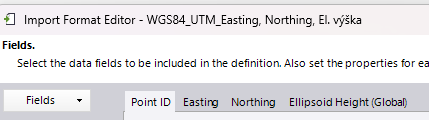
and before the import happened I got the following dialog:
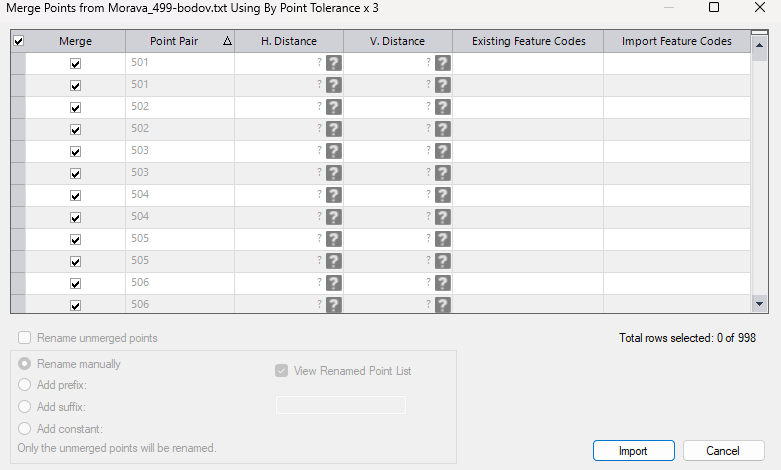
QUESTION: WHY I get such info?
The input TXT file contains strictly defined points with X,Y, Ellipsoid height data. What is here to merge? I do not have DUPLICATE points.
And now after pressing the Import button in the above illustrated dialog (i fact, there is no other option, all other options are greyed out, inactive), the import finishes. When I select a point and see its properties, there is NO change in the point data - ellipsoid height is missing (for ALLL points):
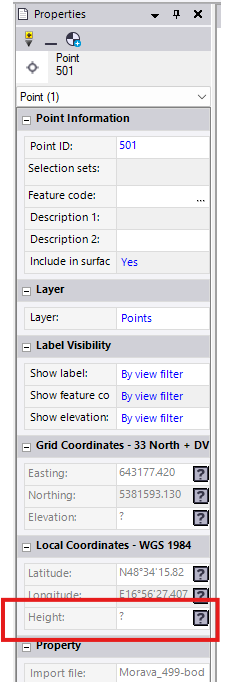
I have NO explanation for it!.
------------------------------
Martin Kalafut
Original Message:
Sent: 04-21-2026 03:49
From: Ronny Schneider
Subject: TBC v2025.21 import problem
It's a bug in the importer, triggered by the amount of your points.
In my video you see this window for merging popping up. That merges the grid x/y component and the global ellipsoid component into one single point.
This window seems to be limited to exactly 1000 lines. With your nearly 1000 points that window would need to show nearly 2000 lines.
But instead of showing an error message, it doesn't show the window at all and simply imports everything as grid only points.
If you import your points in chunks of no more than exactly 500 lines it works. See attached quick export as CSV.
------------------------------
Ronny Schneider
Original Message:
Sent: 04-21-2026 03:27
From: Martin Kalafut
Subject: TBC v2025.21 import problem
attached is my TXT file (999 points, CS: UTM33N, format: Point ID (added by me), EASTING, NORTHING (both in meters), Global Ellipsoid Height (in meters), code page UTF-8 BOM
------------------------------
Martin Kalafut
Original Message:
Sent: 04-21-2026 03:19
From: Ronny Schneider
Subject: TBC v2025.21 import problem
Really weird, works for me when using point numbers in the txt file. Using 2025.21. See attached video.
And you shouldn't have to wait with the Geoid selection till after the import.
Can you send me your text file. Just want to see if there is something funny happening with the encoding, but I don't think so.
------------------------------
Ronny Schneider
Original Message:
Sent: 04-21-2026 02:48
From: Martin Kalafut
Subject: TBC v2025.21 import problem
Sorry, I mixed up the version with Trimble Access which is 2025.23. Yes, I have TBC 2025.21.
And YES, I have unchecked the box (as I practically always do):
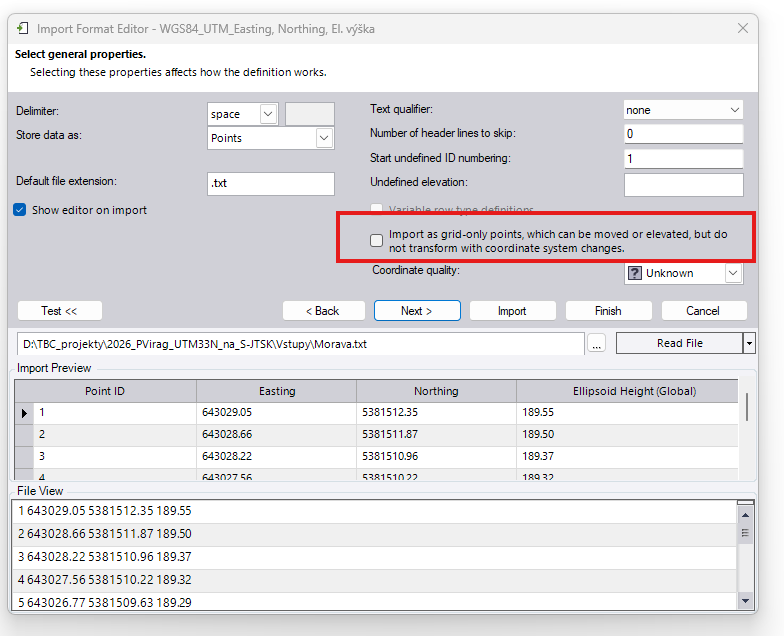
So, as I explained - at least for me - the problem is as I described above.
I found a crabbed solution to this problem which involves the use of Microsoft Excel, but this is an emergency solution and still must test it whether the results are correct.
------------------------------
Martin Kalafut
Original Message:
Sent: 04-21-2026 01:53
From: Ronny Schneider
Subject: TBC v2025.21 import problem
Meanwhile I got home and tried it on my private machine which has 2025.21. Where did you get 2025.23?, are you in the beta test group?
What have you set in the import format editor for the following field? Must be unticked.
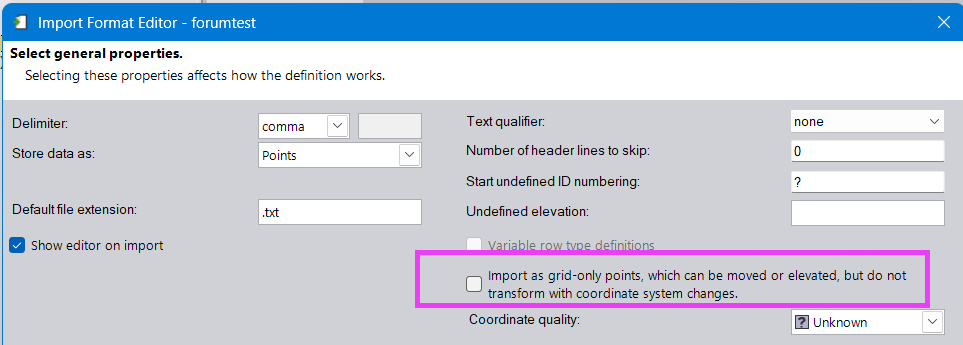
------------------------------
Ronny Schneider
Original Message:
Sent: 04-21-2026 01:28
From: Martin Kalafut
Subject: TBC v2025.21 import problem
Hello Ronny!
Thanks for your information.
However - I stress once again, I use latest TBC version 2025.23 - it does NOT works at all! First, I thought that when I use the option  in my import template, it could solve the problem (TBC correctly assigned a Point ID, a number starting with the value 1 - 1000 to each of points, but the problem remains). Subsequently, I manually added to the TXT file Point ID´s starting with number 1 and then I slightly changed my import template to
Nothing helped - the properties of each imported points looks like this:
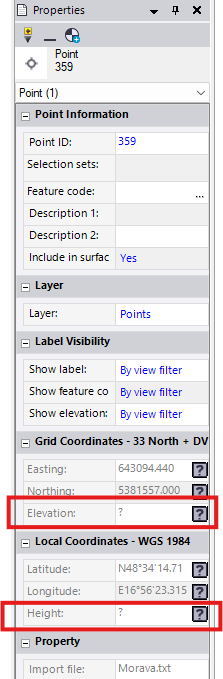
As can be seen, NO ellipsoid (global) height is available at points. I need the global ellipsoid height (NOT Mean Sea Level - MSL -heights in TBC named as Elevation) to be at all points. The idea is that after importing points with horizontal UTM33N Y, X coordinates and global ellipsoid heights to a TBC project , I will then change in the project properties the option NO GEOID MODEL to our precise geoid model as follows:
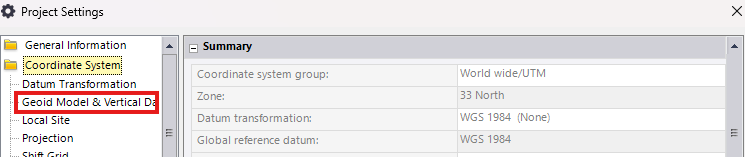
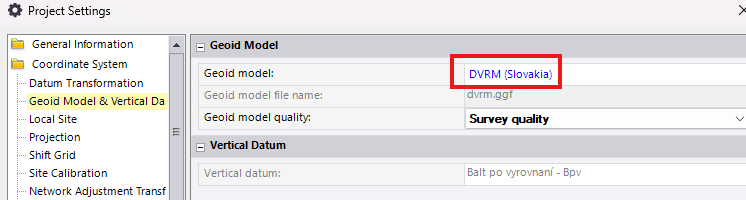
After such change TBC should compute Elevations (MSL heights) based on global ellipsoid heights (which are missing at imported points) and our geoid model DVRM.
This works fine, when I insert a point into to TBC project manually:
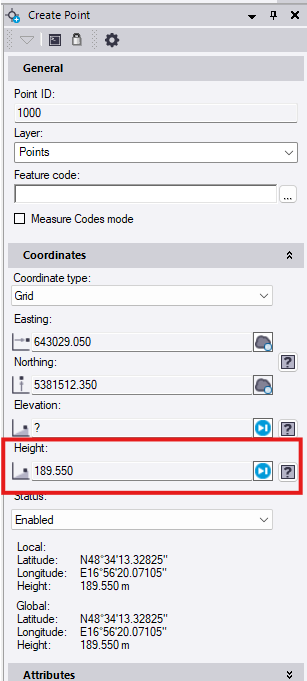
And when I press the ADD button, then I get what I want:
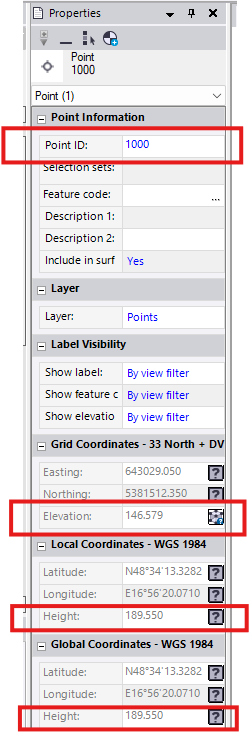
It means - the Point 1000 with EASTING, NORTHING and GLOBAL (ELLIPSOID HEIGHT), after changing the Project Settings from NO GEOID to a geoid model (in my case DVRM. GGF) gets CORRECT MSL height or Elevation (in this case 146.579 m).
However this method is usable for a few points (manually create point), for many points (1000 points) it is NOT thinkable.
When I change my template import to 
TBC imports the points as points with MSL (Elevation) what is NOT true, since the heights in TXT file are global ellipsoid heights, NOT MSL (Elevation) heights (see picture below)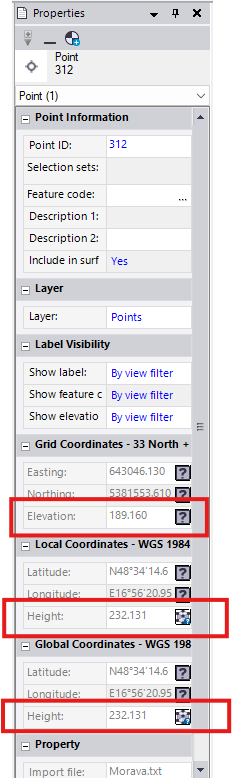
and then TBC computes corresponding global and local (in my case they are identical) ellipsoid heights using DVRM geoid model.
I need exactly the opposite - In my TXT input file I provide horizontal coordinates along with their corresponding global ellipsoid heights and I need to get MSL (Elevations) based on provided horizontal coordinates with their corresponding global ellipsoid heights and my DVRM geoid model. This does NOT work in TBC (it only works when I manually create a point). For such expensive software like TBC, this should be fixed immediately, not sometimes in the unspecified future.
Best wishes!
------------------------------
Martin Kalafut
Original Message:
Sent: 04-20-2026 15:21
From: Ronny Schneider
Subject: TBC v2025.21 import problem
I currently only use 2025.10, and it doesn't work with that one either.
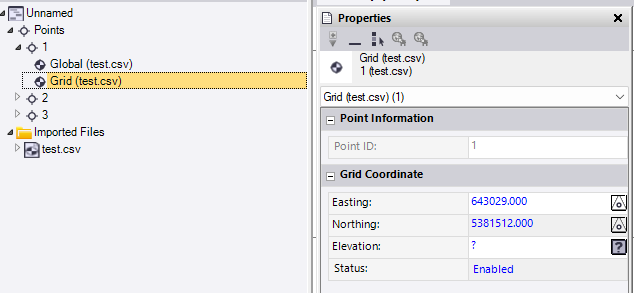
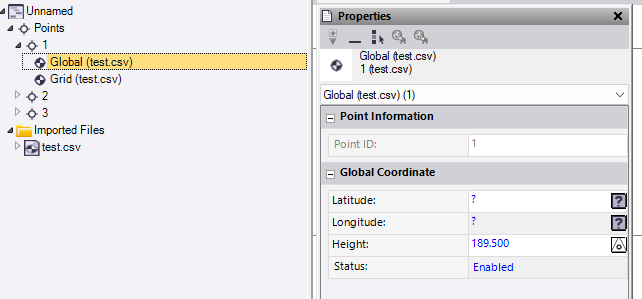
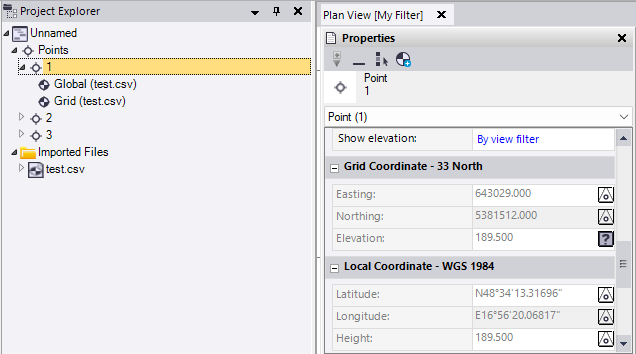
After the import I can see that TBC created 2 independent points for each line in the file. One has the coordinates and one has the elevation.
It seems that adding a column with arbitrary point numbers makes it work. In that case you get 1 point per line. Each point has two data entries, one with coordinates only and one with elevation only. The point itself has the combination of those 2.
This is very likely a bug in the importer. I don't see why a missing point name should cause this behavior. Internally everything should be serial number and not name based. But I've come across other instances where the programmers didn't adhere to this, i.e. causing problems when you rename surfaces and lines that are referenced in long and cross section sheets sets.
Works with or without Geoid, I first thought that would be the issue. Screenshots without Geoid.
------------------------------
Ronny Schneider