Trimble Business Center

 View Only
Expand all | Collapse all

TBC v5.80 - CAD command Create at Intervals - need a clarification

  • 1.  TBC v5.80 - CAD command Create at Intervals - need a clarification

    Posted 11-01-2022 06:17
    Hello,

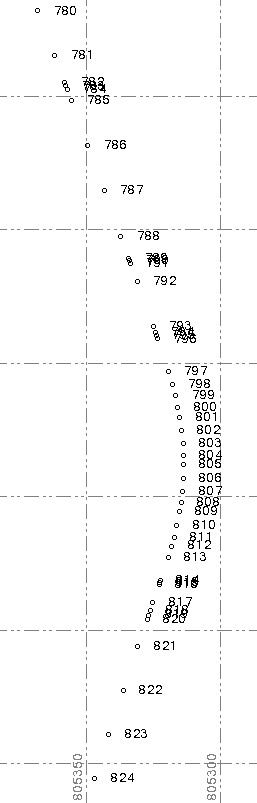
    I have  a set of discrete points (nearly 2000 points), which represent a pipeline.
    A small segment of these discrete points in my TBC v5.80 project is shown here:

    Since I needed a line representation of the pipeline as requested by our customer, I coded them in Feature Definition Manager,
    created FXL file and ran the Feature Code Processing - the result is OK, as can be seen below:
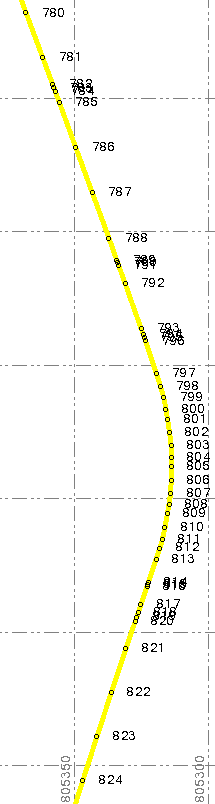

    However, for certain control purposes, I wanted to create a new set of points (regularly distanced 50m each other)
    on the yellow line already created by Feature Code Processing (FCP).

    So, I selected the yellow line created by FCP and started the CAD command Create at Intervals with the following settings:
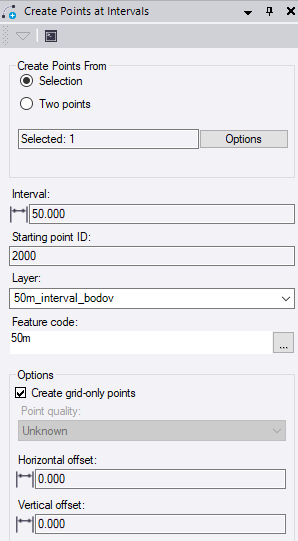
    When I ran the command, I got the following results (shown below):
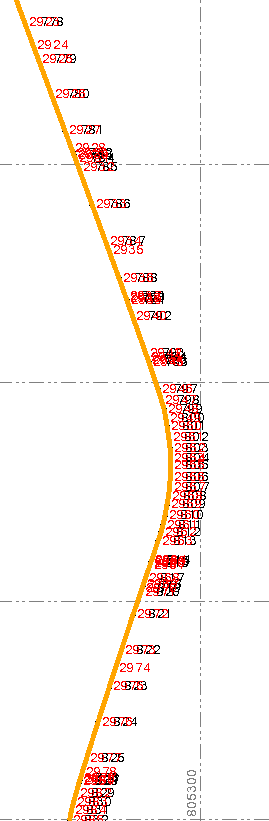
    It means - the request for creating new points at 50m interval was completely ignored by the CAD command
    Create at Intervals and instead - the new points (in red at the picture above) were created exactly
    at those positions, where are located original points from which the yellow line was created by FCP (50m interval was nowhere obtained).

    Questions:

    1. The CAD command Create at Intervals functions exclusively ONLY on straight lines with no arcs
        (no arcs in a line feature are allowed) or is it a problem with Create at Intervals command?

    2. If Create at Intervals command functions only on straight lines, why the command does not create
        points at requested (in my case 50m) interval at least at those parts of the line feature that are straight?

    Thanks for answers in advance!

    Martin Kalafut


    ------------------------------
    Martin Kalafut
    ------------------------------


  • 2.  RE: TBC v5.80 - CAD command Create at Intervals - need a clarification

    Posted 11-01-2022 18:04
    Hi Martin
    If all the points are feature coded and the linestring goes through every measured point then this is exactly what I would expect to see. In addition to creating point at the specify interval the Create at interval command should create points are any nodes along the linestring or polyline. Since all the featured point will create a node in the linestring I would expect all these additional points. This is explained in the Help under "Create Points at an Interval".

    ------------------------------
    James McWha
    ------------------------------


  • 3.  RE: TBC v5.80 - CAD command Create at Intervals - need a clarification

    Posted 11-01-2022 19:38
    TBC Module: ANZ Toolbox
    Command: Points From Chainage Offset

    Prepare a CSV file:
    Id - Chainage - Offset
    001,0,0
    002,50,0
    003,100,0
    etc.

    Use: From File

    Points will be generated  ONLY at 50m interval.


    ------------------------------
    Marian
    ------------------------------


  • 4.  RE: TBC v5.80 - CAD command Create at Intervals - need a clarification

    Posted 11-01-2022 21:13
    I failed to show even easier process, just pick Chainage From, Chainage To and Interval.
    As added benefit, you can select "Dependent Points" Every time you change the line, the points get recalculated.


    Alternatively you can use "new" and somehow "buggy" Create Dependent Points command. The issue is, you can only create one point at a time.


    ------------------------------
    Marian
    ------------------------------


  • 5.  RE: TBC v5.80 - CAD command Create at Intervals - need a clarification

    Posted 11-02-2022 01:47
    Thanks cordially, Marian!

    However, currently I do not have ANZ Toolbox activated.

    Before I add (buy) the add-on module to my TBC, I need 100% certainty that it will produce
    the results which are required. I see in your pictures that your lines are straight lines only
    (do not contain arcs).

    Therefore my question:

    Will also the command from ANZ Toolbox be able to add the points at specified interval
    also on curved (arc) parts of the line?

    This is also unconditionally required, since the pipeline is 15km long
    and contain many arcs. And we also need to do it on the whole pipeline (155km long with many arcs), where
    we will do some control measurements at specified points.

    P.S.
    If necessary, I could send you the VCE file with 15km line containing arcs for testing,
    whether the produced results will be as expected.


    ------------------------------
    Martin Kalafut
    ------------------------------


  • 6.  RE: TBC v5.80 - CAD command Create at Intervals - need a clarification

    Posted 11-02-2022 09:31
    Martin

    Rockpile Solutions has a command for creating points that allows you to be very detailed in specifying point frequency.  you can be very specific for both line and arc as well as vertical.


    ------------------------------
    Ron Ciccarone
    ------------------------------


  • 7.  RE: TBC v5.80 - CAD command Create at Intervals - need a clarification

    Posted 11-02-2022 13:51
      |   view attached
    Hi @Martin Kalafut

    Please see below, from the left; linestring​ (segments only), linestring (with PI Arc), alignment (arc + spirals).

    VCL attached.
    P.S. Scratch that. You cannot upload native Trimble file on Trimble forum. Zipped VCL attached instead.
    P.S. Lucky for me, in Australia ANZToolbox is for free. Please try: https://tbcanz.com/anz-toolbox/ They have very helpful team. Write to them and ask for a 30-day trial, I cannot guarantee that, but they might help you with that.


    ------------------------------
    Marian
    ------------------------------

    Attachment(s)


  • 8.  RE: TBC v5.80 - CAD command Create at Intervals - need a clarification

    Posted 11-03-2022 03:45
    Thanks Marian - the results are as I would expect.
    It seems that the ANZ Toolbox add-on is very useful and not only for AU and NZ!


    ------------------------------
    Martin Kalafut
    ------------------------------


  • 9.  RE: TBC v5.80 - CAD command Create at Intervals - need a clarification

    Posted 11-04-2022 09:19
    Hey Martin, 
    Another method for creating points at only the intervals is as follows. 
    1 - Create an Alignment of your line you want station values on. You can even enter a start chainage in this step if your stationing does not start at Zero. 
    2 - Once you have the alignment created, hit F12 and type "Station Offset Elevation Report" (also found in the corridors tab).
    3 - Select you alignment and Stationing interval you want coordinate on.  

    The resulting excel file will have a number of points.  And you will notice that the ones that land on your Interval have a blank Point number. 


    4 - From here all you need to do is sort the Point number and get rid of anything that isn't blank in the point number column.

    The end result is a set of coordinates at the stationing you need. Simply create a CSV from here and re-import back into TBC. You even get handy Stationing Labels already made for you.

    I know it is a bit of a round about way to do it, there are other methods in other software, but this is one way to accomplish it in TBC without needing any additional Licensing. 

    Good Luck!

    SL


    ------------------------------
    Scott Lehr
    ------------------------------


  • 10.  RE: TBC v5.80 - CAD command Create at Intervals - need a clarification

    Posted 11-04-2022 11:47
    Edited by Martin Kalafut 11-04-2022 12:07
    Scott,

    Cordially thanks for your tip!

    In the meantime - based on advice of @Marian Plucinski in earlier post on this topic - I requested a 30-days trial code
    for ANZ Toolbox. Got it today and created the stationing according to my wish:


    ​​ANZ Toolbox is very useful tool - and I say now, not only for AU/NZ users.

    Nevertheless - I will also try the method you suggested - in any case.
    I suppose - the results should be exactly the same like the outcome produced by ANZ Toolbox.

    Thanks again!

    Scott,

    I tried your method, however - under command pane (F12) I see no such command like you declared (Station Offset Elevation report):

    Do I make some mistake?

    ------------------------------
    Martin Kalafut
    ------------------------------


  • 11.  RE: TBC v5.80 - CAD command Create at Intervals - need a clarification

    Posted 11-04-2022 12:29

    Strange.

    The Button is also in the Corridor Tab. 
    Here is a screen shot of the command. 


    Hope this helps, if not let me know. 

    SL

    ------------------------------
    Scott Lehr
    ------------------------------


  • 12.  RE: TBC v5.80 - CAD command Create at Intervals - need a clarification

    Posted 11-04-2022 13:19
    Here is my Corridor tab (v5.80):


    I do not see the icon Station Offset Elevation on the ribbon like you, but I probably found the reason.

    In v5.80 it is called CHAINAGE OFFSET ELEVATION REPORT (icon below the icon for Corridor Earthwork report:


    Am I correct?

    ------------------------------
    Martin Kalafut
    ------------------------------


  • 13.  RE: TBC v5.80 - CAD command Create at Intervals - need a clarification

    Posted 11-04-2022 13:56
    Yup that looks about right. I am still working on 5.7 so that makes sense. 
    Let me know if this solution works for you. 

    SL

    ------------------------------
    Scott Lehr
    ------------------------------


  • 14.  RE: TBC v5.80 - CAD command Create at Intervals - need a clarification

    Posted 11-04-2022 14:33
    I am not sure, if I do the procedure correct, since the resulting excel file contains ONLY header with no data.

    Here is generation of alignment (beginning part of the alignment, since my line is nearly 155km long):


    And here are my settings for the CHAINAGE OFFSET ELEVATION report:

    The settings above simply produce an empty excel file with header.

    What´s wrong with me?


    ------------------------------
    Martin Kalafut
    ------------------------------


  • 15.  RE: TBC v5.80 - CAD command Create at Intervals - need a clarification

    Posted 11-04-2022 14:54
    Sorry Maybe i didn't include this check box in the Original post. 
    Looks like if you have these settings it will only export the Intervals you want. Even better. 
    No need to delete the node Points. 

    SL


    ------------------------------
    Scott Lehr
    ------------------------------


  • 16.  RE: TBC v5.80 - CAD command Create at Intervals - need a clarification

    Posted 11-04-2022 15:06
    Edited by Martin Kalafut 11-04-2022 15:54
    Yes, I had the box Compute points at C/L unchecked.

    Now, the results look like this:

    I think, I can continue with your procedure to carry out next step.

    ADDENDUM:

    Scott,

    thanks for your idea! Now, I fully completed your procedure and can confirm that the results are EXACTLY the same like
    achieved by using ANZ Toolbox procedure Points From Chainage Offset.

    There is only one formal difference: ANZ Toolbox procedure is simpler and faster.

    Thanks again!

    ------------------------------
    Martin Kalafut
    ------------------------------