Trimble Business Center

 View Only
Expand all | Collapse all

Terrain Awareness Mode for DJI Phantom 4 RTK

  • 1.  Terrain Awareness Mode for DJI Phantom 4 RTK

    Posted 06-13-2019 06:20

    For our drone surveying operations, we use the DJI Phantom 4 RTK and Trimble Stratus/Propeller for processing. In the latest firmware release, DJI has added a flight planning method called Terrain Awareness Mode. I read that in order to utilize this mode, one must import two files to the controller...a tif and tfw. Does anyone know if TBC supports export of these file types?

    Thank you..


  • 2.  Re: Terrain Awareness Mode for DJI Phantom 4 RTK

    Posted 06-13-2019 06:56

    If you use the Capture Image command this creates Georeferenced images (TIF/TFW) - we write those as TIF / TFW or JPG / JGW or PNG / PGW combinations  - these are all World Referenced Images and do the same thing - the "W" extension file is what places the image in WGS84 Coordinates (world coordinates). Most software products (TBC Included) can read these formats interchangeably - maybe DJI can do that too?


    The capture Image command allows you to select which format of data you want and it writes a KML, TIF and TFW  file as shown below


    Press the [...] button in the  Capture Image command to select the path and file extension you want to use in the Capture Image command


    Note the project needs to have a Coordinate System or Site Calibration in the project before you can capture World file outputs


    Alan


  • 3.  Re: Terrain Awareness Mode for DJI Phantom 4 RTK

    Posted 06-13-2019 11:01

    Alan,

    Thanks for your response regarding the DJI Terrain Awareness question. I haven’t tried a mission using this feature yet, but if I can figure out the process, I can see it being a valuable tool.


    I am interested in trying to find training for using TBC for deliverables (i.e. setting up templates, creating plan sets, working in paper space, plotting, etc.). Do you have any recommendations? I would be open to web-based training or live, on-site options.


    Thank you,

    Brent


    Brent Cofer, PE, RLS

    <http://www.pandj.com/>

    10201 Parkside Drive, Suite 300

    Knoxville, TN 37922

    o:

    (865) 688.8342

    c:

    (865) 312.0669

    f:

    (865) 688.8369

    website<http://www.pandj.com/> | vCard<http://dynasend.com/signatures/vcard/bcofer-at-pandj.com.vcf> | email<mailto:bcofer@pandj.com> | map<https://www.google.com/maps/place/10201ParksideDr%23300,Knoxville,TN37922/@35.909493,-84.125482,16z/data=!4m2!3m1!1s0x885c2fa3b6c46be7:0x7dce3362c3cb88e5?hl=en>

    <http://www.pandj.com/>


  • 4.  Re: Terrain Awareness Mode for DJI Phantom 4 RTK

    Posted 06-13-2019 11:25

    Start with the Blog Posts on the Forum I have videos for all the processes relating to Plotting and Drafting - we can do follow ups on questions you may have once you have the basics down


    Go to content - select Blogs and then find the ones relating to Drafting - there are 2 primarily that have all the content


    You can also search Plotting or Drafting and it will pull up Q and A around this subject - there are dozens of Questions answered on the forum already


    Alan


    Sent from my iPhone


  • 5.  Re: Terrain Awareness Mode for DJI Phantom 4 RTK

    Posted 06-14-2019 11:54

    Alan,

    I’ve been trying to use plotbox to create some quick visual outputs for field personnel. When setting up the plotbox, I select 11x17 sheet size. But when I print to pdf or to the printer, the product is 8.5x11. What am I doing wrong?

    Thank you,

    Brent


    Brent Cofer, PE, RLS

    <http://www.pandj.com/>

    10201 Parkside Drive, Suite 300

    Knoxville, TN 37922

    o:

    (865) 688.8342

    c:

    (865) 312.0669

    f:

    (865) 688.8369

    website<http://www.pandj.com/> | vCard<http://dynasend.com/signatures/vcard/bcofer-at-pandj.com.vcf> | email<mailto:bcofer@pandj.com> | map<https://www.google.com/maps/place/10201ParksideDr%23300,Knoxville,TN37922/@35.909493,-84.125482,16z/data=!4m2!3m1!1s0x885c2fa3b6c46be7:0x7dce3362c3cb88e5?hl=en>

    <http://www.pandj.com/>


  • 6.  Re: Terrain Awareness Mode for DJI Phantom 4 RTK

    Posted 06-14-2019 16:06

    Bret,


    When printing a plotbox there is not automatic paper size selection.


    Try the following when printing a plotbox:

    1. Click on the Properties button


    2. Select the paper size.


    3. Check to make sure the orientation is correct.
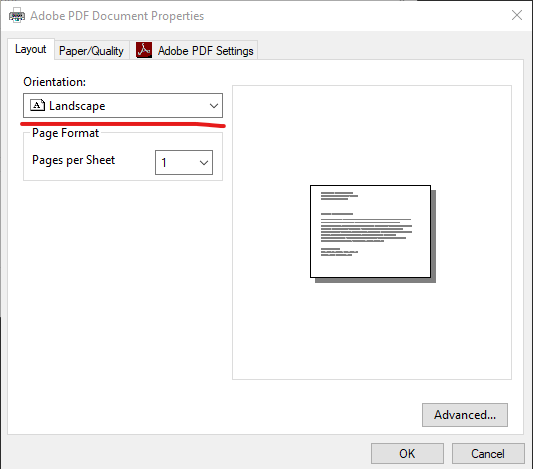


    This is the solution that has worked for me. I hope this helps.


    Alex Culbertson

    Machine Control Manager

    K&E Excavating, Inc.

    3871 Langley St. SE │Salem, OR 97317

    (P) 503-399-4833 (F) 503-399-4767

    Email: Alex@keex.net

    Website: www.keex.net


  • 7.  Re: Terrain Awareness Mode for DJI Phantom 4 RTK

    Posted 02-20-2020 00:40

    Hi Alan,


    I'm also testing this.


    Do the background maps in TBC have elevation data for this function?

    Or would it be required to drape either a background map or previously flown orthomosaic over a surface first?


    Thanks,


    Gareth


  • 8.  Re: Terrain Awareness Mode for DJI Phantom 4 RTK

    Posted 02-20-2020 00:49

    Drape an image over a surface - the Background Map Service does not include any 3D data today at least


    Alan


    Sent from my iPhone


  • 9.  Re: Terrain Awareness Mode for DJI Phantom 4 RTK

    Posted 06-14-2019 15:54

    There is an issue with the TBC v5.1 function in this area Brent - I will try to find you a solution shortly - I am pushing for a Patch update to get the fix out to everyone as this has been a pain point this week for sure


    Alan


  • 10.  Re: Terrain Awareness Mode for DJI Phantom 4 RTK

    Posted 02-20-2020 21:20

    To use the Terrain Awareness in the Phantom 4 RTK drone. The file needs to be a DSM tiff file. You can export this out of Stratus and UAS Master. The issue is that the drone takes Lat/Long. TBC exports out all tiff files as N/E. This causes the controller to crash on import. I have a video showing a workflow that I have put together for my clients, on how to do this. I will upload it.


  • 11.  Re: Terrain Awareness Mode for DJI Phantom 4 RTK

    Posted 02-25-2020 15:28

    Thanks Mike


    Would like to see that video, please share with us.


    FYI I could get a .tif and .tfw from TBC into GS RTK.

    No crash but it just wouldnt recognise the DSM.


  • 12.  Re: Terrain Awareness Mode for DJI Phantom 4 RTK

    Posted 04-20-2020 11:06

    @Gareth Piercey

    I have not forgotten about this. I will finalize the video and get it produced.


  • 13.  Re: Terrain Awareness Mode for DJI Phantom 4 RTK

    Posted 05-27-2020 23:50

    Hi Mike


    Did you end up getting a vid together?


    Cheers 


    Gareth


  • 14.  Re: Terrain Awareness Mode for DJI Phantom 4 RTK

    Posted 08-27-2020 01:33

    Hi Mike,

    I'm really interested in this function are you able to share a workflow in UASM please?

    Gareth