Trimble Business Center

 View Only

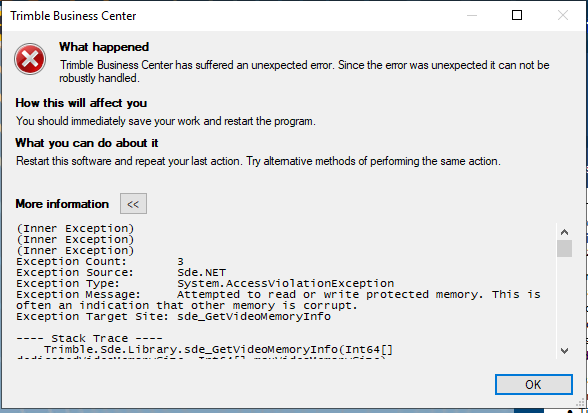
 After a fresh install on a new computer go this error "Attempted to read or write protected memory. This is often an indication that other memory is corrupt."

John Brattan's profile image
John Brattan posted 03-30-2023 15:11
I am an IT technician not a user  of TBC so I know very little about the app itself. I have set up a new computer as an AWS EC2 instance, t3.large, running windows server 2019. The server has 2 cpus,  8GB RAM and 120GB HDD with 26GB free after installation of TBC.
A regular user of TBC has reported the same error which I am investigating below.

I did install an older version of TBC on the computer but found that was incompatible with windows server 2019. I uninstalled that before installing the latest version from the Trimble website which I downloaded from your site.
I followed the instructions in Setting Up a New Project.pdf
 - I started Trimble Business Center from the icon on the desktop
 - Within the the Projects Windows I clicked on [+New Project]
 - I selected <Blank Template> and pressed [OK]
After a couple of second I got this error :

I then did a repair but got the same error.

I then rebooted and got the same error.

I checked the event logs but found nothing relevant to the errors.

I searched Trimble folders for logs but found none.

I then found the clean tool on your site, downloaded the latest version, ran that for the first time to clean up the install. This may or may not have cleaned up any files from the previous version I installed as well, not sure. I then reinstalled the latest versionand rebooted before running TBC again but got the same error.

Any ideas what the issue could be?