Trimble Business Center

 View Only

 Create an Existing Ground Surface from Online Data

David Martin's profile image
David Martin posted 10-03-2024 06:12

All,

I am trying to create an Existing Ground surface from Lidar Data created by Opentopography.org. I am fairly new to TBC, from Civil 3d. 

In Civil 3d, I could download the ARC ASCII Grid and convert it to a surface. I am having a hard time figuring out a workflow to do the same in TBC. I have been able to create a Shape file that has the elevations stored as an attribute, but the line is at elevation 0. 

Does anyone have a good way to create an Existing ground surface from online data?

Ronny Schneider's profile image
Ronny Schneider

It all depends on the type of data.

TBC can't import ARC ACSII Grid data out of the box, but I wrote me a macro for this.

I can share it with you, but you must have at least the "Survey Advanced" license. Macros won't run with anything below.

And I haven't tested it with other coordinate systems yet.

If you have lines and know at least the elevation of one line and the interval you can use i.e. "Elevate Contours by Crossing"

I'm not aware of a way that TBC can elevate lines according to an attribute. Would need to see the data, but a new macro for this should be fairly easy.

Could you send me your data (r.schneider.eu@gmail.com) and I'll have a look. Might be a nice brain teaser for the weekend.

Zach Edwards's profile image
Zach Edwards

Just bring the LiDAR file into TBC. Then, sample cloud down to a reasonable spacing. Then create surface and optionally clean up said surface. Lastly, if you want, you can create contours.

Ronny Schneider's profile image
Ronny Schneider

Hi David,

I had a look at your data and botched up a first version of a macro for elevating the lines from the SHP file.

Unzip it somewhere in "C:\ProgramData\Trimble\MacroCommands3" and restart TBC.

Click on one of the lines first and find the name of the Attribute that holds the elevation value. Afterwards select all the lines in question and run the macro.

It uses the currently set linear project units for the elevation, so it should work with either meters or feet.

Your data did only include normal polylines which were no problem. I did have a SHP file of my own that did include composite geometry. That was a bit trickier but should work as well.

Give it a try and let me know if you run into any troubles.

David Martin's profile image
David Martin

Ronny,

That worked great for what I needed. Thank you for taking the time to help me.

David Martin's profile image
David Martin

Ronny,

Do you have a link to any good references to get started creating macros?

Thanks,

Dave

Erik Petersen's profile image
Erik Petersen

@David Martin

https://community.trimble.com/communities/community-homepage?CommunityKey=8a262af4-a35e-4e9a-9dd3-191cc785899a

Ronny Schneider's profile image
Ronny Schneider

Hi David,

the link from Erik, to the macro forum homepage, should get you started in terms of installation, have a look at the "getting started section".

You may also read through this relative new thread, which includes a link to my Dropbox with some beginner's videos. https://community.trimble.com/question/june-2024-installation-for-macros

Note, that you shouldn't use the latest Visual Studio, but you'll have to find the older installer for 2019. Even in that one is IronPython already out of support, make sure to include it during installation.

On the macro forum front page you also find a section with a download for the SDK. These are basically commented versions of the DLL that TBC brings with its usual installer. Once you've installed Visual Studio and have linked in the SDK (follow my Dropbox videos and the video from Post #2 here) you can browse those comments. If you're lucky it looks like this, with a lot of information, but often it lacks it.
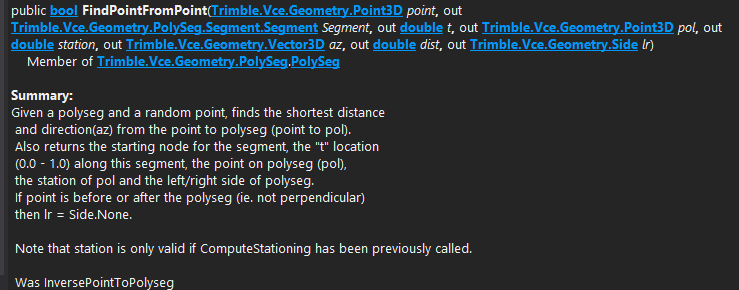
And how everything interacts with each other, what in this example a PolySeg is, why you need it, how pointclouds, surfaces, IFC ........................ work, is not explained anywhere. 

And in terms of documentation this is all we have, and the rest is hours of scrolling through the Visual Studio object browser, trial and a lot of fail

  • TBC does install a few sample macros into "C:\ProgramData\Trimble\MacroCommands3\Trimble" but meanwhile it's only 11
    • previously it was around 50; you can find a collection with outdated code hidden in the forum blog section Sample TMLs (trimble.com)
    • most of those sample macros are maintained by RPS now, hence we don't have access to the source code anymore and are forced to install their software to at least use them

If you follow any of my videos or any posts in the forum please note that with TBC 5.90 the macro folder location was changed, due to the update to Ironpython 3 it's now C:\ProgramData\Trimble\MacroCommands3

I've also published a bunch of macros on GitHub - RonnySchneider/SCR_Macros_Public. With all macros in plain text and commented to a certain degree.