Trimble Business Center

 View Only

 Creating Points from Spot Elevations with Blocks?

Dillon Sell's profile image
Dillon Sell posted 12-15-2025 08:42

Can anyone help walk me through Creating Points from Spot Elevations when working with existing shots that are part of a block? I have an example of the block below.  You can see it is elevated and I would like TBC to create a point at the insertion point of the block with the elevation of the block.  However, no matter how I select the options it won't create a point.

I've tried exploding this block since it is made of a block that is a CAD cross and the separate text.  Both have the same insertion point.  However, they give the same result as I mentioned - no points.

I've also tried exploding the CAD cross again so that it is a pair of CAD lines.  When I get to that point I can make a point using the Linework Cross option.  However even though the individual lines have an elevation, the point that is created does not.  

Going through the help menu hasn't cleared anything up.  I know I could explode everything and then shift the elevation text so that the decimal or text insertion point is in the correct place. But there are a lot of points and I would need to carefully select only the elevation.  While that might be possible, I'd prefer not to and can't be sure that all the exploded text is the same distance from the intended shot location.

M Hufford's profile image
M Hufford

When you explode the block, does it create a CAD Point on your default point layer? (Might have to use Advanced Select to determine where the CAD Point is hiding...)

Dillon Sell's profile image
Dillon Sell

Unfortunately it doesn't make any points when I explode the blocks.  To double check I set my view filter to All which reveals everything in the plan view.  No points are created when exploding the blocks.  

Ronny Schneider's profile image
Ronny Schneider

I never really used this function myself. But with a sample block collection I can't get it to work either. Potentially it's bugged.

Somebody had contacted me several years ago about something like this and sent me some block samples.

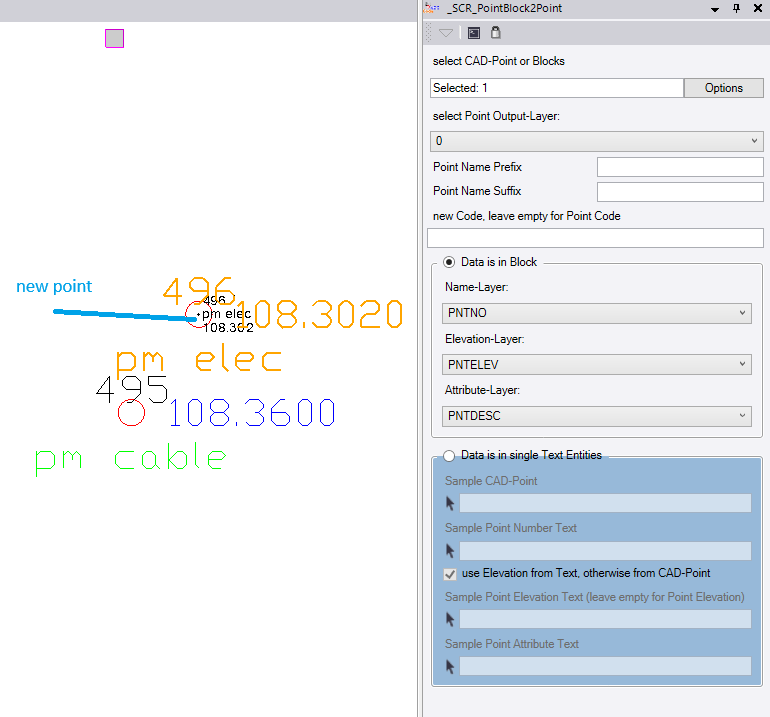
I came up with my macro "SCR_PointBlock2Point" which is included in my public GitHub repo https://github.com/RonnySchneider/SCR_Macros_Public

The only thing it expects is that the point number and elevation are in different layers inside the block.
Dillon Sell's profile image
Dillon Sell

Thanks for the help Ronny.  Alan Sharp also reached out and I was able to work around it by using the Create from CAD command.  That may be an option if you have trouble with the Spot function as well.  I appreciate you sharing the macro.