Hello Sunming,
concerning your question:
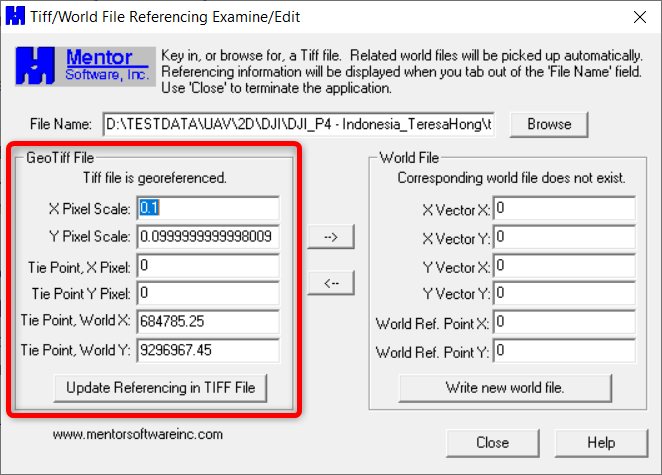
"...To be honest, I am not even sure if TIF files contain coordinate information itself or not...."there is a free tool called GeoTIFF Examiner from Mentor Software. Here is the link describing the tool with a link to download the small EXE file (307.96KB):
https://freegeographytools.com/2007/handling-tiff-worldfiles-with-geotiffexaminerYou can install it, open it and navigate to your TIFF. Load it and you will see if the TIFF file contains a geo-reference.
In my example here the TIFF contains a geo-reference.
If you really want to dig deeper into conversion tools for raster data, you could take a look at the free tool QGIS. Here a link to start from:
https://www.qgistutorials.com/en/docs/working_with_terrain.html
As you can see in the link, GeoTIFF is a very common format for surfaces, even USGS uses it to store their raster height models.
So I would say, yes the format GeoTIFF is making life for many people easier.
But to answer your other questions, I think you need to be more specific about it. So here my additional questions:
I would like to know if I can convert the TIF file to something I can extract the coordinates.
Question: What coordinates do you want to extract? What product do you want to generate at the end from it?
Usually, I ask the sender to convert the file to TTM format so that I can use the surface to do my calculation.However I would like to be able to do conversion myself as not everytime they are available to convert it for me.Answer: Sorry Sunming, I hope someone else can answer here and give you advice how to convert it to TTM.