Trimble Business Center

 View Only

 How can I avoid creating automatically calculated measurement points in a corridor?

弘光 栗原's profile image
弘光 栗原 posted 08-07-2024 01:58
Hello.
I have loaded the XML for the corridor, the format of the XML is #1.
When I load this XML, it seems to automatically create calculated measurement points.
How can I load the XML as it is and not have the calculated points automatically created?
For example, let's say that the XML itself creates a transect of No. 1, No. 20, and No. 30. How can I prevent the automatic creation of No.10 and No.25?
 
#1
<tsf:TSFormControlData xsi:schemaLocation="http://www.nilim.go.jp/ts/main/TSFormControl-4.1 TSFormControl-4.1.xsd" xmlns:rgm="http:// www.nilim.go.jp/ts/main/RoadGM-1.1" xmlns:tsf="http://www.nilim.go.jp/ts/main/TSFormControl-4.1" xmlns:xsi="http://www.w3.org/2001/ XMLSchema-instance">
Ronny Schneider's profile image
Ronny Schneider

I don't 100% understand what you're seeing. Can you upload the full XML here or send me a private message.

Ronny Schneider's profile image
Ronny Schneider

I had a look at the data you sent me.

Those points are not calculated by TBC, they are included as single coordinates in the XML, highlighting the start/end of the different geometry types of the alignment, i.e. straight/curve etc. They are not connected to anything, pure additional information. http://www.landxml.org/schema/landxml-1.2/documentation/LandXML-1.2Doc_CgPoint.html
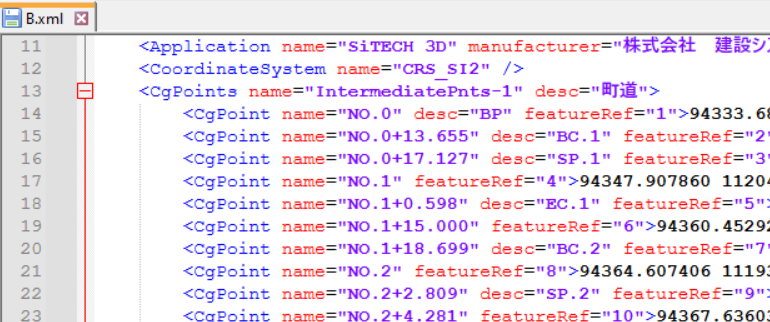
There is no option to exclude parts of the XML data, hence TBC will load them. But it creates a "Selection Set" for them, so you can easily select and delete them.

That file B, that does have those points, also includes a full triangulated and independent surface. That surface will not change when you change the corridor templates.

For file B you'll have to right click on the corridor and create a corridor surface manually again.

So, bottom line, you should export the XML as you did for file A. That one doesn't have the points included and does create a dependent corridor surface straight away.