We use cookies to personalise content and ads, to provide social media features and to analyse our traffic. We also share information about your use of our site with our social media, advertising and analytics partners.
Learn more
Accept Cookies
Skip to main content (Press Enter).
Sign in
Skip auxiliary navigation (Press Enter).
Terms and Conditions
Skip main navigation (Press Enter).
Toggle navigation
Home
Communities
My Communities
Distributor Communities
Public Communities
User Groups
Participate
Help/FAQs
Getting Started Guide
Advanced Tutorial
Communities
Community Home
Threads
Question Thread View
Trimble Business Center
Community Navigator
View Only
Community Home
Threads
18.1K
Library
1.3K
Blogs
384
Events
0
Members
2.9K
Back to {0}
Issue Publishing Field Data to Project Library
Thread closed by the administrator, not accepting new replies.
Add a tag
x
User Tags may not contain the following characters: @ # $ & :
Wellerson Souza
posted 10-13-2022 13:06
Hi
Very often when I am publishing a new design from selectable 3d lineworks to project library I came across with this error.
"The Following items failed to publish:
Teste 3D: The following line has a segment whose planimetric length is less than the minimum allowed, but whose 3D length is greater than the minimum so it cannot be automatically
removed."
See attached for more information.
Then I have to go through each line error and remove it from the design created. Its such a hard work to fix this issue when we have many lines to be removed. Is there any way to fix this problem?
Thanks
Wellz
Attachment
View in library
msg error_14102022.jpg
93 KB
Marian Plucinski
posted 10-13-2022 14:41
Easy-peasy.
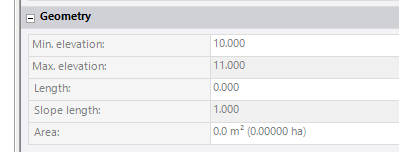
I assume you're suffering from lines which are vertical. Almost zero 2D length. Like the one below:
Solution:
Select all your linework
Data Prep -> Project Cleanup
Object to process -> Current Selection
Remove zero length lines
Copyright 2023. All rights reserved.
Powered by Higher Logic