Trimble Business Center

 View Only

 Keyed in values rounding off automatically

Terison Kurimwi's profile image
Terison Kurimwi posted 01-09-2023 23:29
I a havinga problem with keying in values for coordinates when creating a point or entering a distance value, say for a radius. The digits are rounded off to the nearest whole digit for a point and to the nearest 1 decimal place for a distance. I have checked all my settings on units but evrything is set to 3 decimal places.  See below screen shots.

Screen shot when keying in  a coordinate value
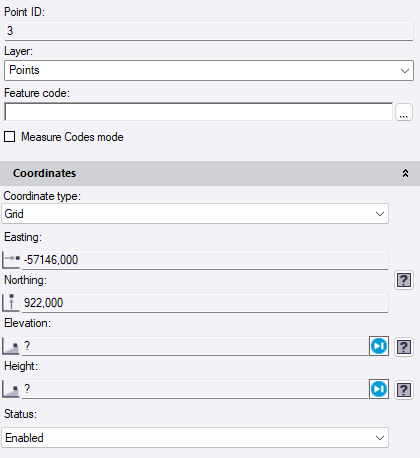
Screen shot after pressing enter.

Values after the decimal have been copied to the nothing and also rounded off.

Can someone please help on where to change the setiing for rounding off like this.
Ronny Schneider's profile image
Ronny Schneider
What version are you using?

There seems something totally wrong with your settings. When I enter a coordinate and press enter the point number is incremented and the coordinate fields show ? again.

Is comma the correct decimal separator for your region. Is the decimal separator correctly set in the Windows region settings? Is it unique and not used for number grouping or list separation as well?

Otherwise, can you upload the project here?