Trimble Business Center

 View Only

 No "Global Coordinate" on topo shots for Site Cal

Michael Brennan's profile image
Michael Brennan posted 07-01-2022 11:39
I'm trying to perform an office calibration, and the topo points from the field aren't recognized as global points. 

In the properties inspector there is global coordinate Lat/Longs, not labeled as Local. I have tried this in a brand new project with nothing but the points as well. 

I have done this exact same process before many times, and I'm left here scratching my head as to why it's just suddenly no longer working. Any help would be appreciated.

TBC 5.60
Chris Saayman's profile image
Chris Saayman
Hi Michael,

What you can do is to go to your Project Explorer, click on the point you want to change to the global coordinate and open its properties, then on the top you will see an icon that looks like a target with a plus sign click on it, then  in the add coordinate pane that will open up you can then select Global, local, or grid which will add the global point to your point list in the Project Explorer.

Regards,
Chris Saayman
Ronny Schneider's profile image
Ronny Schneider
Your points need to be global only, they can't have local coordinates on them as well.
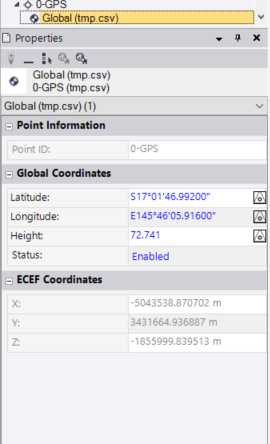
Export them as "Custom P,L,L,h,Code (Global)" and reimport them.
This way you should be able to get rid of the local component.
I also rename those points to "*-GPS" before importing them. Makes it easier to separate local and global points.

From my point of view it is a bug that the site calibration does not except any point that is in the project that does have a valid global coordinate.
Michael Brennan's profile image
Michael Brennan
Thanks for the help, exporting them as a global CSV did the trick. 

Although, I think it's worth pointing out that when I imported them again they still had local and grid coordinates attached in the properties inspector. They were thankfully recognized by the site calibration tool this time, which just leads me to believe this is absolutely a bug.