Trimble Business Center

 View Only

 Problem Importing CAD file Results in False N/E Coords Making File Unusable

Bo Warlick's profile image
Bo Warlick posted 06-12-2023 09:00

I have been looking around for a solution to this problem but have been unable to find a clear answer. I am working with a CAD file provided by the engineer which sets a false northing and false easting that make the file unmanageable. I have been trying to change the Geodic model and Local Site coordinates but have had no luck. I uploaded the control point file to a previous iteration and after some messing around was able to get the file to let me actually work on the CAD file, but I was unsure if I used the correct datum so I started over and have been unable to recreate it.

Can anyone help provide a solution to this problem in TBC? This is not the first time I have run into this issue.

Thanks,

Erik Petersen's profile image
Erik Petersen

Zoom precise to something like From: 100,100 to : -100,-100, then you should be able to zoom out at delete the points at the -100000 or whatever it is

Bo Warlick's profile image
Bo Warlick

Thanks Erik. I didn't think to use Zoom Precise. It always gets locked in and wont let me zoom in or out. Looks like I should be able to use it now.

Marian Plucinski's profile image
Marian Plucinski

Looks like E and N are swapped.

Find one point with real life coordinates (global coordinates) that has local coordinates in your engineers custom coordinate system.

Calculate divergence angle for your global point.

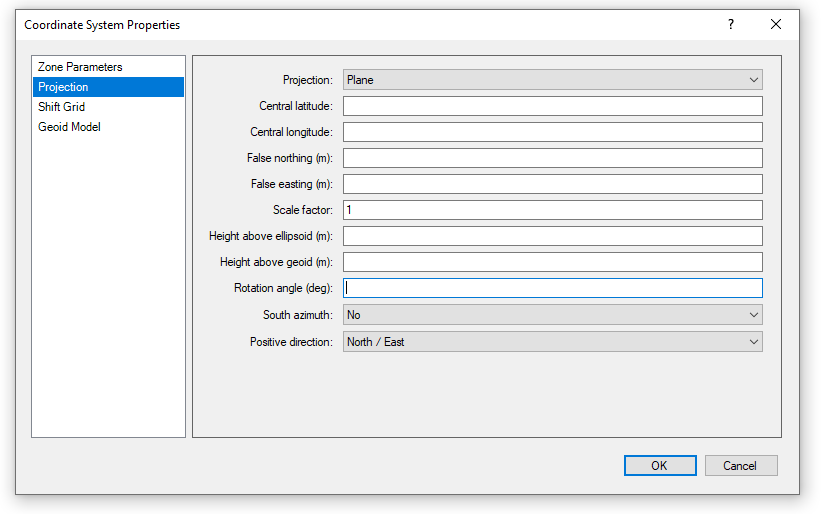
Create new coordinate system:

Planar,

Central Lat and Long are your global point

False easting and northing are your Local coordinates

Scale factor as needed, maybe be 1.000 may not be. You have to assess it based on the information you have.

Rotation angle will be 90 degrees + divergence angle (or 90 - divergence angle), or -90 + divergence angle... one of those will work.

Voila.

Import your DWG in local coordinate system.

Turn or background maps, check how they fit.

Compare with your control points.
Ronny Schneider's profile image
Ronny Schneider

Have you tried MirrorObjects around an axis from 0,0 to let's say 1000000, 1000000? That should swap x and y values.