Trimble Business Center

 View Only

 Saving space in TBC

Jump to  Best Answer
William maestre larrad's profile image
William maestre larrad posted 09-26-2024 07:51

Good afternoon,

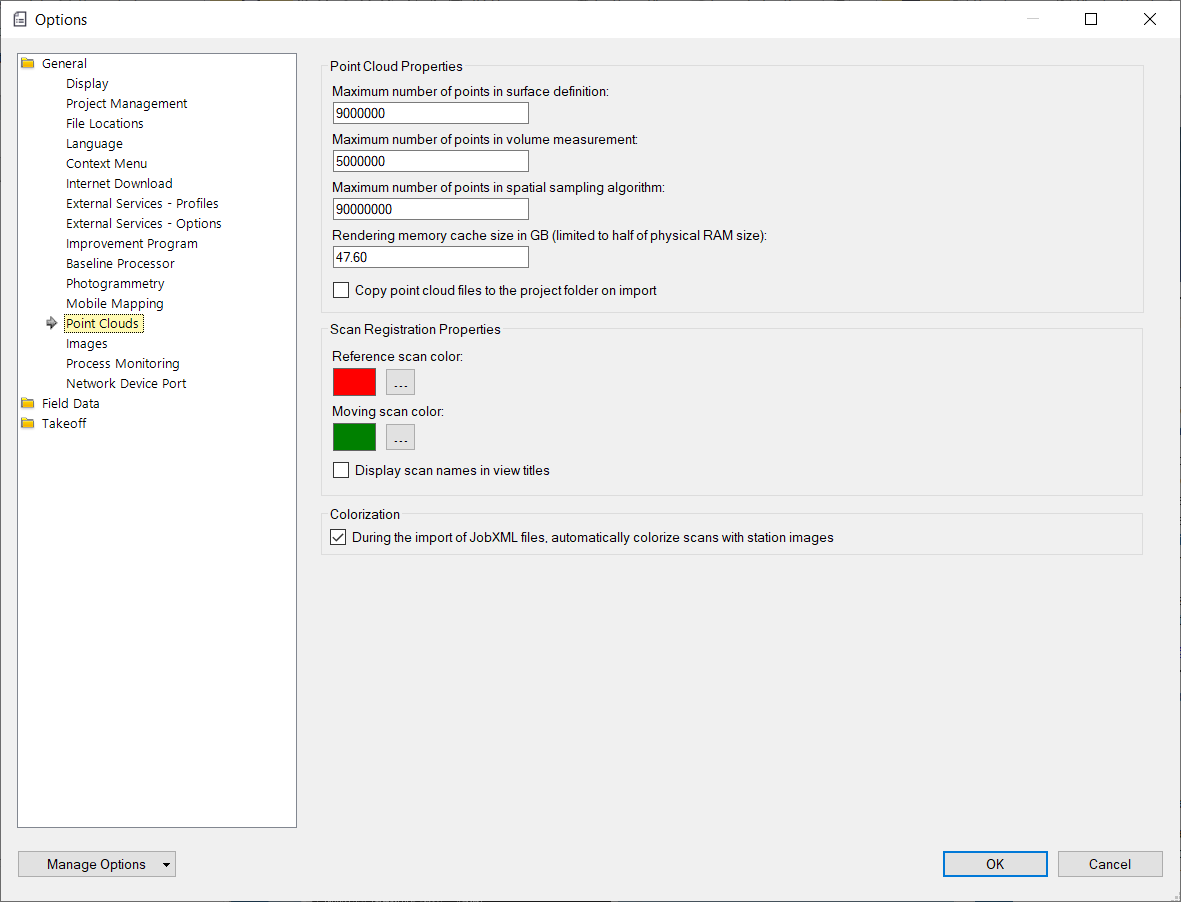
I use TBC quite a lot and something I always noticed is that whenever I import a file (point cloud, static measurements, leveling, traverse...), TBC makes a copy of the files and add them to the project folder. I wonder if this is something that could be avoided in order to save disk space. I also use AutoCAD and this software has a function that "calls" the files without adding them to the actual file/project (the xref function).

Is there a similar function in TBC?

Regards

Erik Petersen's profile image
Erik Petersen  Best Answer

Unfortunately you cannot Xref a single file in TBC, You can only reference another TBC file

Francisco Guerrero's profile image
Francisco Guerrero

There is an option to turn off the history log.  This saves storage by not keeping logs saved of work that's been done.  Looks like i haven't been checking this box off.  

William maestre larrad's profile image
William maestre larrad

Thanks guys for the answer. It's is a pity this option is not available.

Zach Edwards's profile image
Zach Edwards

William,

You can disable the copy/duplication of a point cloud dataset. I don't believe the others can be disabled. Go to your TBC options and make sure the box is unchecked for "Copy point cloud files...". Lastly, and unrelated, you always want to have your RAM set to 50% of your total machine's RAM. I like to get all options set how I like them, and then go to manage options in the bottom left and back up to user profile so it's tied to my TID.