Trimble Business Center

 View Only

 Scan data freeze - Surface Pro 8

Jump to  Best Answer
Neil Winn's profile image
Neil Winn posted 06-29-2022 06:38
I'm using a Surface Pro 8.  SX12 scanning point clouds are freezing on the display in 2D and 3D viewer (points and vectors still move appropriately) when I zoom in/out or select areas of the point cloud.  To troubleshoot, I've done the following:

  • Ensured no docking station was attached (from restart)
  • Used Trimble Business Center 5.70
  • Used Trimble Business Center 5.6 (with patches)
  • Checked Graphics Driver: DirectX 12

I see in the Advanced Display options ​within TBC that the few driver options include DirectX 11.  Is it possible that this discrepancy (11 v 12) is causing the issue?  Any ideas on what graphics settings I should be using?
Ronny Schneider's profile image
Ronny Schneider  Best Answer
RAM could be an issue, but you can get the Pro8 with up to 32 GB. Also, a simple TSC7 can visualize SX12 scan data in Access, so I doubt that it is a memory problem. It might be running slow, but it shouldn't fail to visualize it. Sounds more like a driver, graphics mode issue.

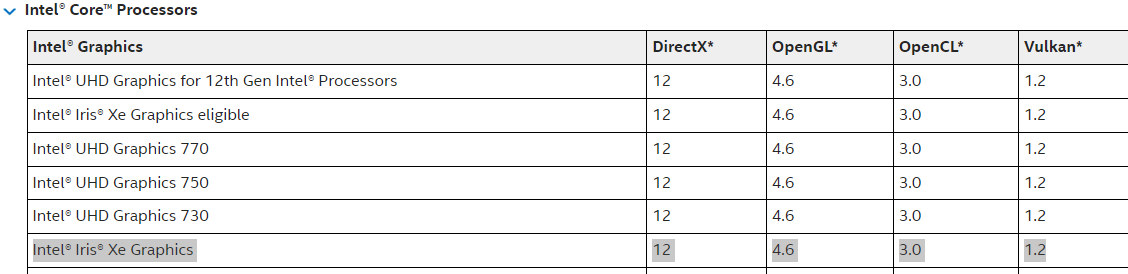
I highly suggest switching to OpenGL in the TBC -> options (tick override automatic detection). When working with point clouds the release notes state that you should use that. After changing it in TBC you need to restart TBC, otherwise that setting doesn't take effect.
You don't need to install a different driver. The Intel Iris Xe GPU does support OpenGL (wouldn't know a modern GPU that doesn't).
https://www.intel.com.au/content/www/au/en/support/articles/000005524/graphics
Adam Bower's profile image
Adam Bower
Has it ever worked for you? I doubt that a Surface Pro 8 is going to handle scan data well. I'm willing to bet you're  maxing out your RAM when you start working with those big scans. Have you monitored your system performance while in the project? ctrl+shift+esc will allow you to see usage under performance. Surface Pro 8s are nice machines and they have their place, but handling scan data and points clouds are not one of them.
Neil Winn's profile image
Neil Winn
Thanks Ronny and Adam.  Switching to OpenGL seems to have fixed my situation.  Point clouds are definitely taxing on the Surface Pro 8, but it's minimally acceptable.  I'm also working on rigging an external GPU given the Surface Pro 8 has Thunderbolt 4 connectivity.  Looks promising for a field/office setup.