TBC Macros and Extensions

 View Only
Expand all | Collapse all

Iron Python installation Problem

  • 1.  Iron Python installation Problem

    Posted 12-19-2021 06:55
    Edited by Julian Weber 12-19-2021 06:56
    Hey Guys,

    I've installed Visual Studio on Win 10, then ironpython 2.7.9 + Macro sdk 5.5

    When i start a project on visual studio "TBCMacros1.sln", ironpython is missing in the Environment section.

    I tried many things, like setting a new environment for iron python manually but it just won't work...

    When in start TBC, i also get the following error message attached.

    it is so frustrating :(...


    ------------------------------
    Julian Weber
    ------------------------------


  • 2.  RE: Iron Python installation Problem

    Posted 12-19-2021 07:35
    Hi Julian,

    please be aware that there are some differences for macros running on TBC 5.40 and older and v5.5 and v5.60. Please have a look at the old threads talking about that and use the last examples which includes try...except for dealing with 5.40 or older and 5.50 etc.

    Your error message seems to be one of this, although apparently one of System.IO and not Trimble.Vce... or Trimble.Sdk... so not sure why

    Regarding why it´s not keeping the reference to IronPython 2.7 not sure why. I think you need to install the latest SDK posted by Gary Lantaff in the forum in August so far I remember but after you have installed VS (in case you installed a newer version or similar).

    I can see my Environments as follows:
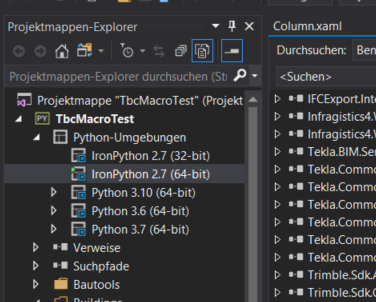

    and the 2.7 64-bit is stored here:


    I would recommend you starting with individual macros from the examples so you can see the whole imports and exceptions etc and start seeing the classes functions, etc.

    I hope this helps.

    Regards,
    Fernando

    ------------------------------
    Fernando Calvo
    calvo@calvo-geospatial.com
    ------------------------------


  • 3.  RE: Iron Python installation Problem

    Posted 12-21-2021 20:24
    Ironpython isn't officially supported by VS anymore. If you install or update VS to the latest version you have to manually tick/force the Ironpython Support.
    -run the VS Installer, then go to Modify -> Individual Components
    -search for iron, IronPython will show as "out of support", tick it anyway and have it installed

    Afterwards you should be able to set IronPython as the interpreter.
    Here my solution debug settings


    ------------------------------
    Ronny Schneider
    ------------------------------


  • 4.  RE: Iron Python installation Problem

    Posted 12-22-2021 01:17
    Hi Ronny,

    thanks for the infos.

    Not sure whether Gary mentioned in the past if it´s only supported for VS2017 and VS2019 but I think the SDK´s were first only for VS2017 and at some point also for 2019, so I would recommend you to work with VS2019 instead of the latest version.

    Regards,
    Fernando

    ------------------------------
    Fernando Calvo
    calvo@calvo-geospatial.com
    ------------------------------


  • 5.  RE: Iron Python installation Problem

    Posted 12-22-2021 18:27
    Hi Fernando,
    I'm running VS2019, but that still shows updates from time to time. From my experience that is then a full install and it can happen the IronPython support is gone again until I force/tick it again.

    Inspecting variable values works for me. But automatic indentation, or any sort of spell checking or intellisense for Python or the Trimble SDK doesn't. I completely depend on the object browser for that, and the internet for Python.

    I've installed
    https://marketplace.visualstudio.com/items?itemName=PaulHarrington.EditorGuidelines
    to help with the indentation issue.

    And 
    https://marketplace.visualstudio.com/items?itemName=TrungKienPhan.WordHighlight-18439
    to find variables easier.

    I also have to say that I'm not a big fan of Python so far, especially the indentation only, no brackets is really annoying.

    Have a nice Christmas everybody

    ------------------------------
    Ronny Schneider
    ------------------------------


  • 6.  RE: Iron Python installation Problem

    Posted 12-23-2021 03:51
    Hi Ronny,

    sorry, I thought I was answering Julian who is just starting with TBC programming, I know you have already developed a lot under TBC so you knew about VS2017 and VS2019 ;-)

    Thanks for the infos, I´ve installed them and they are indeed very helpful, thanks for that. And yes, it´s really painfull searching by hand through hundreds of classes, functions etc in the object explorer and this in case you have referenced the corresponding .dll, etc.

    What I´m doing is searching instead in the Macros SDK folder (i.e. C:\Program Files (x86)\Trimble\Macros SDK ) as it contains not only the .dll´s but also .xml´s so it´s much easier and quicker to find something there just by searching with the windows explorer for example for "IFC" so you get all files with such a part of the text.

    I wish you the whole community a nice Christmas time and a healthy new year!

    Regards,
    Fernando

    ------------------------------
    Fernando Calvo
    calvo@calvo-geospatial.com
    ------------------------------