Ran into another hiccup.
I only want to filter over the points currently visible on the screen.
The following adds the whole region with all scan stations, not all of the latter might be ticked to be visible
adding an additional step and check the scan visibility is getting me close, but will add the whole scan station instead of the few points included in the current region
Original Message:
Sent: 04-11-2026 20:14
From: Ronny Schneider
Subject: built-in way to retrieve certain points from cloud and potential bug in Hoops2dView.PointCloudPick
Referring to the previous post:
- Point 1
- I managed to do it the following way, is pretty quick
self.activeForm = TrimbleOffice.TheOffice.MainWindow.AppViewManager.ActiveView try: self.activeViewFilter = self.currentProject.Concordance.Lookup(self.activeForm.ViewFilter) except: self.activeViewFilter = None if self.activeViewFilter: # create SdeCloud for each region and add to tmp list sdecloudstmp = [] self.visiblesdecloud = None for region in ExposedPointCloudRegionContainer.GetInstance(self.currentProject): if self.activeViewFilter.IsVisible(region): sdecloudstmp.Add(SdeCloud(region.Integration.Provide[SdeCloudId]())) # create SdeCloud object for all visible regions if sdecloudstmp.Count > 0: self.visiblesdecloud = SdeCloud(sdecloudstmp, None, IntPtr(0)) # cleanup tmp objects and list for c in sdecloudstmp: c.Dispose() sdecloudstmp = None
- Point 3 is not worth pursuing
- I tested some code that creates a box filtered SdeCloud with a box that is 10 times bigger than the one just used below the cursor
- trying to avoid filtering from 200 million points upon every cursor movement
- that prefiltered SdeCloud is only recreated if the box around the cursor crosses it; centering on the current cursor position
- that way, instead of filtering from 200 million points, the box around the cursor had to filter from an SdeCloud with only 200000 points or even less
- no speed improvement; still took about 0.07 to 0.1 seconds; curious why; Point 1 definitely combines them and improves speed
- in this example it seems I'm stuck with ~15 FPS just for filtering and dropping to ~5-7 FPS if I want the point coordinates
- the lower the point count in the original region the faster it is
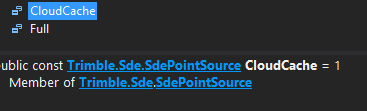
- when applying the filter, what's the exact difference between the 2 SdePointSource enums? What is CloudCache referring too?
------------------------------
Ronny Schneider
------------------------------
Original Message:
Sent: 04-09-2026 20:30
From: Ronny Schneider
Subject: built-in way to retrieve certain points from cloud and potential bug in Hoops2dView.PointCloudPick
Disappointing. Need to try to avoid it then, although I'd love to have it as selection overlay and to compute a best fit plane on the fly.
A few more questions:
- in case of multiple cloud regions on the screen, I assume it would be faster to combine them first into one Cloud object and use the filter just once, instead of creating a cloud object from every region and filtering every single one separate?
- is this even possible?
- I haven't managed to get this one to work yet

- any idea why the Hoops2dView.PointCloudPick doesn't return a valid result
- is there an event that is being triggered when a LimitBox's shape is changed? I know the one when it's being activated, but not upon changing i.e. its size
- I'm wondering if it's worthwhile to create a filtered cloud based on the limitbox and then in a second step having to filter just that pre-filtered cloud when the cursor is moving, would also increase speeds
------------------------------
Ronny Schneider
Original Message:
Sent: 04-09-2026 08:42
From: Bryce Haire
Subject: built-in way to retrieve certain points from cloud and potential bug in Hoops2dView.PointCloudPick
GetMinMaxPoints requires 1 P/Invoke call, where the calculation is done itself in the library we're using. There is no equivalent "GetAllPoints" available to us.
------------------------------
Bryce Haire
Original Message:
Sent: 04-08-2026 15:54
From: Ronny Schneider
Subject: built-in way to retrieve certain points from cloud and potential bug in Hoops2dView.PointCloudPick
That is rather disappointing. How does the GetMinMaxPoints do it then? This one also needs to inspect/loop all filtered points but needs just around 0.01 seconds. Not superfast, but acceptable.
There is no way to quickly get a list with coordinates, GetPoints()?
Filtering from several hundred million points being sometimes faster than retrieving that filtered list of coordinates is definitely worth improving.
------------------------------
Ronny Schneider
Original Message:
Sent: 04-08-2026 10:01
From: Bryce Haire
Subject: built-in way to retrieve certain points from cloud and potential bug in Hoops2dView.PointCloudPick
The enumerator requires a P/Invoke call per point retrieved unfortunately. The overhead with that will add slowness.
------------------------------
Bryce Haire
Original Message:
Sent: 04-07-2026 23:46
From: Ronny Schneider
Subject: built-in way to retrieve certain points from cloud and potential bug in Hoops2dView.PointCloudPick
I found a bottle neck, where I don't know if this is a Python issue.
Iterating over the filtered cloud enumerator
for p in filtered:
, which usually contains about 100 points takes about 0.1 seconds. This is way too slow. Creating the "filtered" object from a 20-million-point cloud takes the same time.
If I manually create 1000 points and add them to the overlaybag it only takes 0.001 seconds, at least 100 times faster. No idea why the enumerator is so slow.
------------------------------
Ronny Schneider
Original Message:
Sent: 04-03-2026 00:43
From: Ronny Schneider
Subject: built-in way to retrieve certain points from cloud and potential bug in Hoops2dView.PointCloudPick
Blue selection is using my Octree. That one needs as uncompiled Python script 18 sec to populate the 875000 points, but refresh rate is much better, at least with an axes aligned simple box. With a circle it gets similar to the built-in rate.
Orange selection is with FilterByBox.
------------------------------
Ronny Schneider
Original Message:
Sent: 04-03-2026 00:07
From: Ronny Schneider
Subject: built-in way to retrieve certain points from cloud and potential bug in Hoops2dView.PointCloudPick
I found the issue with the enumerator.
It's an absolute MUST to dispose of the cloud object, otherwise something gets completely messed up internally. It looked as if all enumerating/looping in any kind of list got broken.
Only a TBC restart fixed it.
This works
boxorigin = Point3DExtensions.ToSde(Point3D(closesttocursor.X - r, closesttocursor.Y - r, closesttocursor.Z - r)) # or build the correct type objects manually, as for instance the vectors below; is probably simpler than finding the assembly the extensions are hidden in boxfilter = SdeFilterByBox(boxorigin, SdeVector3D(2*r ,0, 0), SdeVector3D(0, 2*r, 0), SdeVector3D(0, 0, 2*r)) for region in self.visibleclouds: # visibleclouds contains region objects of type Trimble.Vce.Data.Scanning.ExposedPointCloudRegion or DefaultExposedPointCloudRegion # in IronPython the <> need to be [] #cloudId = region.Integration.Provide[SdeCloudId]() cloud = SdeCloud(region.Integration.Provide[SdeCloudId]()) exclusion = clr.StrongBox[SdeCloud]() filtered = SdeCloud(cloud, boxfilter, SdePointSource.Full, exclusion, None, IntPtr(0)) exclusion.Dispose() # !!!!!! super important for p in filtered: self.overlayBag.AddMarker(Point3D(p.Coordinates.X, p.Coordinates.Y, p.Coordinates.Z), GraphicMarkerTypes.BigDot_IndependentColor, Color.Orange.ToArgb(), "", 0, 0, 1.0) cloud.Dispose() # !!!!!! super important
Is quite a bit slower than my own Octree approach. That one needs quite some time to create the lookup table but seems much faster for basic box filtering where the box axes are aligned to world.
------------------------------
Ronny Schneider
Original Message:
Sent: 04-02-2026 23:09
From: Ronny Schneider
Subject: built-in way to retrieve certain points from cloud and potential bug in Hoops2dView.PointCloudPick
Hello Bryce,
thanks for the code.
no, I wasn't aware of it and how to use it, and it doesn't seem to be straight forward as the error below shows.
It's not a standard Trimble.Sdk assembly and mostly undocumented in the object browser.
We still haven't got any decent documentation on how the pointcloud database works internally and how everything is intertwined.
The last reasonably decent documentation we received was for IFC objects, and that dates more than 1 year back, https://community.trimble.com/viewdocument/2023-2024-bimifc-schema-update?CommunityKey=8a262af4-a35e-4e9a-9dd3-191cc785899a&tab=librarydocuments
There are database files, guids, the standard serial numbers, several types of integrations???, what does SDE stand for, spatial data engine?? ......
A decent tree-like view would be good for this.
And please keep in mind that you're advertising the macro language to be used with IronPython, no help/samples/documentation/templates are provided to use C#.
A lot of the above code doesn't work straight away in IronPython. I had to rely heavily on a chatbot. I finally got to the point where I do get a filter result, but now I'm stuck on looping over the filtered list.
So far, I've got to this point
            closesttocursor = self.activeForm.View.PointCloudPick(e.MousePosition.X, e.MousePosition.Y, False)

            # for some reason those SDE classes are stored in a separate assembly
            clr.AddReference ("SDE.NET")
            from Trimble.Sde import Cloud as SdeCloud, FilterByBox as SdeFilterByBox, CloudId as SdeCloudId, SdePointSource

            # visibleclouds contains region objects of type  Trimble.Vce.Data.Scanning.ExposedPointCloudRegion or DefaultExposedPointCloudRegion
            # in IronPython the <> need to be []
            cloudId = self.visibleclouds[0].Integration.Provide[SdeCloudId]()
            cloud = SdeCloud(cloudId)

            # casting with an extension like ToSde() doesn't work in IronPython
            # either import
            # from System.Windows.Media.Media3D import Point3D as SdePoint3D, Vector3D as SdeVector3D
            # and build the objects manually
            # or import Point3DExtensions
            # problem with those is that they are spread over multiple assemblies, you need to add the proper reference
            # Point3DExtensions.ToSde is in Namespace "Trimble.Vce.Geometry" but inside "Trimble.Vce.Scanning"
            # if you reference "Trimble.Vce.Geometry" only you won't have access to the methods in Trimble.Vce.Scanning->Namespace:Trimble.Vce.Geometry.Point3DExtensions
            # but once you reference "Trimble.Vce.Scanning" it's enough to import from "Trimble.Vce.Geometry"

            clr.AddReference ("Trimble.Vce.Scanning")
            from Trimble.Vce.Geometry import Point3DExtensions
            # now you can do the following

            r = self.captureradius.Distance
            boxorigin = Point3DExtensions.ToSde(Point3D(closesttocursor.X - r, closesttocursor.Y - r, closesttocursor.Z - r))
            # or build the correct type objects manually, as for instance the vectors below; is probably simpler than finding the assembly the extensions are hidden in
            boxfilter = SdeFilterByBox(boxorigin, SdeVector3D(2*r, 0, 0), SdeVector3D(0, 2*r, 0), SdeVector3D(0, 0, 2*r))

            exclusion = clr.StrongBox[SdeCloud]()
            filtered = SdeCloud(cloud, boxfilter, SdePointSource.Full, exclusion) # and here it fails, it wants more arguments
it fails on the last step with "expected IntPtr, got NoneType".
From the VS object browser
Cloud(Trimble.Sde.Cloud sourceCloud, Trimble.Sde.Filter filter, Trimble.Sde.SdePointSource pointSource,out Trimble.Sde.Cloud filterExclusion, Trimble.Sde.ProgressionDelegate progressionCallback = null, IntPtr userData = null)
it seems to ignore the missing "ProgressionDelegate", but insists to get the "IntPtr"
using
filtered = SdeCloud(cloud, boxfilter, SdePointSource.Full, exclusion, None, None)
it complains about NoneTypes
using IntPtr with an arbitrary number works, why does it need this pointer? what is this pointer?
filtered = SdeCloud(cloud, boxfilter, SdePointSource.Full, exclusion, None, IntPtr(0))
But now I'm unable to loop over the filtered list. It says it contains some points, but the enumerator is empty. I have the feeling this is using some extension again.
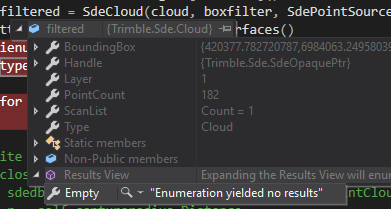
I tried
filtered.GetEnumerator()
but doesn't work either
------------------------------
Ronny Schneider
Original Message:
Sent: 04-02-2026 10:18
From: Bryce Haire
Subject: built-in way to retrieve certain points from cloud and potential bug in Hoops2dView.PointCloudPick
Hey Ronny,
Any chance you have played with the FilterByBox in the Sde library?
Something like this.
// Given: Point3D center, double halfSize, IPointCloudRegion region// 1. Get the SDE CloudId from the region integrationvar integration = region.Integration.Provide<IPointCloudRegionIntegration>();var cloudId = integration.Provide<Sde.CloudId>();if (cloudId == null) return;// 2. Build an axis-aligned box filter around your center pointvar origin = new Point3D( center.X - halfSize, center.Y - halfSize, center.Z - halfSize);var axisX = new Vector3D(2 * halfSize, 0, 0);var axisY = new Vector3D(0, 2 * halfSize, 0);var axisZ = new Vector3D(0, 0, 2 * halfSize);var boxFilter = new Sde.FilterByBox( origin.ToSde(), axisX.ToSde(), axisY.ToSde(), axisZ.ToSde());// 3. Create a filtered Cloud - SDE handles spatial culling internallyusing (var cloud = new Cloud(cloudId))using (var filtered = new Cloud(cloud, boxFilter, SdePointSource.Full, out var exclusion)){ exclusion?.Dispose(); var results = new List<Point3D>(); foreach (SdePointInfo pt in filtered) { results.Add(pt.FromSde()); }}
------------------------------
Bryce Haire