Trimble Business Center

 View Only
Expand all | Collapse all

[FEATURE REQUEST] Please add easier, more streamlined way to add background images from TBC to Siteworks using Worksmanager.

  • 1.  [FEATURE REQUEST] Please add easier, more streamlined way to add background images from TBC to Siteworks using Worksmanager.

    Posted 02-08-2023 06:49
    Hello,
      
    As far as I know, the only way to publish background images to siteworks is some convoluted process of adding plot boxes and exporting them from the capture image command with only the georeferenced pdf turned on and it takes forever to do and half the time siteworks still tells me it's missing an associated world file. 
      
    As general practice, I already reference in every relevant pdf from the plans into my Trimble project while building the project and would love if I could just publish those somehow to Worksmanager for the field crews to open as a background image in siteworks. I don't understand why georeferenced vector pdf's in Trimble aren't recognized as georeferenced images in siteworks? Even if I push "public to TCC", it won't show up in the background images command on siteworks. 


    Please add this feature!

    ------------------------------
    john chronister
    ------------------------------


  • 2.  RE: [FEATURE REQUEST] Please add easier, more streamlined way to add background images from TBC to Siteworks using Worksmanager.

    Posted 02-15-2023 03:20
    Edited by Matthew Pitt 02-15-2023 03:20

    I have a slightly easier way to do this if it is an existing geo referenced image or vector PDF. This method assumes you have TCC Explorer installed (if not get it, google TCC explorer Nederland and it's the top result)

    Select your PDF in project Explorer

    Press F12

    Type "writeworldfile"

    Go to your project file in Windows Explorer
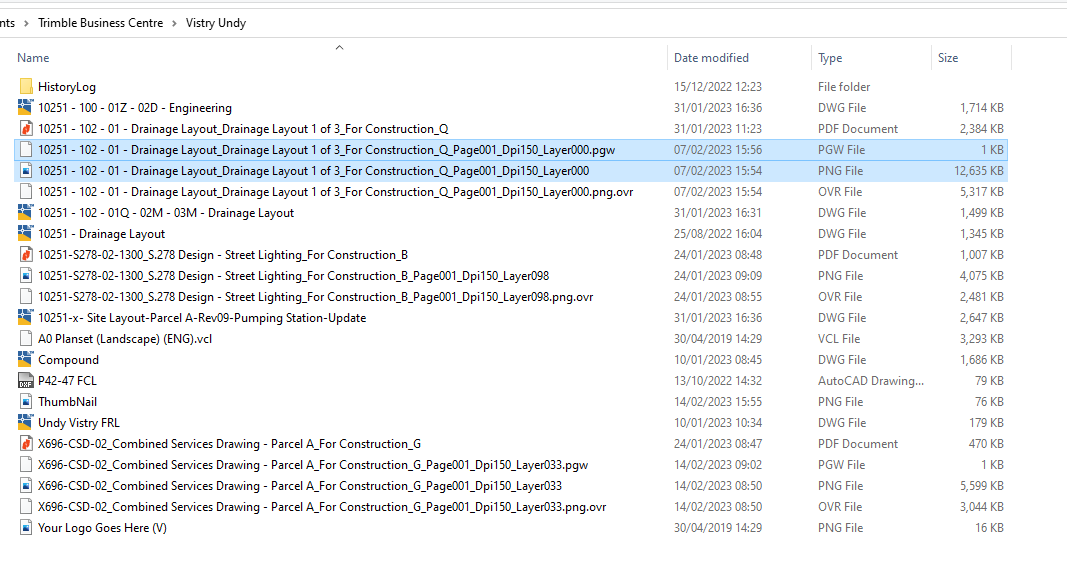
    Select the .png and .pgw shown above

    Go to TCC Explorer

    Open "Trimble Synchroniser Data"

    Select the Controller you are adding the image to

    Select "Trimble SCS900 Data"

    Select the Project you are adding the image to

    Press "Alt" then "F" then "N" then "F" this should create a new folder, right click menu doesn't work properly in TCC Explorer

    Name the Folder "Background Images"

    Paste the .png and .pgw


    ------------------------------
    Matthew Pitt
    ------------------------------


  • 3.  RE: [FEATURE REQUEST] Please add easier, more streamlined way to add background images from TBC to Siteworks using Worksmanager.

    Posted 02-16-2023 22:47

    See here for another way to create those georef files

    https://community.trimble.com/discussion/export-georeferenced-images-for-trimble-access-1


    ------------------------------
    Ronny Schneider
    ------------------------------


  • 4.  RE: [FEATURE REQUEST] Please add easier, more streamlined way to add background images from TBC to Siteworks using Worksmanager.

    Posted 02-15-2023 08:59

    Something else to keep in mind is that some of those PDFs might have a larger amount of pixels that Siteworks might not be able to support. I haven't looked in a minute, but last I knew, the max pixel width of an image that would work as a background image in Siteworks was 8192x8192.


    ------------------------------
    Katie Byron
    ------------------------------


  • 5.  RE: [FEATURE REQUEST] Please add easier, more streamlined way to add background images from TBC to Siteworks using Worksmanager.

    Posted 02-17-2023 08:46

    TBC should have a warning or something letting you know the image would be too big for siteworks. Perhaps the image limitation could be increased for siteworks or even tiled for larger images. This is a handy tool, and a more streamlined process would be helpful. Perhaps the capture image tool should be present in the construction data tab with the site creation and publishing workflows I wasn't even aware of the tool for quite a while until I read the patch notes for siteworks.


    ------------------------------
    Steven Lloyd
    ------------------------------


  • 6.  RE: [FEATURE REQUEST] Please add easier, more streamlined way to add background images from TBC to Siteworks using Worksmanager.

    Posted 02-16-2023 09:16

    I agree, John.  It seems like there should be an easier way.  Like it should be an option when creating a design in the Job Site just like you add the linework and surface you should be able to add image(s).


    ------------------------------
    Wayne Welshans
    ------------------------------


  • 7.  RE: [FEATURE REQUEST] Please add easier, more streamlined way to add background images from TBC to Siteworks using Worksmanager.

    Posted 02-16-2023 17:21

    Trimble doesn't even recognize how valuable background images are to the field. They don't even promote the fact that you can have your plans in the background of your data collector. I've convinced clients asking about Trimble vs. Topcon, that Trimble has the advantage just because of background images. There is no WorksManager support (last I knew). Don't count on them making it any easier to export in TBC. Though, I've found that .gif as 12x18 (ish) plotbox captures the best "dimmed" background images for Siteworks. It's a lot for roadway projects but sites don't take too long.


    ------------------------------
    Adam Bower
    ------------------------------