TBC Macros and Extensions

 View Only
Expand all | Collapse all

forcing a menu tab to reload - WITHOUT resetting everything to default?

  • 1.  forcing a menu tab to reload - WITHOUT resetting everything to default?

    Posted 21 days ago

    We had a similar discussion quite a while ago

    replace/reload macro icons - best software to create icons | TBC Macros and Extensions

    Back then the consent was to "Reset Tabs to Default" in order to reload icons and changed grouping. But that removes all user customizations, a no-go.

    Saving the ribbon i.e. to the cloud, resetting to default, and loading the ribbon from the cloud naturally doesn't work.

    There must be another way to trigger a reload. RPS do have a macro that somehow does it.


    ------------------------------
    Ronny Schneider
    ------------------------------


  • 2.  RE: forcing a menu tab to reload - WITHOUT resetting everything to default?

    Posted 20 days ago

    Maybe try saving/loading the ToolsManager (SaveToolLayout, LoadToolLayout).
    This may reset the tabs visibility. 
    Callling "ReloadRibbon" from TrimbleOffice is not enough. 


    ------------------------------
    Bryce Haire
    ------------------------------


  • 3.  RE: forcing a menu tab to reload - WITHOUT resetting everything to default?

    Posted 20 days ago

    SaveToolLayout, LoadToolLayout save and reload current state. That will not pickup if macros have moved to a different tab group for instance, it places them back exactly where they were.

    I don't get why customizing, resetting single tabs or groups, exporting just single tabs or groups is still not possible or an absolute pain a whole decade later.

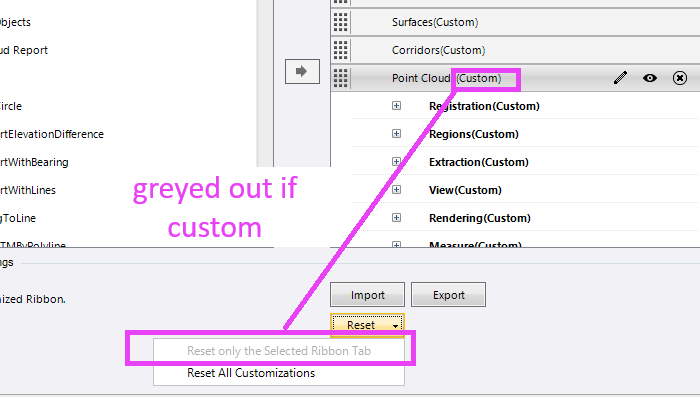
    I believe as soon as you bring something in from a save file or the cloud the ribbon tabs are set to "Custom" and that greys out the selective reset option.


    ------------------------------
    Ronny Schneider
    ------------------------------