Trimble Business Center

 View Only
Expand all | Collapse all

R12i base station issue

  • 1.  R12i base station issue

    Posted 05-11-2024 20:06

    Hello All,

    I dont know how best to title this thread, nor how to explain some of this properly so bear with me...

    I work with a mineral exploration company based in Canada, we use our Trimble R12i systems, with an RTK survey style to get accurate elevation data, we then merge that data with our instruments that "read" densities of the earth. This elevation data is crucial to our work and I am currently having some issues with at least one of my R12i heads. This may be something in the settings that we have missed, or just dont know about.

    I will include some photo examples of what I am coming up against

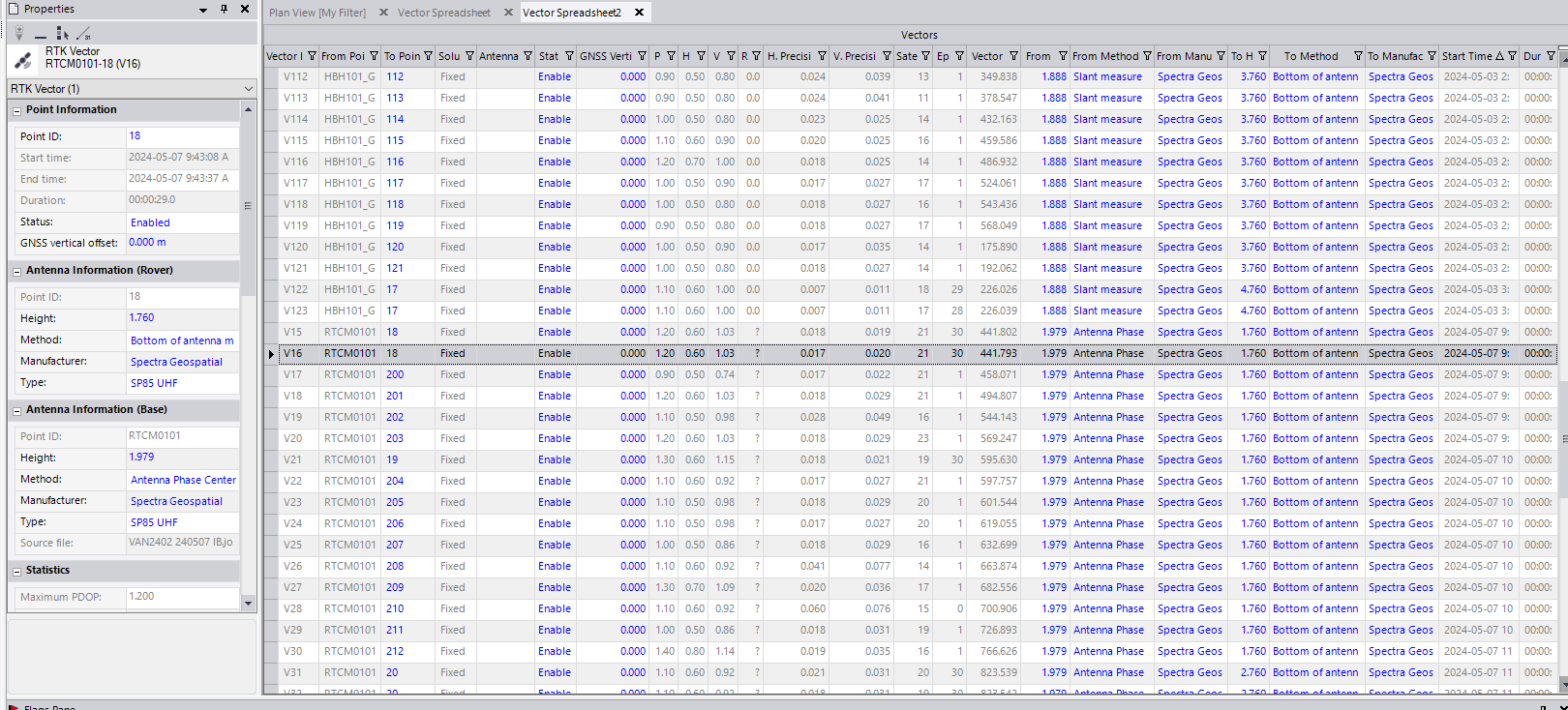
    Our RTK survey style, is set up as a default, to measure to our R10 lever Extension. However we have come across an issue where once the data has been downloaded and imported into TBC, The "Measure to" for the base has changed to "Antenna Phase Center" of its own accord. Upon further investigation in the Vector Spreadsheet, The R12i does not recognize itself as an R12i.... nor that it has been manufactured by Trimble, which then removes the option for "R12 internal" in the "From Type" column.

    I can go back through and manually change the data points back to R10 lever extension. But I would like to get to the bottom of why the R12 wont recognize itself or its internal antenna. This may be overthinking on my part.....but like I said this elevation data is CRUCIAL to our survey and will completely invalidate all of our collected data if it is off by more then 5mm to 10mm

    Below is a photo of our vector spreadsheet.

    If anyone has any suggestions or advice, would be greatly appreciated

    Thank you!


    ------------------------------
    Thomas Sproule
    ------------------------------


  • 2.  RE: R12i base station issue

    Posted 05-11-2024 20:29

    Which TBC version are you using?

    Did that behavior just occur recently, or did you buy the R12i just recently, and you're importing its data the first time?

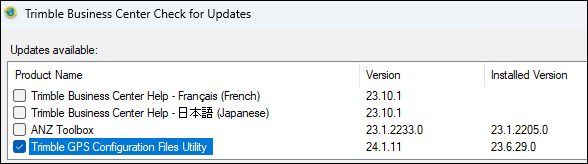
    Have you checked if there are any updates available in TBC? Support tab - check updates

    Maybe that particular receiver is not included in the GNSS device database you're using.


    ------------------------------
    Ronny Schneider
    ------------------------------


  • 3.  RE: R12i base station issue

    Posted 05-12-2024 12:00

    we run different heads(sp80 and sp85). but i see the same thing often. tbc reverts to phase center. when ever i have checked it has been fine, and now i don t often check anymore unless vertical is critical on our projects. 

    i can say that it is pretty easy to check. look at one of you rtk tie points observed from that base. check the elevation. then change the base over to how you observed it in the field, lever and what ever tape measurement you had, of course good notes are key here. then compute the project and see if the tie point elevation is the same as how it was with phase center. 

    looks like your rover is to phase center too. i don t think i have seen this. and if you are running a 2m pole then phase center would be wrong here. 

    maybe ronny is right the profile needs to be loaded. but personally i have never seen a setting in tbc to load receivers. if anyone knows of this then that might help. might be hidden in the tbc package, i have drop down for many different kinds in the "from manufacture". in my case i have spectra as an option and 

    i actually think it is a problem with the data collector. i am looking at a dataset with the same sp85 heads. one day with survey pro on tsc3. one day with tsc5 and access same heads. the access base has been switched to phase center. all the others are good. not sure why it is doing this. perhaps in your case do you have your survey style setup correctly? 

    i also tried brining in jxl or job and drag and drop or import and in all instances the base is switched to phase center. 

    thinking about this more i am curious if it has to do with the corrections that are sent from the base. for us anyways. 

    not sure if this is any help. but at least you are not the only one with problems here. 


    ------------------------------
    ian bissonnette
    ------------------------------


  • 4.  RE: R12i base station issue

    Posted 05-13-2024 05:59

    TBC always changes to phase center for me when I import in Receiver data. I usually change the Bases. I did the math the first couple times and now I don't bother anymore as we use the same equipment. Sometimes we'll have 60 or more observations which is a lot of manual work if TBC would get something wrong. I do wish TBC had something better for this.

    I would suspect a Survey Style issue in Access. Without knowing your setup in the field, we can't help. Or an Access problem, not an issue with the R12i.

    RTK-PPK Specs

    Also, 5-10 mm accuracy is not within Trimbles specs for the R12i for RTK, just FYI. If you *need* this kind of accuracy, either total station it or do PPK with longer observations. If you desire this accuracy, it is quite possible that the R12i will do it on good days but how do you know?


    ------------------------------
    Jordan Koehn
    ------------------------------


  • 5.  RE: R12i base station issue

    Posted 05-13-2024 07:37

    Based on the screenshot you have an invalid leap seconds error, and unknown antenna type.

    Please follow below steps to correct this issue, in TBC/Support/ Check for updates / Download and install Trimble GPS Configuration Utility.

    Invalid leap seconds in TBC | Trimble Business Center

    The TBC team have just release an updated GPS Configuration Files Utility to address this issue.

    Regards, 


    ------------------------------
    Florentin Toplicianu
    ------------------------------


  • 6.  RE: R12i base station issue

    Posted 05-13-2024 16:41

    i did what florentin said and updated the gps config, there is actually a 25 version now that made it so that i did not have to go in and change that date. (i tried at first and had a hard time because it would not let me store the change with notepad anyways). so this solved the invalid leap seconds that i have had for a bit now. but i still get the phase center when i would rather not have the phase center. i have a screen shot with the same base station and rover on two different days. first day is with survey pro on tsc3. second day is with tsc5 and access 2023 latest version. i think they have a 2024 coming out right about now. also of interest, when i import from survey pro i get a pop up with base information for the survey, including base height and measured to. but with access it just dumps all the data in, with no check in.


    ------------------------------
    ian bissonnette
    ------------------------------


  • 7.  RE: R12i base station issue

    Posted 05-14-2024 15:57
    Thank you for all the information and help everyone, That update has solved the issues, I was lead in the wrong direction with my boss. Who seems to think if we never change our TBC software, we never will need to update anything ha.

    The last thing I just need to confirm (for my own sanity and My bosses ultimately)

    The "From Method" column. If I am measuring to my R10/R12 Lever Extension. Does that column need to say R10/R12 lever extension. Or should it say Antenna Phase center.

    again. Thank you all for the help.


  • 8.  RE: R12i base station issue

    Posted 05-14-2024 16:27

    The "From Method" should be Antenna Phase Center. When you start a base, it will take what ever method you used to start the base and convert it to Antenna Phase Center. This is what will be broadcast from the base as part of CMRx or RTCM corrections.


    ------------------------------
    James McWha
    Asia Pacific Regional Support Manager, Geospatial
    ------------------------------


  • 9.  RE: R12i base station issue

    Posted 05-18-2024 19:34

    In the job data, there should be your base station height and what it was measured to, and then the next piece of data is the height relative to antenna phase center. You can see it through expanding your JOB file within Project Explorer.  Not sure if you can view it any other way though.  

    Years ago I had my vendor send through to Trimble, for Trimble RTX post processing returned results, that the field height measurement info be included since it is a quality control check.  But those PDFs still come back only showing antenna phase center.


    ------------------------------
    Robert Hoy
    ------------------------------


  • 10.  RE: R12i base station issue

    Posted 05-18-2024 20:26
    ya i agree.
    for us there is more confusion because the sp80/85 heads actually have two phase centers, i think they are for L1 and L2 bands. plus when we send our data away to the NAR CAN post processing service, they also calculate a phase center which last time i checked was slightly different.
    showing the data to what we measure would be appreciated.


  • 11.  RE: R12i base station issue

    Posted 05-14-2024 17:15

    james converting to phase center makes our QA processes way harder. i do not see why the software would act this way, or if  you want to show phase center then do not remove the field measurements that we made and show both.

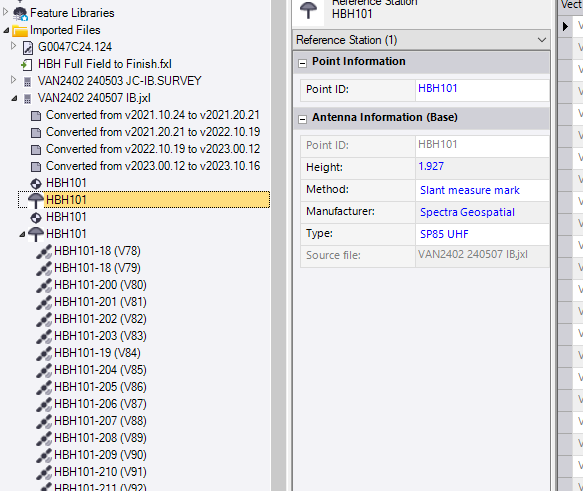
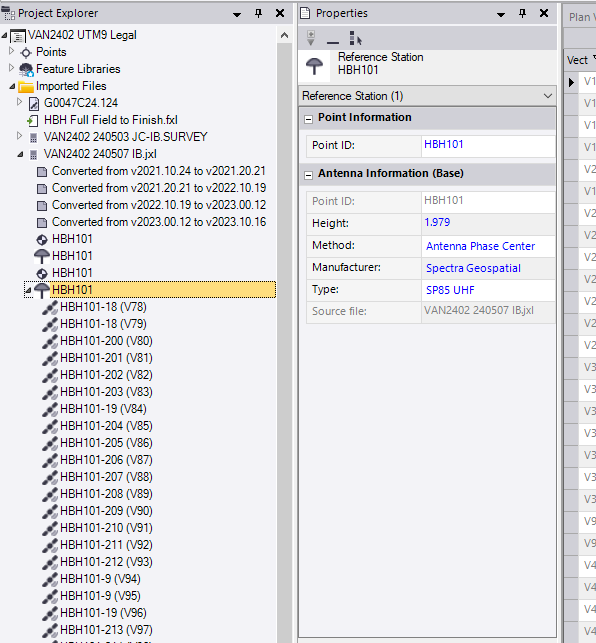
    i know that it is possible for the software to keep the method because i can see it with survey pro. do you think your team could look at holding how we measure in the field? actually i see that the info is stored. so it seems like tbc could be back calculating to show what we measure in the field:
    i guess the harder thing is when a second rover is hooked to that base, again i think survey pro has prompts for what you are measuring to at the base. 

    thomas

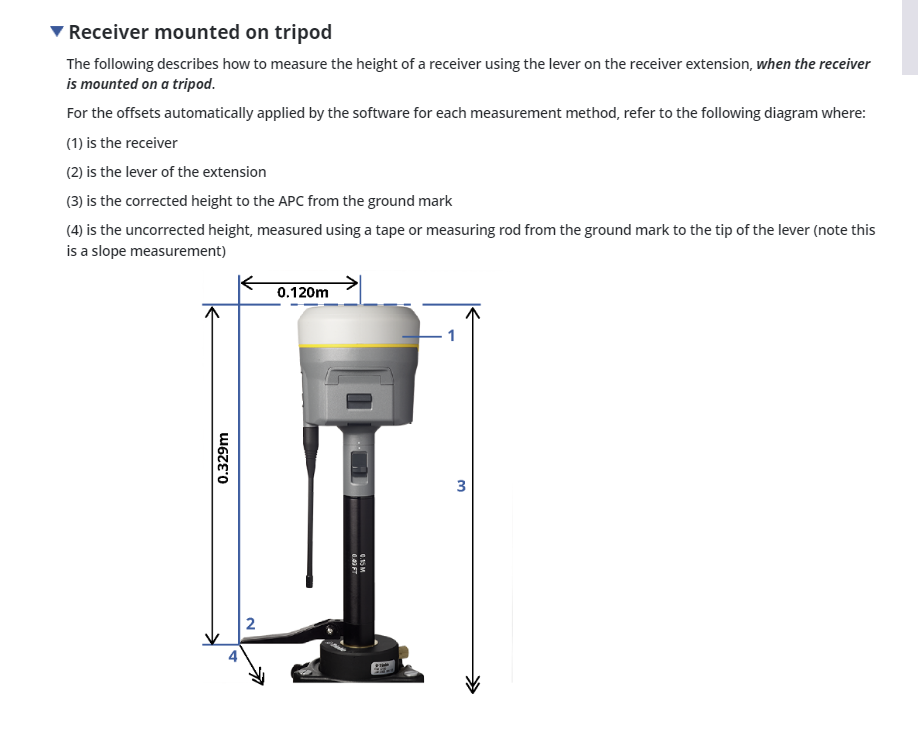
    the 'from method' refers to the base station. so it depends on how you tape measured your base and what notes you have for that information. most people would use the lever extension and tape from lever to a control point on the ground. the software figures out the triangle solution. 

    i actually noticed that you have short tape measurements, that makes me think that you are setup on a concrete/steel pilar, in that case i usually do not use the lever because you can not actually tape to the center that is hidden under the tribrach and the shorter tape reading makes the difference larger than on longer tape readings. but this is another issue.

    you can see in my image clips above that you should be able to see what you actually measured and put in your data collector in the line for your base setup. 

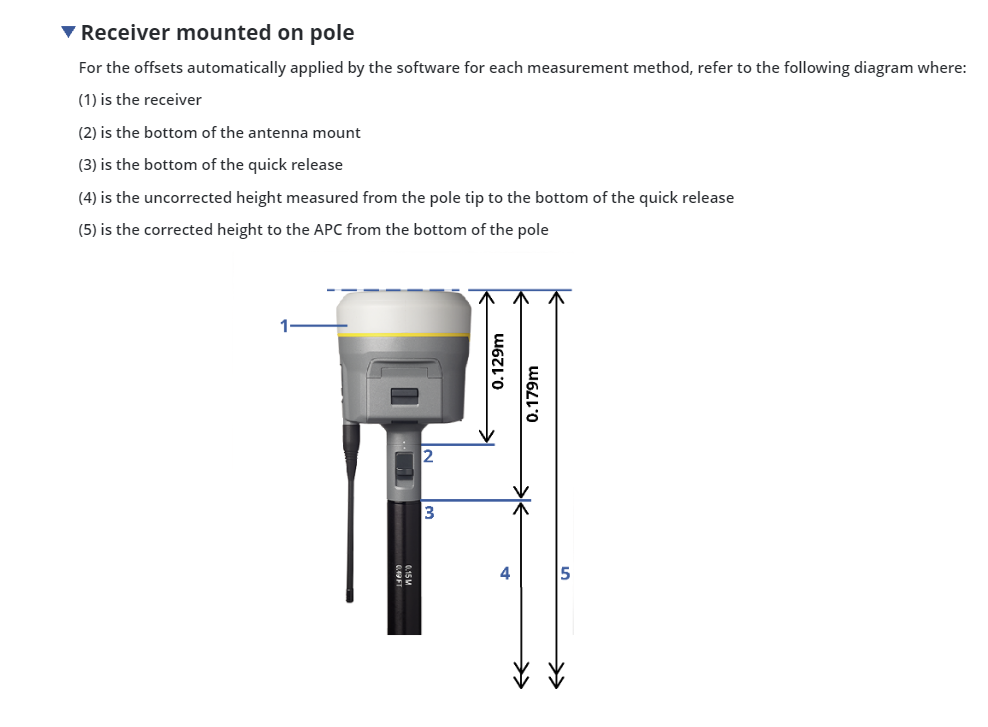
    the 'to method' refers to the rover. and your screen shot shows 'phase center' and a 2m pole. i would assume that most people would use 'bottom of quick release' on a standard 2m pole. but you should pull out a tape measure and double check. there are some poles that are setup differently.

    it seems like you should resetup and take a couple check shots if you are in question with any of this, if possible.

    ------------------------------
    ian bissonnette
    ------------------------------


  • 12.  RE: R12i base station issue

    Posted 05-15-2024 08:21
    ya thomas, sorry maybe i was a little confusing with my remark about the concrete/steel pilar. i was referring to a pilar style control point where you screw a tribrach right down onto the monument. in that case the lever does not work well. but otherwise on a normal tripod, then the lever is great.